
Participant
January 19, 2017
Answered

remove Document cloud from the home section

  • January 19, 2017
  • 1 reply
  • 400 views

I need to remove all reference to the cloud from our Adobe DC standard installation.  there has to be a way to do this.  I cant believe Adobe does not offer phone support for this product.

To be clear,  there is a "Storage" section under the home tab that lists My Computer, Document Cloud, Add Account.  I want to remove/hide the Document Cloud option and all other references to it
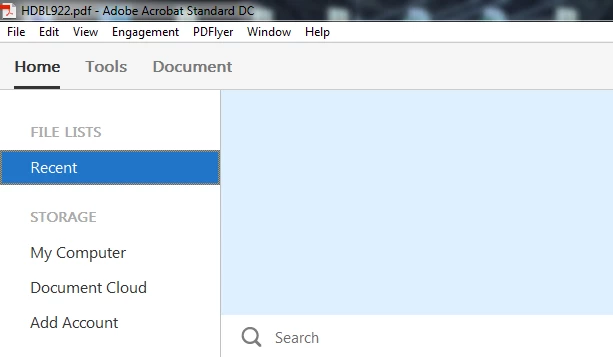
Any information would be great.

thanks

This topic has been closed for replies.
Correct answer AkanchhaS8194121

Hi Walteriafe1966,

The spaces you are referring to are set as default. Unfortunately, this would not be possible customize them.

It has been added to give you quick and easy access to your file, so that you can Add/Remove in acrobat to work on it easily.

We would appreciate your feedback on this.

Use this form to request new features or suggest modifications to existing features.

Feature Request/Bug Report Form

Regards,

Akanchha

1 reply

AkanchhaS8194121
AkanchhaS8194121Correct answer
Legend
January 19, 2017

Hi Walteriafe1966,

The spaces you are referring to are set as default. Unfortunately, this would not be possible customize them.

It has been added to give you quick and easy access to your file, so that you can Add/Remove in acrobat to work on it easily.

We would appreciate your feedback on this.

Use this form to request new features or suggest modifications to existing features.

Feature Request/Bug Report Form

Regards,

Akanchha