Participating Frequently
October 28, 2012
Question

remove password security on acrobat 11

  • October 28, 2012
  • 3 replies
  • 56621 views

hello!

when i try to remove password security from my pdf file , i get this message
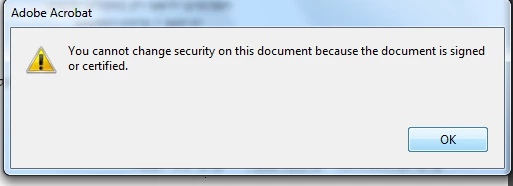
anyone knows why?

it doesn't happen on acrobat 9

This topic has been closed for replies.

3 replies

Participant
June 11, 2014

There is a work around,Just open the secured PDF file and select Print.

In the Print option,give to print as PDF (depends upon the software installed,for example Nitro PDF creator will be displayed,incase you have installed Nitro PDF) instead of any printer name.

Save the file and use the same without password.

WeyrCat
Participant
November 1, 2012

Hi! I'd love to find out how you remove the passwords at all... My paystubs come passworded but the company changes the password every month (so I have to remember or note which pw goes with which stub, because the ones that already came I cannot change!) It's unbelievably frustrating.

Legend
November 1, 2012

@WeyrCat - if you know the password, in Acrobat you can use Tools > Protection > Encrypt > Remove Security.

@shay_df - I assume you previously Reader-extended the document, in which case Acrobat has signed the file. You cannot remove the underlying password security  until you de-extend the rights using File > Save a Copy.

shay_dfAuthor
Participating Frequently
November 1, 2012

i did that. i've saved a copy. and still got these messages , can it be a bug on this version(11)?. try this and please let me know

Legend
October 28, 2012

The message is self-explanatory. A file with a digital signature isn't editable.

shay_dfAuthor
Participating Frequently
October 29, 2012

there is no digital signature on this file

Steven_Madwin
Adobe Employee
Adobe Employee
November 1, 2012

how can i check this?


Hi shay_df,

With the file open you need to open (aka expand) the Signature Navigation panel on the left side of Acrobat. Clcik on this pen icon:

If there is no writing in the panel at all (just one big blank white slate) then the next thing to look for is to see if the file was Reader Enabled (what Dave mentioned below). To check if the file has been Reader Enabled:

  • Select the File > Properties menu item
  • Select the Security tab on the Document Properties dialog
  • Look for the following text at the bottom of the dialog:

"This document restricts some Acrobat features to allow for extended features in Adobe Reader. To create a copy of the document that is not restricted (and has no extended features in Adobe Reader), choose File > Save a Copy."

If the test is there then the file has been Reader Enabled. If not then it has not.

If none of these procedures point to an existing digital signature then let me know and we can probe deeper.

Steve