
Inspiring
July 2, 2024
Answered

Remove spot colours from pdf

  • July 2, 2024
  • 2 replies
  • 3921 views

Hi! This might be a very simple question with an even simpler solution, but I need help. 
My issue is the following:
I have a pdf file with spot colours (print marks) on it. I need the artwork without the marks. Is there any way to eliminate the print marks from the artwork and save is as a new? 
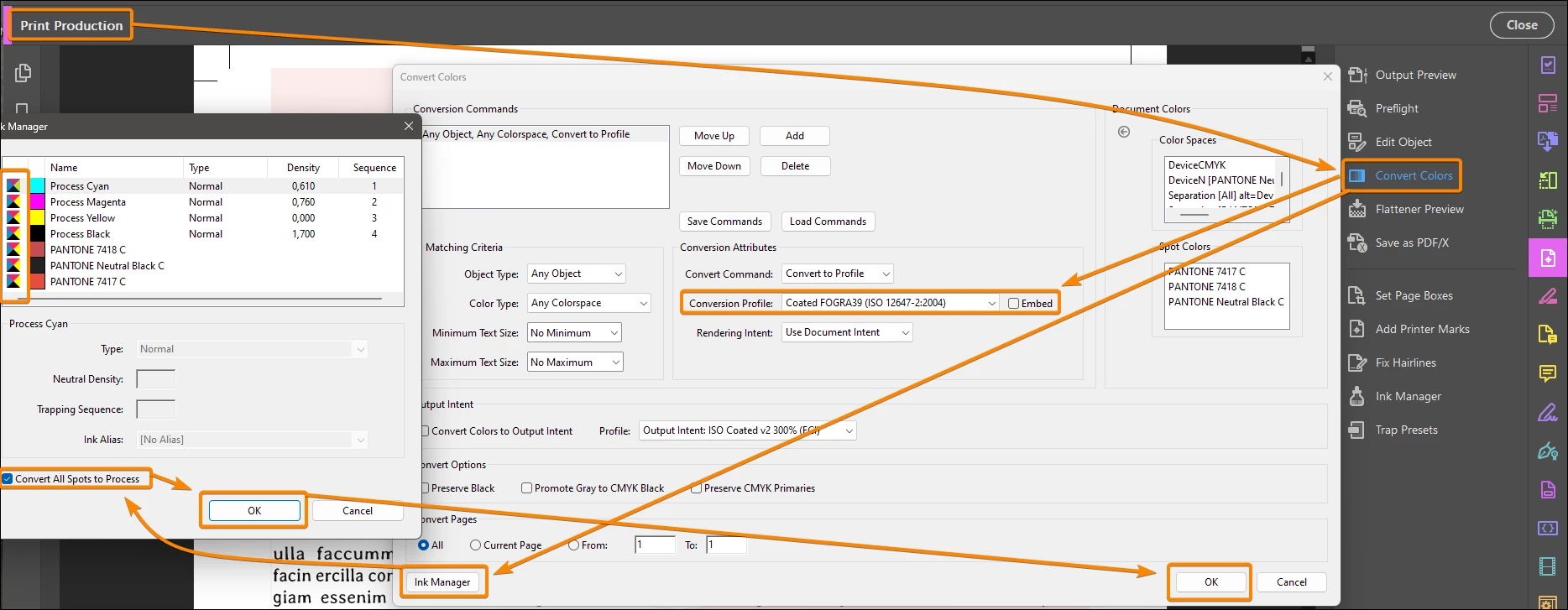
Correct answer JR Boulay

Remove spot colours from pdf

Go to Print Production : Convert Colors : Ink Manager : Convert All Spots to Process


2 replies

JR Boulay
Community Expert
JR BoulayCommunity ExpertCorrect answer
Community Expert
July 11, 2024

Remove spot colours from pdf

Go to Print Production : Convert Colors : Ink Manager : Convert All Spots to Process


Acrobate du PDF, InDesigner et Photoshopographe
Amal.
Community Manager
Community Manager
July 11, 2024

Hi there


Hope you are doing well and thanks for reaching out.


Please try the steps below and see if that works for you:


  • Open your PDF file in Adobe Acrobat Pro.
  • Navigate to Tools > Print Production.
  • Click on Preflight.
  • In the Preflight dialog, select the Fixups tab (represented by a blue wrench icon).
  • In the search field, type "remove".
  • To edit an existing preflight profile:
    1. Select the desired profile.
    2. Click on the small Options menu (fly-out menu).
    3. Choose Duplicate Profile to create an editable copy.
    4. Edit the duplicated profile as needed.


Remove Crop marks.png


Regards

Amal

NelladelAuthor
Inspiring
July 11, 2024

Hello!
Thank you so much for the detailed solution. This does indeed work, however is there a way to make printer marks inside the bleedbox disappear? I'm thinking about crease marks on a cardboard box for example.