Known Participant
December 19, 2021
Answered

Rename all fields on a Form

  • December 19, 2021
  • 8 replies
  • 16790 views

Is there a way to rename all fields on a large form

     From: field's current name e.g. "type of defect"

     To: field's page number +  current name e.g. "page6_type of defect"

Correct answer JR Boulay

Simple and free solution:

Install the demo version of Qoppa PDF Studio 2021 and open a copy of your form with it.

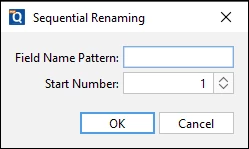
Find the "Sequential Renaming" function (right-click), rename selected fields and save.

Open the watermarked copy with Acrobat Pro and copy-paste the modified fields into your original form.


I've been waiting for Adobe to implement this feature in Acrobat Pro for so long...


8 replies

JR Boulay
Community Expert
Community Expert
August 3, 2024

Beware that this script will result in the loss of all actions, formats, validations and calculations.

Acrobate du PDF, InDesigner et Photoshopographe
JR Boulay
Community Expert
Community Expert
March 31, 2024
Acrobate du PDF, InDesigner et Photoshopographe
Participant
April 1, 2024

Thank you

boilermaker73
Inspiring
May 10, 2024

While I realize this initial post began several years ago, I found it by accident since I presently need to rename approximately 22 form fields on an interactive PDF form I created years ago as I am in the middle of updating the form and need to rename approximately 22 form fields. Needless to say, I really don't feel like renaming every form field on the form individually as it's altogether boring and very time consuming  to say the least. However, around 18 years ago I had created a script to rename form fields while I was designing/developing interactive PDF forms for family, friends, and myself. Unfortunately, to quote an old saying, hindsight is 20/20, and I failed to save the script.  However, while I don't presently have the script, time permitting I am contemplating recreating one in JS like I had done years ago and when I am finished, I intend to post the script to the forum for others to copy/use as a way of giving back what I have learned from others over the years. This aside, getting back to creating a JS to rename existing form fields on a PDF form really isn't that difficult to achieve. In reality, if memory serves me correctly, the steps to create the JS begin with a 'for' loop whereby you essentially iterate through the form fields one by one, obtain/save the rectangular coordinates for each form field in a variable for later use, delete the old form field, and create the replacement field assigning a new name and the same rectangular coordinates you obtained/saved from the old form field you since deleted/replaced and you're done. Needles to say, all the methods used are listed and explained in the Javascript for Acrobat API Reference back then and now. Why I failed for whatever reason to save the script I created years ago to rename form fields residing on a PDF form I really don't know given the script worked like a charm. Once again, I will post the script to the forum when done as this really should have been provided by Adobe a long time ago.

Participant
March 29, 2024

I'm just posting to say that it makes me sad that I wasted a free trial to add text form fields only to find that duplicating them results in a problem that only third party solutions can solve unless you learn to script or take an ungodly amount of time to rename them manually. Is there a place to make product requests? 

Participant
September 22, 2023

This questions is 2 years old by now ... any solutions other than Qoppa?

Joel Cherney
Community Expert
Community Expert
September 22, 2023

Well, there are the other solutions that have already been discussed in this thread. If you'd looked at try67's page, you'd find this tool, which is explicitly a PDF form field renaming tool. (I can see in my post from 2 years ago that I tried to, or meant to, post a link to the tool; I can't guess why the link isn't in that post.) 

Participant
September 22, 2023

Thanks for your reply. There are 3 'levels' presented there. The first 2 are out because they required Java and our IT dept does not allow java. Not sure about the 3rd

JR Boulay
Community Expert
Community Expert
December 20, 2021

OP doesn't want to create a plugin, she just wants to rename several fields at the same time.

Acrobate du PDF, InDesigner et Photoshopographe
Bernd Alheit
Community Expert
Community Expert
December 20, 2021

A plugin can rename fields.

Bernd Alheit
Community Expert
Community Expert
December 20, 2021

It is possible when you create a plugin for Adobe Acrobat.

JR Boulay
Community Expert
JR BoulayCommunity ExpertCorrect answer
Community Expert
December 20, 2021

Simple and free solution:

Install the demo version of Qoppa PDF Studio 2021 and open a copy of your form with it.

Find the "Sequential Renaming" function (right-click), rename selected fields and save.

Open the watermarked copy with Acrobat Pro and copy-paste the modified fields into your original form.


I've been waiting for Adobe to implement this feature in Acrobat Pro for so long...


Acrobate du PDF, InDesigner et Photoshopographe
Known Participant
January 13, 2023

Couldn't find the "sequential renaming" function in Qoppa, BUT, I did find out they don't have a "run form field recognition" function function in the software that recognizes boxes, lines, etc in a pdf file and automatically creates a form field. Makes this software useless in my opinion.

JR Boulay
Community Expert
Community Expert
January 13, 2023

Select several fields, right-clic on any one : Sequential renaming


Acrobate du PDF, InDesigner et Photoshopographe
Joel Cherney
Community Expert
Community Expert
December 19, 2021

I had thought that this can't be done with Javascript, which is the way that I'd do any such mass renaming. However, a few minutes of searching led me to this page, where Forums Regular try67 offers tools that automate this kind of task. They kind of give it away in their first paragraph of description; if you were automating field renaming with JS, " it requires removing the old field and then creating a new one in its place with the new field name." That certainly can be automated with JS. 


So in your shoes, I would personally try to do exactly that in JS, but that's because I enjoy trying to figure out how to do that kind of thing. However, if I were on the clock or working with a client, I would reason that spending $10 would be the best move, in terms of a cost-benefits analysis. 

Known Participant
December 20, 2021

To aid my learing and given this is not a high priority, I am going to give it a try. Seen a few posts to dynamically create fields in sepecified location just not sure I can get the same size and location.

Stay tuned and I will post progress.


Thank You!