

Request Signature option is now available under two new locations in Acrobat DC
Request Signature option is now available under two new locations in Acrobat DC
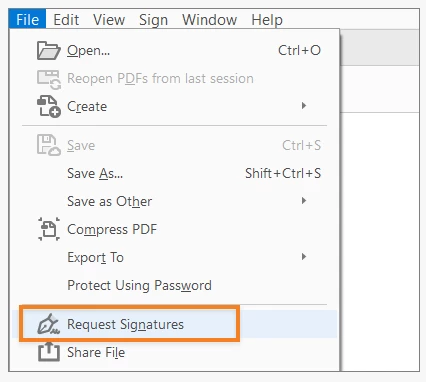
1. New Request Signatures option in the File menu
Request Signatures option is now also available under the File menu. You can simply open the PDF in Acrobat and access the option via File > Request signature.
NOTE: Adobe is testing this new experience in Acrobat DC. Therefore, the Request Signatures option may not be available to all Acrobat DC users in the File menu.
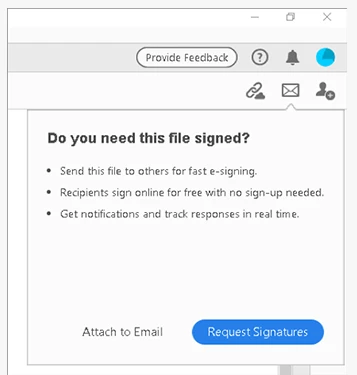
2. Request signatures prompt when you attach an unsigned PDF to email
Acrobat now can detect if the PDF is not signed when you send it as an email attachment via Send file by email option. It will display Request signatures contextual tip when you attach the unsinged PDF.
NOTE: Adobe is testing this new experience in Acrobat DC. Therefore, the Request Signatures prompt may not be available to all Acrobat users.
- Did you find it helpful? If yes, share your experience with us: Join the conversation here. We are listening!
- To discover a host of other great features added in a recent update– Go straight to: Acrobat and Reader August 2020 Release | What's new in Acrobat DC
 AdChoices