
Copy link to clipboard
Copied
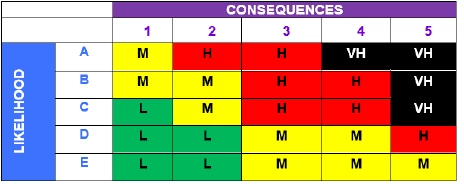
I have this risk calculation matrix (Table below) at work that I need to automate
Briefly, the risk can be calculated by Likelihood and the consequences of an hazard.
e.g. if a user select one cell ("Likelihood") with D and selects the second cell ("Consequences") with 3. Then I want the third cell showing the risk calculated to be M.
The problem is there are so many combinations here, so I don't know what to do.
Anyone can help with the JavaScript of this?
Copy link to clipboard
Copied
You can use this as custom calculation of 3rd field:
var L = this.getField("Likelihood").valueAsString;
var C = this.getField("Consequences").valueAsString;
var S = L+C;
if(S=="A1"||S=="B1"||S=="B2"||S=="C2"||S=="D3"||S=="D4"||S=="E3"||S=="E4"||S=="E5")
event.value = "M";
else if(S=="C1"||S=="D1"||S=="D2"||S=="E1"||S=="E2")
event.value = "L";
else if(S=="A2"||S=="A3"||S=="B3"||S=="B4"||S=="C3"||S=="C4"||S=="D5")
event.value = "H";
else if(S=="A4"||S=="A5"||S=="B5"||S=="C5")
event.value = "VH";
else
event.value = "";
Copy link to clipboard
Copied
For the matrix you can use an array of arrays.
Copy link to clipboard
Copied
Apologies, I am quite new to JavaScript and bit of a noob.
I think I need to do something like this. but not sure how to continue the rest....
C = consequences
L = Likelihood
R = Risk
If the user types in 1 in the "C" cell and C in the "L" cell, I want the answer to return as "L" (Low risk)..
So far I have attempted this but I dunno how to do the rest.
var C=[[1],[2],[3],[4],[5]];
var L=[[A],[B],[C],[D],[E]];
var R=[["M","M","L","L","L"],["H","M","M","L","L"],["H","H","H","M","M"],["VH","H","H","M","M"],["VH","VH","VH","H","M"]];
Copy link to clipboard
Copied
You can use this as custom calculation of 3rd field:
var L = this.getField("Likelihood").valueAsString;
var C = this.getField("Consequences").valueAsString;
var S = L+C;
if(S=="A1"||S=="B1"||S=="B2"||S=="C2"||S=="D3"||S=="D4"||S=="E3"||S=="E4"||S=="E5")
event.value = "M";
else if(S=="C1"||S=="D1"||S=="D2"||S=="E1"||S=="E2")
event.value = "L";
else if(S=="A2"||S=="A3"||S=="B3"||S=="B4"||S=="C3"||S=="C4"||S=="D5")
event.value = "H";
else if(S=="A4"||S=="A5"||S=="B5"||S=="C5")
event.value = "VH";
else
event.value = "";
Copy link to clipboard
Copied
Thanks heaps! This works like a champ!
Copy link to clipboard
Copied
Is there a logic behind it, or is it pretty much arbitrary what the result is for each combination?
If the latter you'll need to specify it for each combination in your code, using a set of if-else conditions, or a 2D array, as was suggested.
Get ready! An upgraded Adobe Community experience is coming in January.
Learn more