
Participant
October 30, 2021
Question

Sanitize Document is removing all the letter "s"es from the document

  • October 30, 2021
  • 1 reply
  • 2298 views

This happens after I sanitize after redacting:
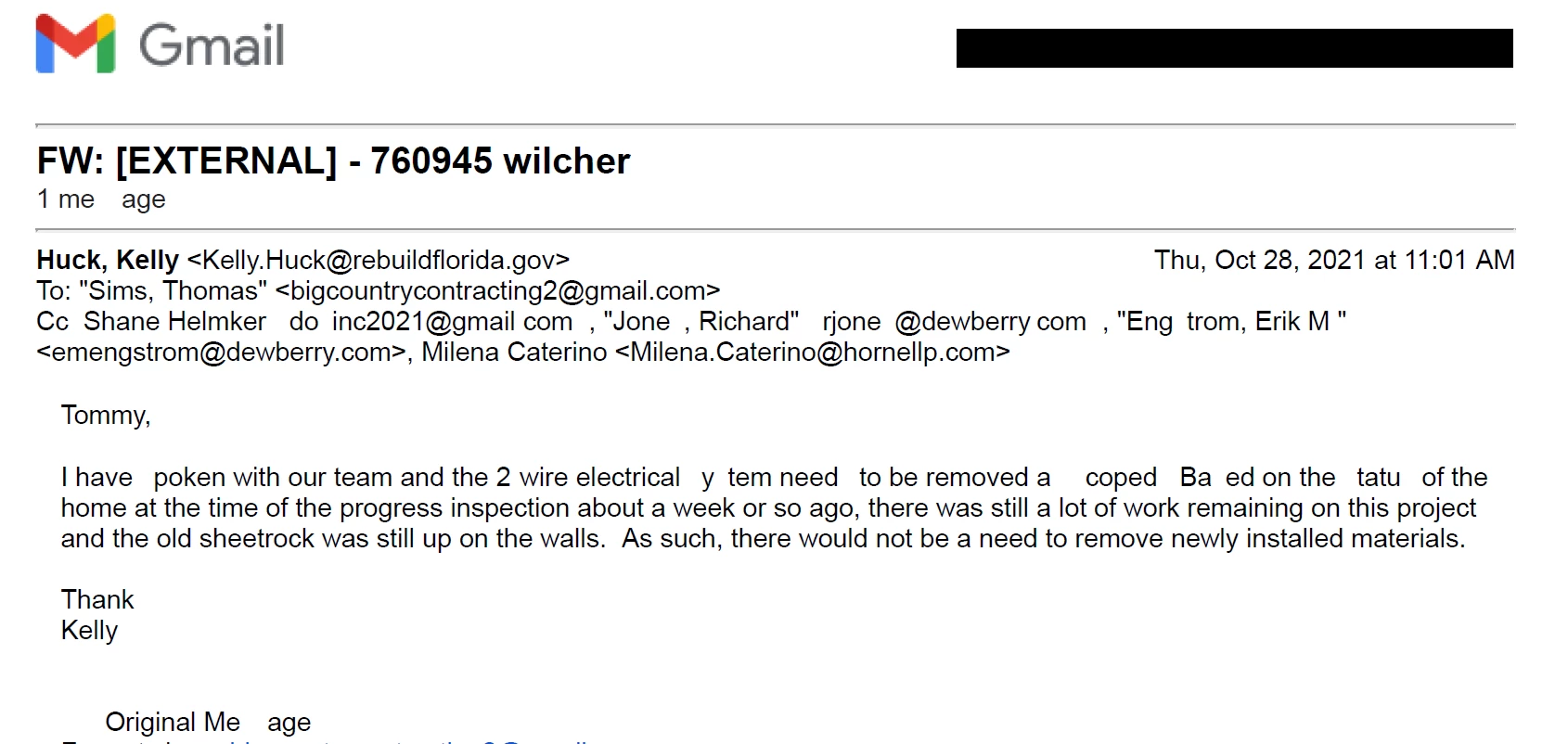
 

 Furthermore, the middle of the document has all the "s"es except for one, but the bottom third is just as bad as the top. This only happens if I sanitize but it happens every time.

This topic has been closed for replies.

1 reply

Luke Jennings3
Community Expert
Community Expert
October 31, 2021

Are the fonts embedded in the original PDF? File> Properties> Fonts, all should say embedded or embedded subset, if they don't, run a preflight fixup on the PDF to embed the fonts before redacting & sanitizing. Tools> Print Production> Preflight> Fixups.

Participating Frequently
June 30, 2023

Dear luke

This option luckilly worked for me, so thank you for the information. When I follow these steps, the PDF comes out in black and white. Is there a way to do this, and keep the colors in the document?


Thank you in advance. 

Luke Jennings3
Community Expert
Community Expert
June 30, 2023

Which document elements are in color? I don't know what's happening here. Try File> Save as other> PDF/X> Settings> PDF/X-1a, after embedding the fonts.