
Participant
May 7, 2024
Question

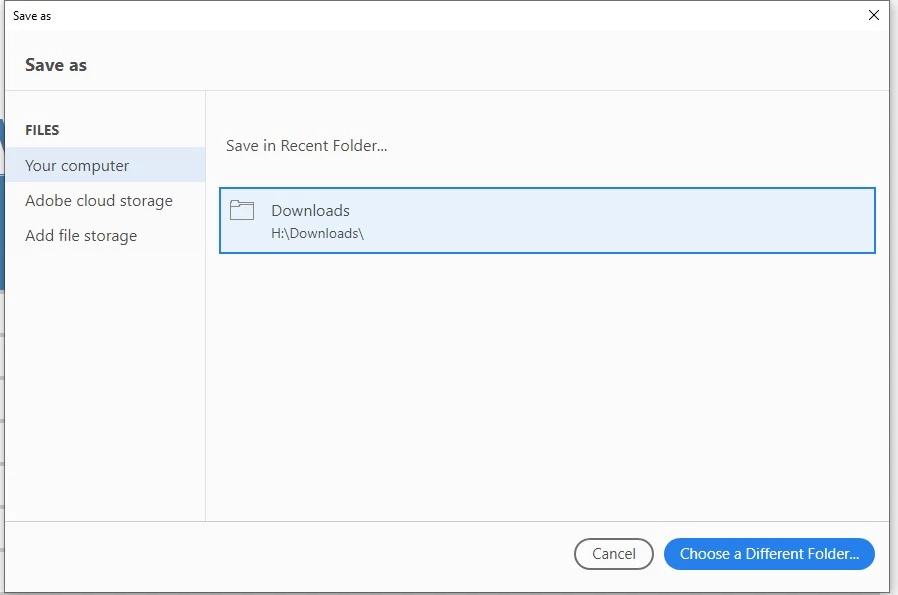
Save As - Save in recent folder

  • May 7, 2024
  • 1 reply
  • 1462 views

I have two Adobe Acrobat installed in my AVD computer. 

         Adobe Acrobat (64 bit) v 23.008.20555

         Adobe Acrobat Pro 2020 v 20.005.30574


The default app for pdf extension is set to Adobe Acrobat (64 bit).


The problem is, the save as -Save in Recent Folder in Adobe Acrobat (64 bit) is not showing up even after the "Show online storage when saving files" is ticked. We have noticed that it is not working only for users who have licensed for Adobe Acrobat Pro 2020. 


We want this to work for both Adobe Acrobat (64 bit) and Adobe Acrobat Pro 2020


This topic has been closed for replies.

1 reply

Amal.
Community Manager
Community Manager
May 29, 2024

Hi there


Hope you are doing wel and thanks for reaching out.


Please update the Acrobat 2020 to the recent version 20.05.3063X from the help menu > check for updates and reboot the computer once.


Also under the Acrobat Preferences > General > Uncheck 'Show online storage when saving files' > Click OK and reboot the computer.


Let us know how it goes.


~Amal

Participant
June 7, 2024

I have been experienceing the same problem for months and this solution did not work. 

Amal.
Community Manager
Community Manager
June 10, 2024

Hi there


We are sorry to hear that, What is the version of the OS and the Acrobat DC you are using?


Also, Would you mind collecting the Adobe CC logs https://helpx.adobe.com/creative-cloud/kb/cc-log-collector.html and Procmon logs (Win Only) https://www.adobe.com/devnet-docs/acrobatetk/tools/Labs/acromonitor.html and share them via any cloud storage. Just upload the log file to the cloud and generate the link and share that link with us for further investigation.

Regards
Amal