
Scanning in Acrobat results in hidden text that will not print
This is very strange. I have been using Acrobat Pro for many years to scan various personal and business documents. I have noticed that when I subsequently open some of the scanned PDF files, random blocks of the image (sometimes text, sometimes handwriting) appears to be missing. It turns out that Acrobat is turning these blocks into hidden text for some reason. I can see a thumbnail of the missing blocks if I use Examine Document > Hidden Text > Show Preview, but when I print the document, nothing I've tried can make these blocks print.
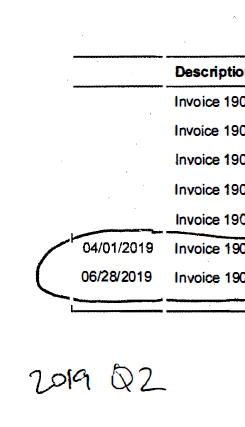
Here is an example. In the original document that I scanned directly into Acrobat, the top of the first column actually says "Date," and there are dates for every row. There is a handwritten "2019 Q1" at the bottom, just above the "2019 Q2":
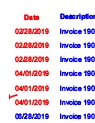
The missing dates and handwritten section appear in red in the preview image under Examine Document > Hidden Text> Show Preview:
How do I make these invisible (but still saved) parts of my scans reappear, both on screen and when I print? How can I prevent parts of my scanned document becoming hidden in the first place? (My scans should be exact replicas of the original documents, with the addition of OCR data to make them searchable but with nothing removed.) Why is this happening, and why is it happening so randomly?
Thank you. As you can imagine, this is a most distressing discovery. I have years of financial and other documents with random parts missing.
 AdChoices