


Copy link to clipboard
Copied
Hello All,
Over the past few years you have all been very helpful and again im after some assistance/advice.
Is there anyway to condense the attached script as when i try and add it to my selection properties in the custom calculation script it errors and says its too long





Copy link to clipboard
Copied
There are a few different ways the script can be reduced, such as Bernd's suggestion.
However, my prefered solution would be to make a design change to the form. Right now the script is handling each field individually, which is inefficient for so many fields. It appears the fields are already divided into functional groups , so one solution is to use group naming. For example, "Group1.fieldname", where "Group1" is the group name. This type of naming allows all fields in the group to be accessed, and operated on, with a single line of code.
For example: this.resetForm("Group1"); - Resets all fields in the group.
Or: this.getField("Group1").display = display.hidden; - hides all fields in the group
It's a lot of work to change the field names, but it will massively simplify handling the fields in a script.
BTW: the problem with the code being too long isn't a limitation in the form field script. It's a limitation of the script editor. Download NotePad++ and use it as the script editor, then there won't be a problem with the script length.
Use the Acrobat JavaScript Reference early and often
 8
Replies
8
8
Replies
8


Copy link to clipboard
Copied
E.g. you can split the script in several document level functions and use this functions.
Copy link to clipboard
Copied
Thank you Bernd.
This will work as an intrim fix until i can understand groups more
Copy link to clipboard
Copied
There are a few different ways the script can be reduced, such as Bernd's suggestion.
However, my prefered solution would be to make a design change to the form. Right now the script is handling each field individually, which is inefficient for so many fields. It appears the fields are already divided into functional groups , so one solution is to use group naming. For example, "Group1.fieldname", where "Group1" is the group name. This type of naming allows all fields in the group to be accessed, and operated on, with a single line of code.
For example: this.resetForm("Group1"); - Resets all fields in the group.
Or: this.getField("Group1").display = display.hidden; - hides all fields in the group
It's a lot of work to change the field names, but it will massively simplify handling the fields in a script.
BTW: the problem with the code being too long isn't a limitation in the form field script. It's a limitation of the script editor. Download NotePad++ and use it as the script editor, then there won't be a problem with the script length.
Use the Acrobat JavaScript Reference early and often
Copy link to clipboard
Copied
Hi Thom,
How would i add the group designation to the code.
This solution would be extremly helpful in other areas of my form and hopefully speed up the form itself

Copy link to clipboard
Copied
You would need to rename the fields to start with the group name, followed by a period.
For example:
Group1.FirstName
Group1.LastName
Group1.DOB
Then you could show/hide all three fields using the code Thom provided.
Copy link to clipboard
Copied
Hello try67,
Sorry, I assume this then takes place in the Text Field Properties as below
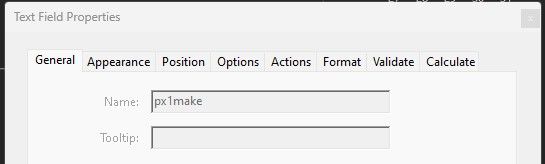
becomes

Copy link to clipboard
Copied
Correct.
Copy link to clipboard
Copied
Perfect,
Thank you very much for your help


Get ready! An upgraded Adobe Community experience is coming in January.
Learn more
 AdChoices