Participant
October 19, 2023
Answered

Searching for specific text in Adobe Acrobat Reader is getting tons of unwanted results

  • October 19, 2023
  • 1 reply
  • 902 views

I have hundreds of pdfs on soil science that I need to search for references to oil. However, when I search for "oil" this also brings up all the references to "soil." There are millions of instances of the word "soil" and I do not want to look at each one of them. Is there an easier way to do this? I am at a loss here. It is taking me a very, very long time


Here is that has not worked:

Searching for "oil" in quotation marks

Searching for " oil" with a space in front of it
This topic has been closed for replies.
Correct answer try67

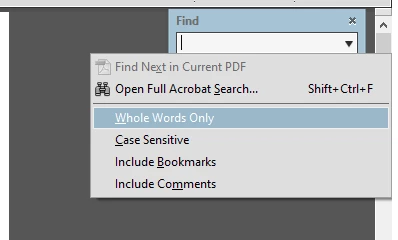
If you're using the simple Find pop-up menu click the arrow in it and tick "Whole Words Only":


If you're using the Advanced Search dialog tick the "Whole words only" check-box before performing the search:


1 reply

try67
Community Expert
try67Community ExpertCorrect answer
Community Expert
October 19, 2023

If you're using the simple Find pop-up menu click the arrow in it and tick "Whole Words Only":


If you're using the Advanced Search dialog tick the "Whole words only" check-box before performing the search:


B PorterAuthor
Participant
October 19, 2023

Mother of god. I could have been doing this the whole time. Thank you.