Exit
  • Global community
    • Language:
      • Deutsch
      • English
      • Español
      • Français
      • Português
  • 日本語コミュニティ
  • 한국 커뮤니티
0

Security Alert Message w/Adobe Acrobat

New Here ,
Aug 07, 2023 Aug 07, 2023

Every time I open a PDF in Adobe Acrobat, I get a security Alert message. Please see attached for the message.

Can you please assist in this issue ASAP
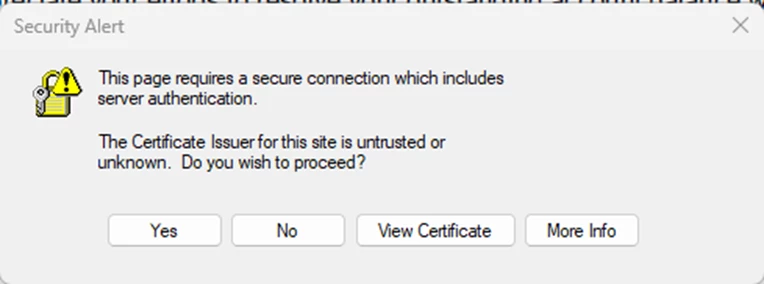
taghreed31522412lar1_0-1691420817178.png


656
Translate
Report
Community guidelines
Be kind and respectful, give credit to the original source of content, and search for duplicates before posting. Learn more
community guidelines
Community Expert ,
Aug 07, 2023 Aug 07, 2023

<moved from enterprise and teams >

Translate
Report
Community guidelines
Be kind and respectful, give credit to the original source of content, and search for duplicates before posting. Learn more
community guidelines
Community Expert ,
Aug 07, 2023 Aug 07, 2023

Can you post a full-window screenshot, please?

Also, what's your exact version of Acrobat? You can find out by going to Help - About Adobe Acrobat.

Translate
Report
Community guidelines
Be kind and respectful, give credit to the original source of content, and search for duplicates before posting. Learn more
community guidelines
New Here ,
Aug 08, 2023 Aug 08, 2023

taghreed31522412lar1_0-1691524451044.pngtaghreed31522412lar1_1-1691524555801.png


Translate
Report
Community guidelines
Be kind and respectful, give credit to the original source of content, and search for duplicates before posting. Learn more
community guidelines
Community Expert ,
Aug 08, 2023 Aug 08, 2023

That's not a full-window screenshot.

Translate
Report
Community guidelines
Be kind and respectful, give credit to the original source of content, and search for duplicates before posting. Learn more
community guidelines
New Here ,
Aug 15, 2023 Aug 15, 2023
LATEST

The issue has been resolved by  disable Adobe protected mode

Translate
Report
Community guidelines
Be kind and respectful, give credit to the original source of content, and search for duplicates before posting. Learn more
community guidelines
