jrsva
Known Participant
December 9, 2020
Answered

Selecting among digital IDs for signatures

  • December 9, 2020
  • 2 replies
  • 5408 views

We have two different digital IDs for use in signing different types of documents.  Somehow the images have gotten mixed up so the same image is attached to both IDs.  I need to edit one ID to embed the correct image or delete it and start over.  I'm kinda shaky on this whole procedure.  Please advise.


In Acrobat DC:  Tools / Certificates / Digitally Sign

Draw the signature box, click the drop-down for Sign As to show two choices.  The printed data shown is correct but both display the same image.

This topic has been closed for replies.
Correct answer ls_rbls

ls_rbls:

"The only difference in screenshots is the 'Modern user interface' which can be enabled and disbaled through Edit-->>Preferences--->>> Signatures."


I can't find anything about "Modern user interface" here.  Sure it isn't somewhere else under Preferences?


I'm more than half of that 150 yr all by myself.  😉


I apologize, I forgot to add that the "Modern user interface" was added in Acrobat workspace after your version. So your version still uses the classic interface when signing.


In the screenshots below I disabled the Modern user interface to illustrate that there is no difference between versions of Acrobat... maybe just some minute differences in the steps:


  • In my screenshots below I am using the same steps as you but I disabled the the modern user interface so you can appreciate the similarities of the classic user interface just like in the version that you're using
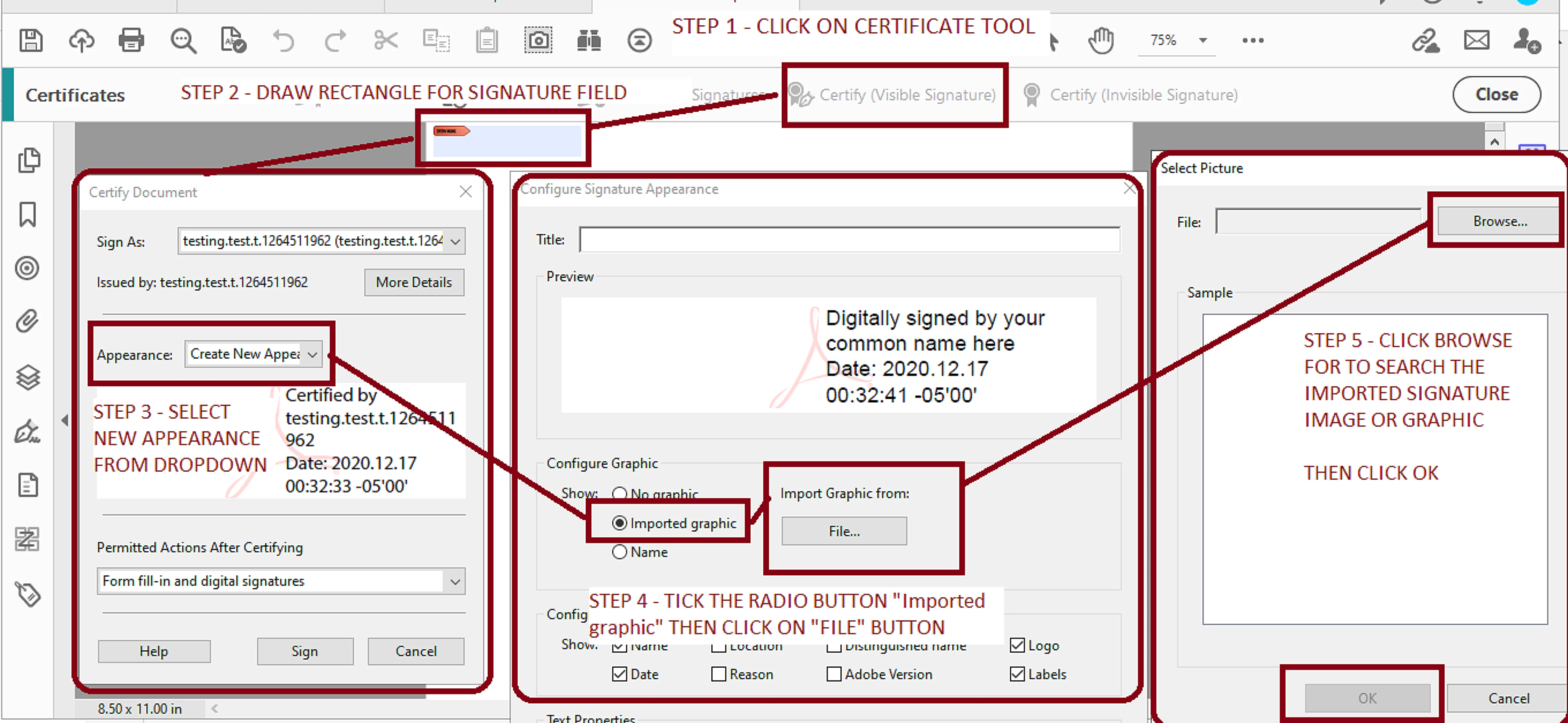


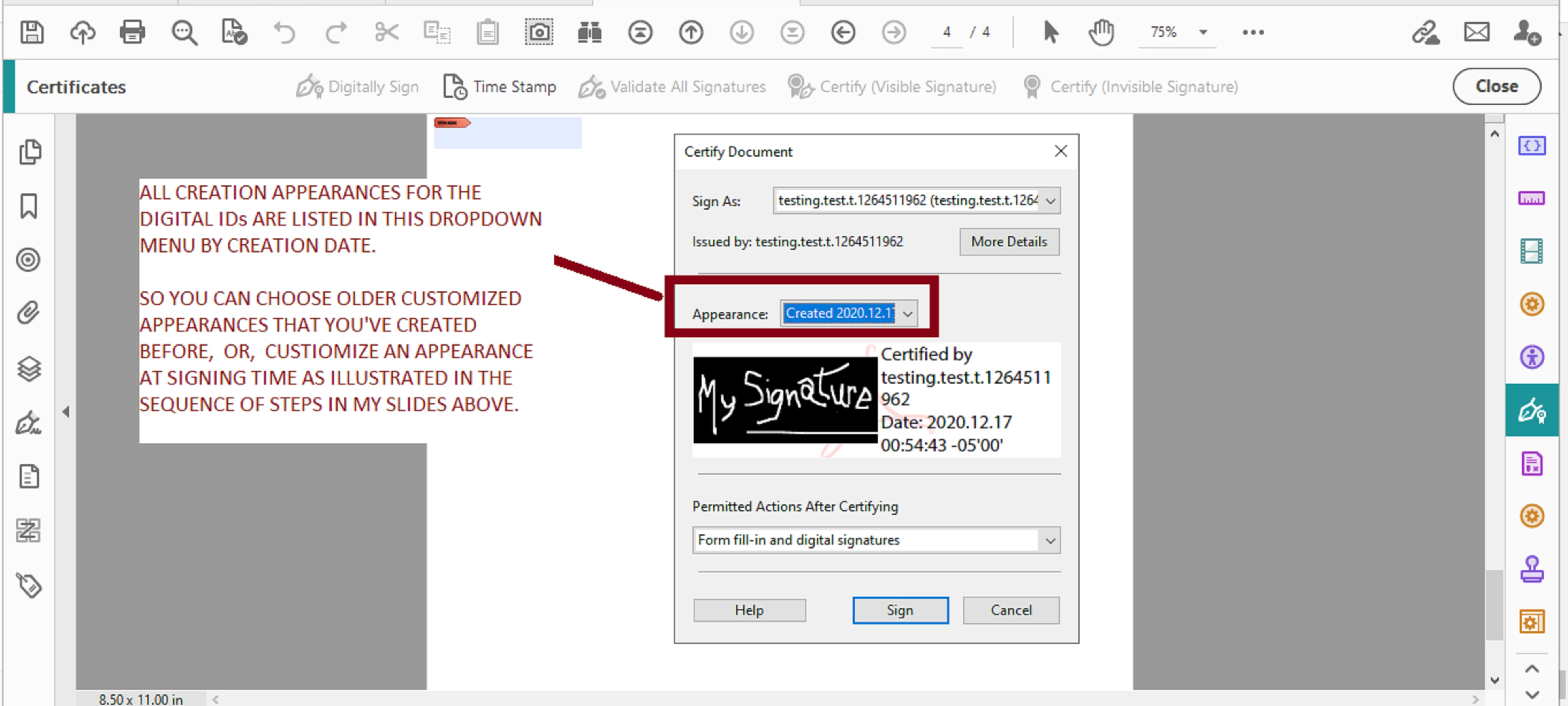
  • Below is the end result after I choose the desired graphic to be imported to the digitalID's appearance


And if I access these same settings from EDIT--->>>PREFERENCES--->>>SIGNATURE  this is how it looks with the modern user interface disabled in Adobe Acrobat Pro DC (paid subscription):
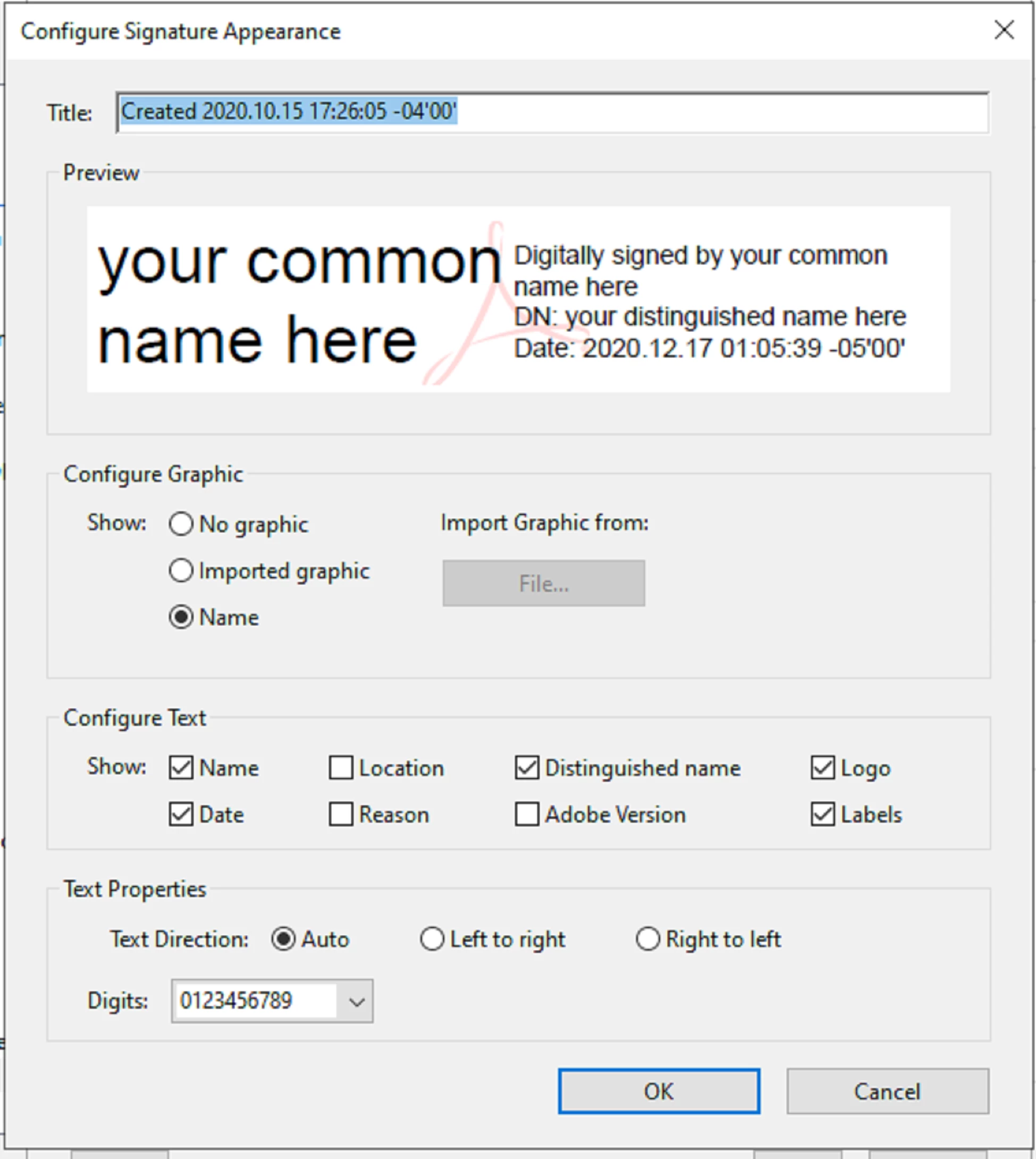


Note that there is no difference from the screenshots that you provided earlier. That is what I meant by Acrobat version been irrelevant. So it looks like we are missing an step.


But if none of this guidance works , I would say to click on Help and "Repair Installation", then try again.




2 replies

Bernd Alheit
Community Expert
Community Expert
December 18, 2020

The modern user interface is not available in your old version.

Dave__M
Community Expert
Community Expert
December 9, 2020

Go to your Preferences, and choose Signatures on the left.

Click on More..., and from there, you can choose the signature you wish to edit, and click the edit button.

I hope this is helpful.

My best,

Dave

jrsva
jrsvaAuthor
Known Participant
December 10, 2020

Sadly, this does not help.  We have two digital IDs and everything seems right in the edit mode.  They show the correct signature images and both say "Digitally signed by your common name here" and give the date and time.  When I look at the third item down, "Create and manage identities for signing," it also seems correct, referencing the proper digital ID files.  Now, when I try to apply the signatures, the printed names are correct but both use the image file for signature #1.  Oops.


I can make screen shots of these things if that will help to identify the problem; however. they will show both real names and real signatures, which I am not wild about posting on line.

ls_rbls
Community Expert
Community Expert
December 16, 2020

I posted this two days ago:

I am using Adobe Acrobat Pro DC 2015 Release (Classic) I Version 2015.006.30505.

This is a purchased product, not a subscription, so I cannot update it. I tried running an update a year or so ago and it was all messed up, took several days consulting with Adobe tech help to sort it out. So, it is what it is.


ls_rbls said that the Acrobat version is irelevant . . .


The version is irrelevant because these steps are consistent since version 9 for thr creation and appearance of digital signatures, which is very well documented in the Adobe Acrobat Digital Signature Guide and the addendum to this reference guide.


The only difference in screenshots is the "Modern user interface" which can be enabled and disbaled through Edit-->>Preferences--->>> Signatures.


Your HTML and Fortran experience of 50 years is very probably what is interfering in understanding these basic steps. I am trying to throw a funny note here (not actually being disrespectful).


I am sure that if all of us here in this discussion add up our ages together the total is well above 150 years of age.


Trust me, I struggle too with the lazy millenial slangs of cell phone texting and youtubers that have become rich and famous with only "Internet-Google is my Friend" educational background.


Like for example, "coz" or "bcuz" to express the actual word "because", or "sup?!?"  just to actually say "what's up".


So don't expect too much difference in the cloud computing coding environment.


This is everywhere, even in other industries and professions, such as journalism.


What used to be a reputable profession with real top stories in newspapers and magazines is now suffering from this thing called "citizen journalist" ... all you need is a stupid cell phone and shoot a video of something, post it online, and all of sudden you're now a journalist with the added perk that you never had to go to college (because Google docs, MS WORD, and Grammarly will do everything for you).


So who cares about design errors in a code, right?