
Participating Frequently
April 12, 2023
Answered

Send PDF by eMail: Attachment-option not available any more?

  • April 12, 2023
  • 4 replies
  • 17703 views

Hi, when clicking on the Envelope icon in Acrobat, there used to be a window offering two options: as an attachment via my standard mail-app, or as link to a cloud version. Since yesterday that window is shown all blanc for less than a second, then after some moments of hesitation (no chance to chose anything, thus) an eMail with a link is generated without further confirmation.

How can I get „Send as attachment“ back? (btw, as mentioned by others before: I’d love to be able to set this behaviour once forever, and not having to confirm every single time again.)

Acrobat 2023.001.20143 on Mac OS 10.15.7, standard mail app: Apple Mail
Correct answer Meenakshi Negi

Hi  owghh and lexxlevi,


Thank you for your patience so far.


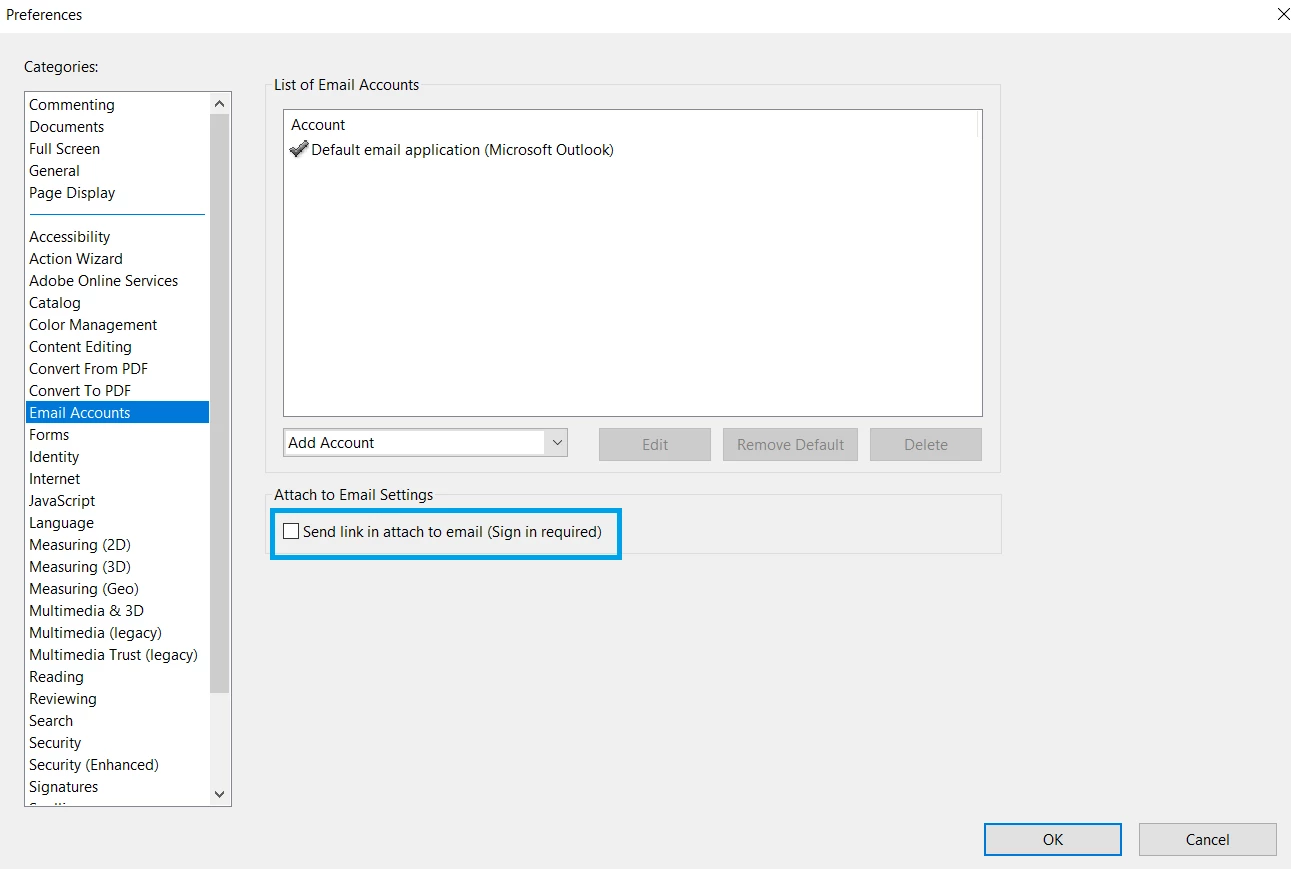
To send the PDF as an email attachment by default, disable the "Send link in attach to email (Sign-in required)" option in Acrobat Preferences.

Go to Edit > Preferences >  Email accounts in Acrobat or Acrobat Reader on a Windows machine. For Mac, Application Preferences > Email accounts.

Refer to the screenshot attached below:


Thanks,

Meenakshi


Marking a reply or response “Correct” will help future users with the same issue quickly identify the correct answer.


4 replies

Participant
July 16, 2024

Has this been figured out?  I did the preference uncheck the send as a link button, rebooted my computer, did a dance and said a prayer and I still can't send as ann attachement from Acrobat Adobe Pro.  version 11 worked great but Pro ina pain in the but.  


Please help

Participant
July 17, 2024

Hi - i called into support and they were able to remote into my computer and get it resolved for me.  I would call or chat with support. 

Meenakshi Negi
Community Manager
Meenakshi NegiCommunity ManagerCorrect answer
Community Manager
April 17, 2023

Hi  owghh and lexxlevi,


Thank you for your patience so far.


To send the PDF as an email attachment by default, disable the "Send link in attach to email (Sign-in required)" option in Acrobat Preferences.

Go to Edit > Preferences >  Email accounts in Acrobat or Acrobat Reader on a Windows machine. For Mac, Application Preferences > Email accounts.

Refer to the screenshot attached below:


Thanks,

Meenakshi


Marking a reply or response “Correct” will help future users with the same issue quickly identify the correct answer.


Participant
April 17, 2023

Correct

I tried it once without success, but now it works.

Thank you very much

Meenakshi Negi
Community Manager
Community Manager
April 17, 2023

You are welcome lexxlevi!

Let us know if we can be of any help.


Thanks,

Meenakshi


Marking a reply or response “Correct” will help future users with the same issue quickly identify the correct answer.

Meenakshi Negi
Community Manager
Community Manager
April 14, 2023

Hi owghh and lexxlevi,


Thank you for reporting this, and sorry for the inconvenience caused.

We have contacted the Engineering team for more information and will get back to you soon.
We appreciate your patience on this.


Thanks,

Meenakshi


Meenakshi Negi
Community Manager
Community Manager
April 12, 2023

Hi owghh,


Thank you for reaching out.


Would you mind sharing the screen recording of the workflow?

Did you try reinstalling the application? If not, try using the following steps: 

- Remove the application and run the cleaner tool (https://www.adobe.com/devnet-docs/acrobatetk/tools/Labs/cleaner.html).

- Reboot the machine.

- Reinstall Acrobat from the following page: https://helpx.adobe.com/acrobat/kb/acrobat-dc-downloads.html.

If the issue still occurs, we may need logs.

Let us know how it goes.


Thanks,

Meenakshi

Participant
April 13, 2023

Hello, I have the same problem since yesterday. It probably happened after a Windows update. I tried the reinstallation as described but it was unsuccessful. When I click the envelope icon, it immediately saves and shares to Adobe Cloud. My e-mail is saved in the settings and the firewall is not blocking the program.
Many thanks for the support.
ll.

Meenakshi Negi
Community Manager
Community Manager
April 13, 2023

Hi lexxlevi,


Thank you for reaching out and sharing the information.

Could you please confirm the application and OS version number?


Thanks,

Meenakshi