
Participating Frequently
September 16, 2021
Answered

Sept Update 2021.007.20091 Bug with Protected View on all Documents.

  • September 16, 2021
  • 5 replies
  • 7440 views

On systems that have recently had Adobe Reader DC 2021.007.20091 upgraded. 


Any PDF that is opened comes up with the following error message.

Adobe Acrobat Reader DC (32-bit) cannot open in protected view due to a problem with your system configuraiton. Would you like to open the file with protected view disabled.
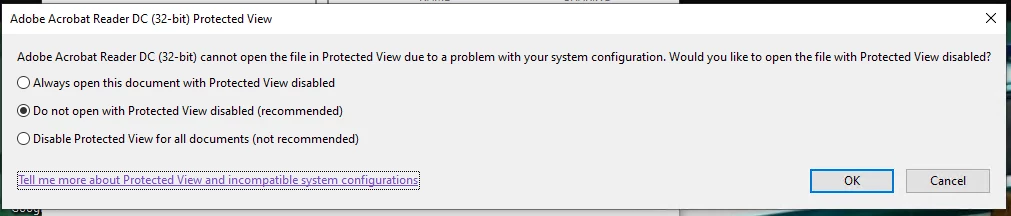
If we choose option 1. the file will open. But closing it and reopening it. the same error message comes back.
If we choose option 2. the file will not open at all.
If we choose option 3. the file will open. But closing it and reopening it, the same error message comes back.
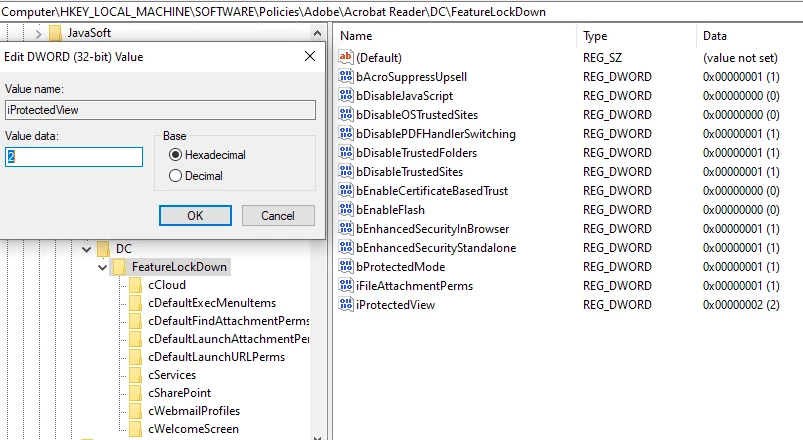
Disabling Protected view is obviously a very bad idea. We currently control these security settings via Group Policy. If we Change iProtectedview from Dword 2 to 1, we can get internal files to open normally. but PDF's with the downloaded from Internet Flag obviously will still get the issue. However, again. Iprotectedview to 1 or 0 is a very bad idea.

If we downgrade to 2021.005.20060 or lower. We no longer experience this issue. However, downgrading than opens up to the CVE's recently published, that 2021.007.20091 address's.
This is breaking several hundred machines.
Please advise.

This topic has been closed for replies.
Correct answer Bilal Ansari

Update:

Microsoft confirmed that this is a known issue for the latest security updates, KB5005565 and KB5005566. They have created files for temporary mitigation workarounds for this issue while a permanent update is created. Please apply the appropriate Known Issue Rollback to your impacted systems and then deploy the policy as mentioned in https://docs.microsoft.com/en-us/troubleshoot/windows-client/group-policy/use-group-policy-to-deploy-known-issue-rollback#using-group-policy-to-apply-a-kir-to-a-single-device. Let us know if it does not work.


Windows 10, version 1903

https://download.microsoft.com/download/7/f/1/7f194890-eea9-4cad-b19f-25ab67e41bbe/Windows%2010%20(1903%20&%201909)%20Known%20Issue%20Rollback%20091721%2001.msi

Windows 10, version 1909

https://download.microsoft.com/download/7/f/1/7f194890-eea9-4cad-b19f-25ab67e41bbe/Windows%2010%20(1903%20&%201909)%20Known%20Issue%20Rollback%20091721%2001.msi

Windows 10, version 2004, Windows 10, version 20H2 and Windows 10, version 21H1

https://download.microsoft.com/download/7/f/1/7f194890-eea9-4cad-b19f-25ab67e41bbe/Windows%2010%20(2004%20,%2020H2%20and%2021H1)%20Known%20Issue%20Rollback%20091721%2001.msi

Windows Sever 2020

https://download.microsoft.com/download/7/f/1/7f194890-eea9-4cad-b19f-25ab67e41bbe/Windows%20Server%202022%20Known%20Issue%20Rollback%20091821%2001.msi

5 replies

Bilal Ansari
Bilal AnsariCorrect answer
Participating Frequently
September 21, 2021
Participant
September 23, 2021

This fixes the issue for me.  Any idea when we get a proper fix and i don't like the idea of rolling out KIR to all our devices 😞

Participating Frequently
September 23, 2021

same thing with us this fix the issue but some workaround are very complicated.


Bilal Ansari
Participating Frequently
September 20, 2021

Hi all,

Thanks for the response. The problem you are facing is same as mentioned in the post https://community.adobe.com/t5/acrobat-reader-discussions/adobe-reader-not-opening/td-p/12383418. Reposting it here as well.


This is because the Windows security update KB5005565 is causing Reader to become incompatible with the process mitigation flag EnableExportAddressFilterPlus. Note that this flag is off by default. They are usually explicitly enabled in the enterprise enviroment. Also note that users having older version of Acrobat will also face this issue with security update KB5005565 installed and EnableExportAddressFilterPlus set.


As a workaround, follow any one of the step mentioned below:

  • Using Powershell (in admin mode), execute the command -> Set-ProcessMitigation -Name AcroRd32.exe -Disable EnableExportAddressFilterPlus
  • Delete or reset registry HKEY_LOCAL_MACHINE\SOFTWARE\Microsoft\Windows NT\CurrentVersion\Image File Execution Options\AcroRd32.exe
  • Repair Adobe Acrobat Reader. This will automatically reset the registry.
  • Uninstall KB5005565 security update. Note, Adobe does not recommend uninstalling security update as a first response. Kindly uninstall only if other solutions do not work.


If you are using the enterprise setup (MDM/Intune/GroupPolicy etc.), you will also have to update the Exploit Protection Baseline configuration to reflect this. You can use the following XML as a guide.


<AppConfig Executable="AcroRd32.exe">
<DEP OverrideDEP="false" />
<ASLR ForceRelocateImages="true" />
<Payload OverrideEnableExportAddressFilter="false" OverrideEnableExportAddressFilterPlus="false" OverrideEnableImportAddressFilter="false" OverrideEnableRopStackPivot="false" OverrideEnableRopCallerCheck="false" OverrideEnableRopSimExec="false" />
</AppConfig>


We are working with Microsoft to get this resolved at the earliest.

Let us know if that helps.


Regards,

Acrobat Team.


Update:

Microsoft confirmed that this is a known issue for the latest security updates, KB5005565 and KB5005566. They have created files for temporary mitigation workarounds for this issue while a permanent update is created. Please apply the appropriate Known Issue Rollback to your impacted systems and then deploy the policy as mentioned in https://docs.microsoft.com/en-us/troubleshoot/windows-client/group-policy/use-group-policy-to-deploy-known-issue-rollback#using-group-policy-to-apply-a-kir-to-a-single-device. Let us know if it does not work.


Windows 10, version 1903

https://download.microsoft.com/download/7/f/1/7f194890-eea9-4cad-b19f-25ab67e41bbe/Windows%2010%20(1903%20&%201909)%20Known%20Issue%20Rollback%20091721%2001.msi

Windows 10, version 1909

https://download.microsoft.com/download/7/f/1/7f194890-eea9-4cad-b19f-25ab67e41bbe/Windows%2010%20(1903%20&%201909)%20Known%20Issue%20Rollback%20091721%2001.msi

Windows 10, version 2004, Windows 10, version 20H2 and Windows 10, version 21H1

https://download.microsoft.com/download/7/f/1/7f194890-eea9-4cad-b19f-25ab67e41bbe/Windows%2010%20(2004%20,%2020H2%20and%2021H1)%20Known%20Issue%20Rollback%20091721%2001.msi

Windows Sever 2020

https://download.microsoft.com/download/7/f/1/7f194890-eea9-4cad-b19f-25ab67e41bbe/Windows%20Server%202022%20Known%20Issue%20Rollback%20091821%2001.msi


Participating Frequently
September 20, 2021

Thank you.


I've pushed a new Exploit guard Policy via with that flag set to false via GPO and it has resolve the issue.
however, I have only experienced this issue on systems that got the update via Windows Update or Via SCCM/WSUS Updates.


On systems where KB5005565 was slipstreamed into an image and the OS was deployed with adobe 2021.007.20091 AND EnableExportAddressFilterPlus=True.

The Issue does not occur.

This might be helpful informaiton for microsoft and you to assist in investigation.

Thank you for your help.

Bilal Ansari
Participating Frequently
September 20, 2021

Could you let us know the following:

  1. Is KB5005565 update installed on the machine?
  2. What is the value of registry HKEY_LOCAL_MACHINE\SOFTWARE\Microsoft\Windows NT\CurrentVersion\Image File Execution Options\AcroRd32.exe? Kindly post a snapshot.
  3. Run Powershell (in admin mode) and execute the command -> Get-ProcessMitigation -Name AcroRd32.exe
  4. Run Powershell (in admin mode) and execute the command -> Get-ProcessMitigation -Name Acrobat.exe
Participating Frequently
September 20, 2021

Yes, it is installed

please see attached screenshot and txt files.

thanks,


Bilal Ansari
Participating Frequently
September 17, 2021

Hi,

Apologies for the issue that you are facing.

Would it be possible to share the Process Monitor logs from the affected machine using the Log tool: https://www.adobe.com/devnet-docs/acrobatetk/tools/Labs/acromonitor.html

Download the tool, run it, reproduce the issue, and save the logs. Share the logs with us either by uploading them to the Document Cloud Storage: https://documentcloud.adobe.com/link/home/ and share the link with us. Or attach it to the thread.

Participating Frequently
September 17, 2021

I've performed the monitoring and it appears I get a very simlier error without needing to open an actual PDF file. See attached.
Also the link for the logs.


https://documentcloud.adobe.com/link/track?uri=urn:aaid:scds:US:20bd2c00-6c3e-40b4-9fe4-6e1c0e03a6c7

Participant
September 17, 2021
I have a quite similar problem (and sorry do not have any solution either) .

Same Acrobat Reader release: 2021.007.20091

Mac Book Pro: Mac Big Sure. version 11.5.2

Any PDF that is opened( new and old) comes up a page with the warning" Unattended closure of Adobe Reader" and a very detailed report to be automatically sent to Apple. (done but automatic answer with "no solution")

any help