
Participant
October 10, 2025
Answered

Set as Default

  • October 10, 2025
  • 1 reply
  • 374 views

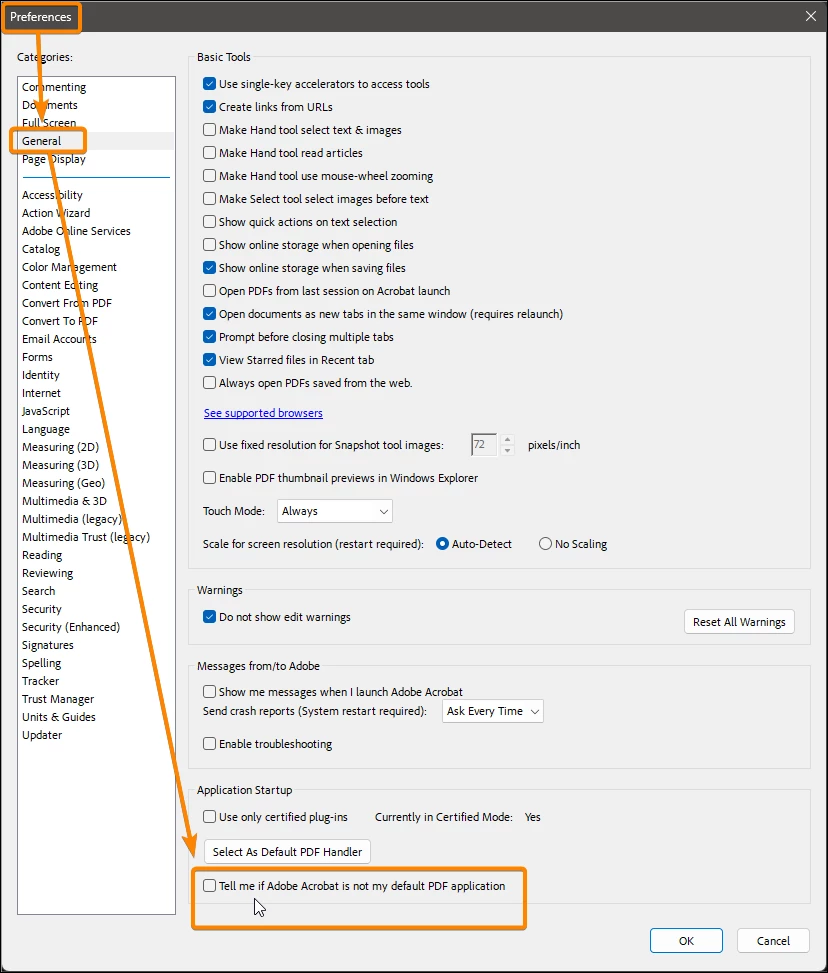
Whenever I open a new .pdf A window pops up asking if I want to set Adobe acrobat as my default .pdf application when it is already set as the default. I have checked to make sure it is set in preferences and that all the doc types are checked. What else is there to get this to stop happening? 
Correct answer JR Boulay

Workaround: uncheck this option.


1 reply

JR Boulay
Community Expert
JR BoulayCommunity ExpertCorrect answer
Community Expert
October 13, 2025

Workaround: uncheck this option.


Acrobate du PDF, InDesigner et Photoshopographe
Participant
October 13, 2025

So far that is working. I thought I had unchecked that once before. 


Thanks for the help.

JR Boulay
Community Expert
Community Expert
October 15, 2025

Yes, I even tried restarting the computer. It will still pop up and ask to make it my default. I also just noticed that the box will have a check mark in it after I relaunch. 


Be sure to use the File menu : Exit Application for the Preferences to be saved.

Is it possible that you have another programme (Foxit, Edge, Chrome, etc.) that is also set to be the default PDF reader?

Acrobate du PDF, InDesigner et Photoshopographe