
Participant
October 24, 2024
Answered

Set value of a textbox if a dropdown value has certain value

  • October 24, 2024
  • 1 reply
  • 1074 views

Using Acrobat Pro, I have a dropdown field called Program. User will select from three options

  1. Choose One (this is default to prompt user to select something)
  2. SNAP
  3. TANF


I then have Textbox field that is called programLong. I want this field to auto update to the long names for each or be blank if option 1 is not changed.

Here is my code that will only update the programLong filed if I preview and then click Edit. It will not update when the dropdown field changes values.


var progValue = this.getField("Program").value;
if (progValue == "SNAP") {
event.value = "Supplemental Nutrition Assistance Program (SNAP)";
}
else if (progValue == "TANF"){
event.value = "Temporary Assistance for Needy Families (TANF)";
}
else if (progValue == "Choose One"){
event.value ="";
}
This topic has been closed for replies.
Correct answer ls_rbls

+++EDITED REPLY... I made a mistake


Hi there @David38818339zr2v ,


Here is a working example using Acrobat's built-in features and one line of code employed as a Custom Calculating Script: https://acrobat.adobe.com/id/urn:aaid:sc:US:df02540b-5841-436a-963f-8d0cad6a5eab


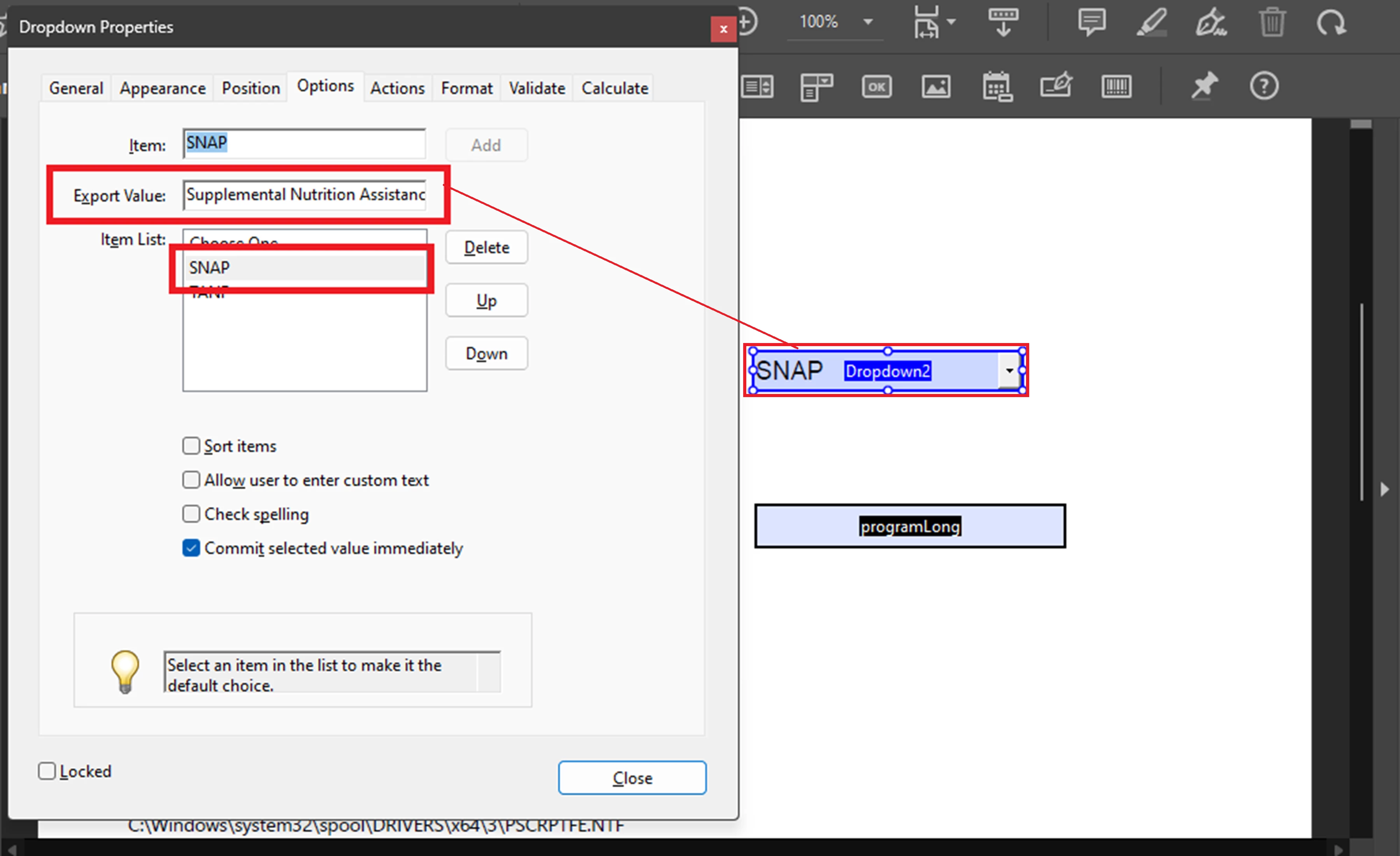
In this particular example, I am assuming that the users will not be able to type in any data in the "programLong field. In which case, you can keep that textfield as readonly. Therefore,  I am assigning to each item of the dropdown menu the long answer as the export value (illustrated in my screenshot below).


The Custom Calculating Script Script that I am using on "programLong" textfield :


var progValue = this.getField("Program").value;
(progValue == "Choose One")? event.value =="" : event.value = progValue


The script will execute as soon as the selection is commited in the dropdown field "Program", populating the "programLong"  textfield with the desired long answer (export value).


See screenshot:


1 reply

Participant
October 24, 2024

I have tried to place this script on a the calculated field on Program and programLong fields with no success.

PDF Automation Station
Community Expert
Community Expert
October 24, 2024

It won't work in the Program field because you are using event.value.  It should work in the programLong field as a custom calculation script.  If you are going to use it in the Program field it would be a validation script, but you have to change this.getField("Program").value to event.value and change all event.value's to this.getField("programLong").value.  Also select "Commit selected value immediately" in the options tab of the dropdown.  These two articles explain calculation vs validation scripts:

https://pdfautomationstation.substack.com/p/calculation-vs-validation-scripts

https://pdfautomationstation.substack.com/p/calculation-vs-validation-scripts-eb5

There is an easier way though:

1)  Set the corresponding export values of "SNAP" and "TANF" to the long versions.

2)  Enter the following custom calculation script in the programLong field:

event.value=(this.getField("Program").value=="Choose One")?"":this.getField("Program").value;

Participant
October 25, 2024

You can also use:

event.value=this.getField("Program").value;

But you have to set the export value of Choose One to null and that can only be done with a script or a tool like this one I developed (paid for).


There is another way, one I am not fond of, but I used a single space. Not one that I would normally encourage, but it works for our purpose.