wøøfie
Inspiring
March 11, 2013
Answered

Share PDF Save Presets

  • March 11, 2013
  • 1 reply
  • 19620 views

I'm looking for a simple way to share PDF save presets.  Ideally, some kind of package I can email to both Mac and PC users for use in both Acrobat Pro XI and Illustrator CS6.  Would likely be used mostly in saving .ai to PDFs in Illustrator.

Manually describing save settings through email always leads to user-inaccuracy.  Would be great if there was a file type that, when opened, just plugs itself into relevant programs with PDF export or save options.

Would really appreciate some help on this!
This topic has been closed for replies.
Correct answer Steve Werner

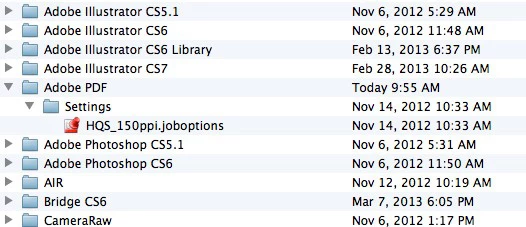
The presets are stored with the .joboptions extension. They are used in InDesign and Illustrator in PDF Presets, and in Acrobat Distiller as well.


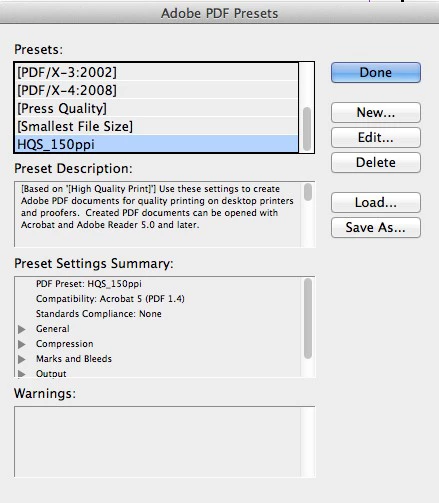
I made a custom PDF preset called HQS_150ppi. It's been saved into the path I wrote about. Note the .joboptions extension:

In InDesign CS6, it's shown in the Export > Adobe PDF (Print) dialog box or File > Adobe PDF Presets. In Illustrator CS6, it's shown in Save As > Adobe PDF (pdf) dialog box or Edit > Adobe PDF Presets:

1 reply

Steve Werner
Community Expert
Community Expert
March 11, 2013

This is a blog posting I wrote several years ago for InDesignSecrets.com. But PDF presets are standardized in InDesign, Illustrator and Acrobat Pro. At the end of this posting are the paths to where presets are stored:

http://indesignsecrets.com/customizing-pdf-presets.php

wøøfie
wøøfieAuthor
Inspiring
March 11, 2013

This file path does not exist on my Mac.  Neither do any of those folders.  Where else might these presets be stored?

wøøfie
wøøfieAuthor
Inspiring
March 11, 2013

Ah, found it through a different path, but I only see default presets as .joboptions, not my custom presets..?