
New Participant
June 16, 2024
Answered

Signature not working

  • June 16, 2024
  • 1 reply
  • 2343 views

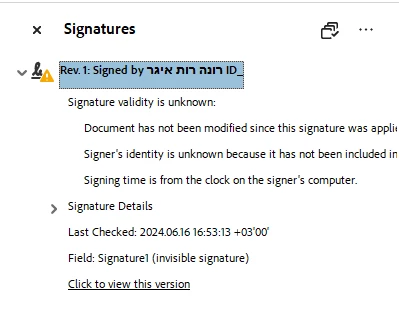
I was sent a signed file and when I open it, I can't see the signature. I have a message saying "At least one signature has problems" and it directs me to the Signature Panel and when I click on it, it says the signature validity is unknown.
 

This topic has been closed for replies.
Correct answer MikelKlink

It should be visible.
I think it is only invisible for me.


You seem to think that invisible signatures are somehow bad. They are not. At least not in general.

But if you are sure the signature should be visible in the document, and if the document is not confidential, you may share it here, so we can analyze it. If the signer cooperates, you may alternatively create a new document without confidential information, let the signer sign it, and if the signature again is invisible in contrast to expectations, you can share that document.

1 reply

try67
Adobe Expert
June 16, 2024

As is stated in that dialog, this signature field is invisible. But the signature is still there, it's just not validated.

You would need the public key from the signer to validate it.

New Participant
June 16, 2024

And in case I get the public key, what is the process of validating it?

try67
Adobe Expert
June 16, 2024

Add it to your list of trusted certificates, then right-click the signature and select Validate Signature.