Participant
July 17, 2025
Answered

signature validation problem in adobe acrobat

  • July 17, 2025
  • 1 reply
  • 430 views

hi does anyone know how to get an audit trail or validation document in adobe acrobat? a company that i am working with is saying the signature is invalid because adobe has an alert that the file has been changed after signature. but it has not been changed. how can we show this?

Correct answer MikelKlink


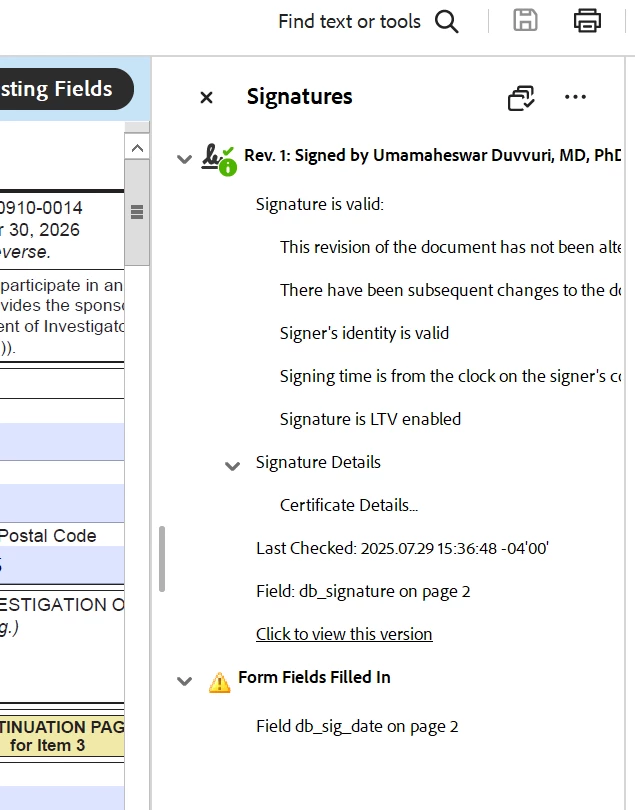
As you can see on the panel, Acrobat says that a field, db_sig_date (the signature date?), has been filled in after signing. This would mean that indeed the document has been changed after signing. 

Could that actually be the case for your document?

If yes, then the signing party should change their work flow and first enter the date and sign thereafter. 

If no, though, I.e. you still are sure nobody has changed that field after signing, there may be other causes. E.g. there might be some JavaScript code in the document that automatically fills the current date into that field upon opening the document. To find the actual cause, we would need the document in question for analysis. If you cannot share the original document, please ask the signer to create a similar document with dummy data. 

1 reply

MikelKlink
Participating Frequently
July 17, 2025

When you open the document in Adobe Acrobat, what does the signature panel show exactly?

sg_1998Author
Participant
July 28, 2025

it basically says the signatures are not valid, even though I have not changed the document or the signatures. and then there is no audit trail to prove otherwise, as far as I can tell. see screenshot


MikelKlink
Participating Frequently
July 28, 2025

You show the top bar, but what does the signature panel say? (You can press the "Signature Panel" button on the bar to open it.)