
Participant
March 20, 2010
Answered

Signature won't print for receipient

  • March 20, 2010
  • 2 replies
  • 26929 views

My financial advisor recently sent me a PDF to fill out, sign, & return. I'm using Acrobat Professional CS4 (MacPro tower, OS/10.6.2) and filled in the needed lines using the Typewriter tool. I then used Acrobat's stamp tool to place my scanned signature on the appropriate part of the form. Saved the file and emailed it back.

When she opens the file she sees all of my additions including the signature but when she attempts to print it out for a needed hard copy, the signature disappears. Is there some security setting in the document that I need to reconfigure or is the problem on her end? In Document Properties -> Security Method, Method is set to No Security and Summary reads Allowed for all ten options.

Additional info: she is on Windows, however I sent the file to a friend in my Mac club and he had the same issue: saw everything I added, but signature will not print. Prints just fine here at home. Hence I'm convinced it is some document setting on my end that needs alteration.
    This topic has been closed for replies.
    Correct answer MichaelKazlow

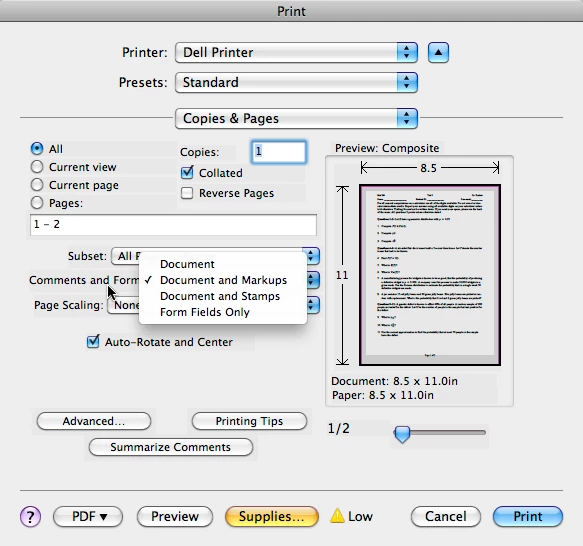
    The person printing has to make a choice. Document Only, Document and Markups, Document and Comments, Document and Stamps, Form Field Only.

    2 replies

    MichaelKazlow
    MichaelKazlowCorrect answer
    Legend
    March 20, 2010

    The person printing has to make a choice. Document Only, Document and Markups, Document and Comments, Document and Stamps, Form Field Only.

    Participant
    March 21, 2010

    That information about the recipient making a choice during printing is very helpful for me (I am not the original post sender). I will have to remember to tell recipients to select print "Document with stamps" if I use that method. Thanks.

    Participant
    March 20, 2010

    I do not have an answer, but I did send a similar type document to myself by email, received it, and the signature stamp printed properly. You may be able to run some tests by sending to yourself, and it would be best if you could receive the file on a different computer from the one you sent from.

    Also, I notice that many of the stamps seem to be items that a person would not want to print, such as "Sign here" or "Witness". These are guides for the recipient to know what action to take but should not be part of the final print. (This of course would apply to comments and other marks, as well.) So how in Acrobat does a person specify whether or not a specific object is to print? There should be a way to turn printing of objects on/off, since the stamps and comments may be needed for prep but not needed on the final print. But the Properties box for the stamp/object does not have that function. Creating a signature graphic with the stamp function puts it in the same category: when to print and when not to print; and how do you turn it on and off?