
Participant
November 12, 2021
Question

Sitka Banner Fonts not working correctly on Windows 11

  • November 12, 2021
  • 4 replies
  • 5762 views

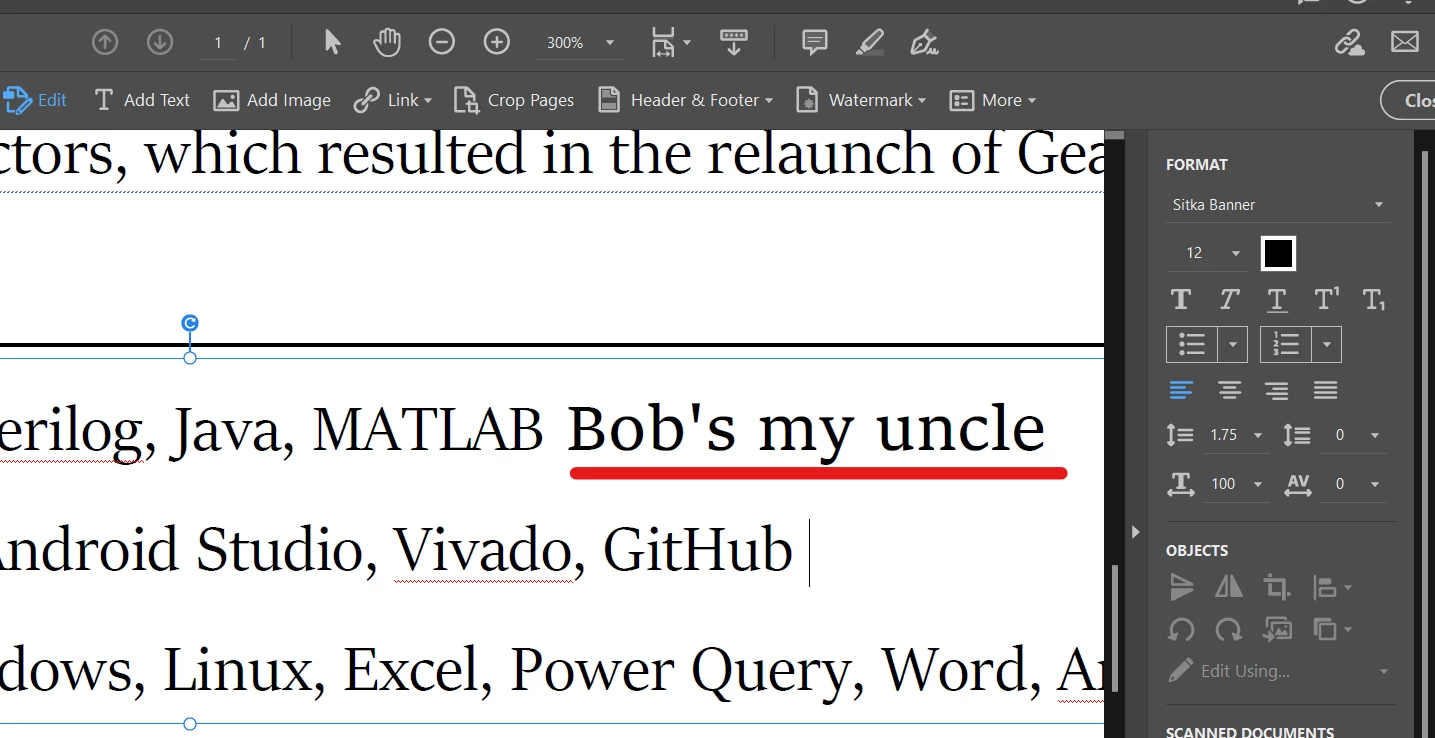
Adobe Acrobat seems to be having trouble with Sitka fonts on my machine since upgrading to Windows 11. I'm trying to update my resume, which has Sitka Banner for most of the bullet points. In the image below, please notice how the entire line "Jave, MATLAB" is Sitka Banner. However when adding new text, with the same formatting conditions, the text is clearly heavier and badly different: "Bob's my uncle". Adobe thinks both fonts are Sitka Banner. If I convert a word doc to PDF, almost the entire thing is changed to this different "Bob's my uncle" font which is not Sitka Banner (looks more like Sitka Text). I can only imagine this is a bug related to to the Windows 11 upgrade since the font family hasn't changed. Please help!


4 replies

Participating Frequently
February 5, 2026

I am having the same issue. I found this thread helpful:

https://learn.microsoft.com/en-us/answers/questions/5708961/sitka-font-family-broken-on-windows-11-microsoft-p


I recently switched to Windows 11 and I had this issue where adobe fonts couldn’t sync the Sitka font family. But I still had it (because it’s a windows font). When I’d open a .PSD or .Ai that used Sitka, it would ask to be updated because fonts were missing. When I would update it, the font would change, and I couldn’t get it to match, even though it was supposedly the same exact font… 

I guess the short of it is that  in Window 11 Sitka is not the same font. Its a variable version that doesn’t work correctly at present. 

Participant
January 29, 2024

Seeing this in 2023 and there are still issues with these fonts. I had the banner font and It will not package or embed within an illustrator file I am trying to work on across two different computers.

Participant
July 16, 2024

Problem still exists in July, 2024.

S_S
Community Manager
Community Manager
January 6, 2025

Hi @Frank22689529qdie,


Hope you are doing well. Sorry for the trouble, and the delayed response.


If you are still experiencing the issue, you might want to try the suggestions Amal provided above. Just an addition, also check the checkbox "Embed OpenType fonts."


This should embed every font that has been used in the document, thus preventing the issues with fonts not matching.


-Souvik

Participant
November 28, 2021

Also experiencing problems with the Sitka font. Editing in Acrobat and exporting documents from Word does not seem to properly display the Sitka font, particularly the bold typeface, despite the font comes with default Microsft Windows. 

Amal.
Community Manager
Community Manager
November 29, 2021

Hi there


We are sorry to hear that. Please check for any missing/pending updates for Windows OS and try updating it.


Also try to create a new test user profile with full admin rights in Windows and try using the application there and check.


Regards

Amal

Amal.
Community Manager
Community Manager
November 12, 2021

Hi there


Hope you are doing well and sorry for the trouble. As described, Sitka Banner Fonts not working correctly on Windows 11 when converting Word to PDF.


Is this a behavior with a particular PDF file or with all the PDFs? Please try with a different PDF file and check.


Also make sure you have the font installed on your system and that you have the required permission to use the font.


Would you mind sharing the steps you are doing to create the PDF from the Word file?


Please try the steps below and see if that works for you:

  1. open the Word file
  2. Go to Adobe Acrobat Ribbon on the top
  3. Go to Preferences > Advanced Settings > Fonts > Select 'Embedd all fonts' and click OK and create the PDF as shown below


Hope this information will help


Regards

Amal