Participant
May 2, 2023
Answered

Sort PDFs by Page Dimensions

  • May 2, 2023
  • 2 replies
  • 3221 views

Hi,

I have a few thousand engineering drawings in PDF format and I'm looking for a method of sorting these according to page dimensions. I have A4, A3 and A2 drawing sizes, and I want to process these with a selection of Actions to modify certain parts of each drawing.


I've got Acrobat Pro, and I've got as far as using Preflight to check an individual document - what I need is a batch process method to chew through the whole collection.


Any help would be much appreciated!


Thanks,

Paul
This topic has been closed for replies.
Correct answer JR Boulay

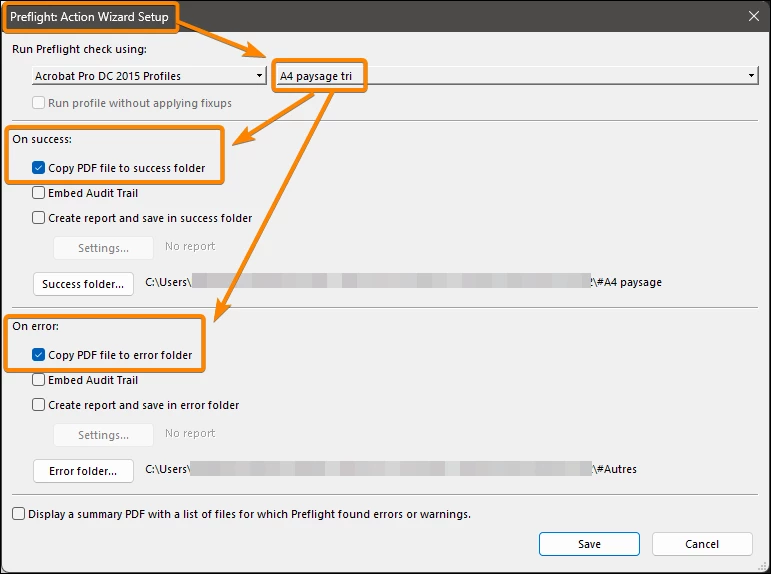
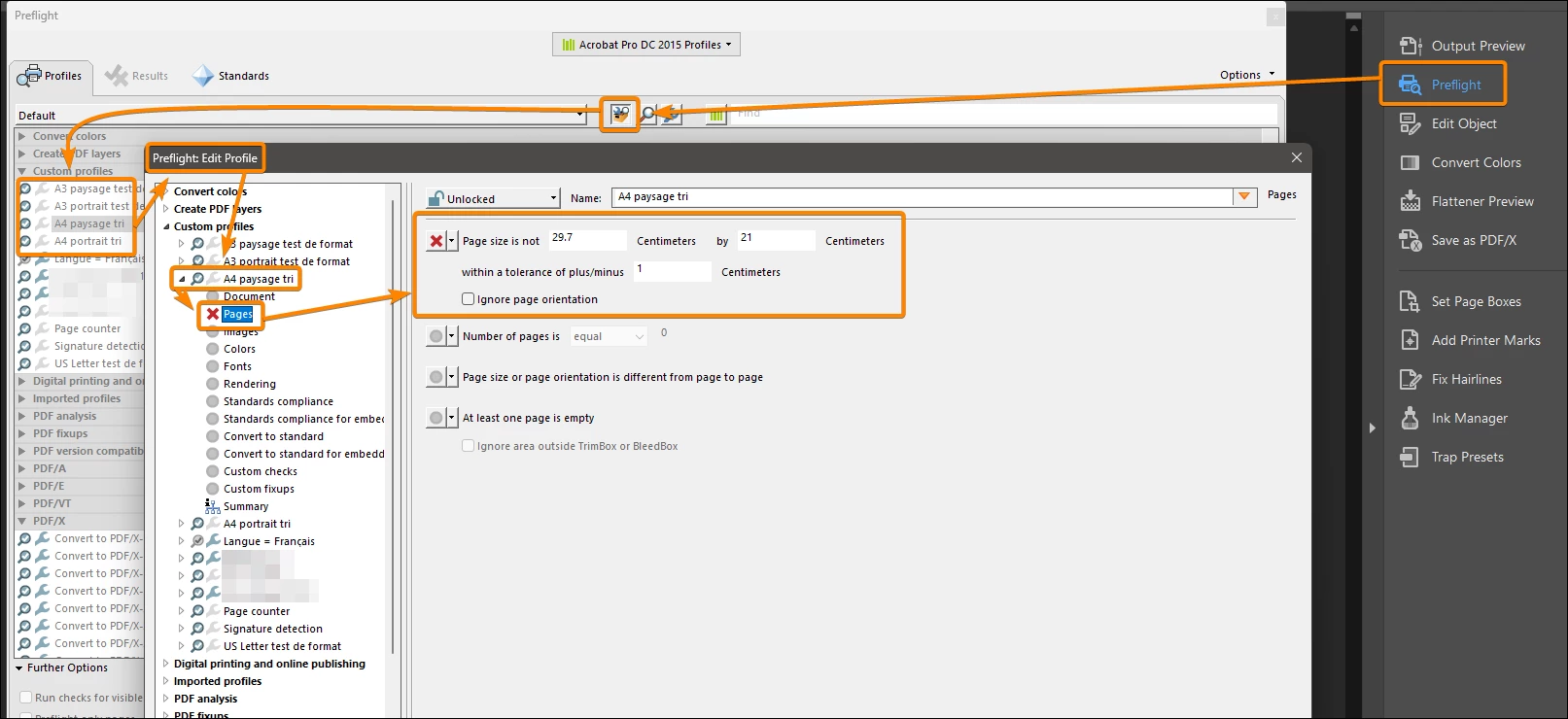
It is easy to do this with a Preflight profile used in an Action.
The advantage is that preflight profiles allow you to define a tolerance, as page dimensions are never exact.

That's how I usually sort between 6 sizes: A4, A3 and US Letter, in portrait and landscape.


2 replies

JR Boulay
Community Expert
JR BoulayCommunity ExpertCorrect answer
Community Expert
May 3, 2023

It is easy to do this with a Preflight profile used in an Action.
The advantage is that preflight profiles allow you to define a tolerance, as page dimensions are never exact.

That's how I usually sort between 6 sizes: A4, A3 and US Letter, in portrait and landscape.


Acrobate du PDF, InDesigner et Photoshopographe
msubsltdAuthor
Participant
May 9, 2023

JR, try67 - apologies for not replaying sooner, got distracted by another thing.


Many thanks for your help, I know have a working solution.


Cheers,

Paul

Participant
June 5, 2024

Hi!

Could you tell what solution do you have fot sort PDF drawings. I  have the same problem


Thanks!

try67
Community Expert
Community Expert
May 2, 2023

This is not as trivial as it might seem. Some of the issues involved with this:

- A PDF file can contain pages of multiple sizes.

- A page in a PDF file has multiple boxes in it (Crop, Trim, Bleed, Art, Media and BBox), and each one could have different dimensions (slightly or not) from the others.

- A script in Acrobat can't move files, only save a copy under a new folder.

msubsltdAuthor
Participant
May 3, 2023

Hi,


Each PDF drawing has one or more sheets, but they will all be the same size, there's no mixing of page sizes in any file.

Saving a new copy to folder depending on page size would be fine.


Thanks,

Paul

try67
Community Expert
Community Expert
May 3, 2023

Then you can use something like this, as a part of an Action, and run it on your files.

Adjust the folder paths as needed, of course, but keep the same syntax I used:


var pageBox = this.getPageBox("Crop", 0);
var pageWidth = ((pageBox[2]-pageBox[0])/72).toFixed(2);
var pageHeight = ((pageBox[1]-pageBox[3])/72).toFixed(2);

if (pageWidth==8.3 && pageHeight==11.7) {
	this.saveAs("/C/SortedPDFs/A4/" + this.documentFileName);
} else if (pageWidth==11.7 && pageHeight==16.5) {
	this.saveAs("/C/SortedPDFs/A3/" + this.documentFileName);
} else if (pageWidth==16.5 && pageHeight==23.4) {
	this.saveAs("/C/SortedPDFs/A2/" + this.documentFileName);
}