New Participant
June 19, 2021
Answered

spanish accents missing letters

  • June 19, 2021
  • 3 replies
  • 5662 views

When I copy and past from a Spanish document all letters with accents are missing. This is a new problem. Until last week all letters copied and pasted. Any ideas?


This topic has been closed for replies.
Correct answer Bevi Chagnon - PubCom.com

Ideally, all characters — including accented ones — should be inserted into the original source document, such as MS Word. By the time a PDF has been created from the source document, it's a bit late in the process to now add the correct accented character.


And it takes longer to do it in Acrobat, too, because Acrobat has only basic, rudimentary editing tools.


In MS Word:

  1. Choose the Insert ribbon/tab.
  2. Symbols.
  3. More Symbols.
  4. And then select the accented character from the chart.



In Acrobat, it's a bit more work to swap in an accented character:

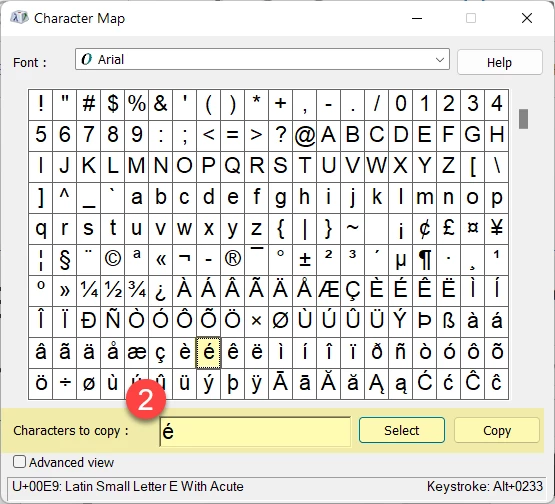
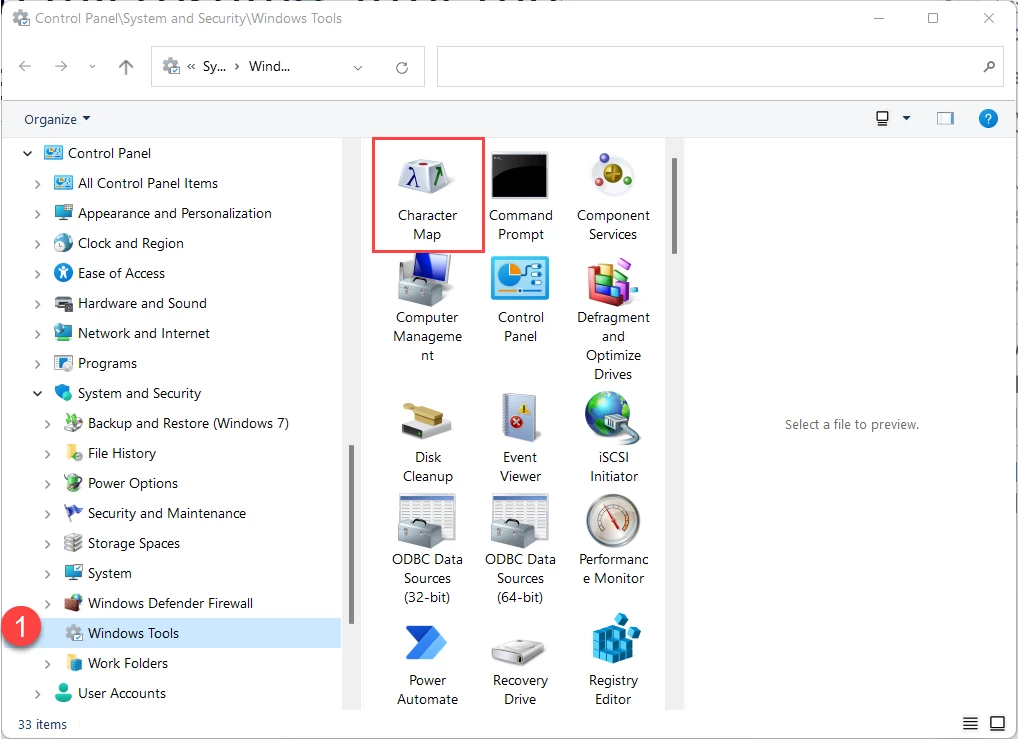
  1. Open your operating system's character/glyph chart. In Windows, it's in the Control Panel / Windows Tools / Character Map.
  2. Find the accented character you want and copy it to the clipboard (Control + C).
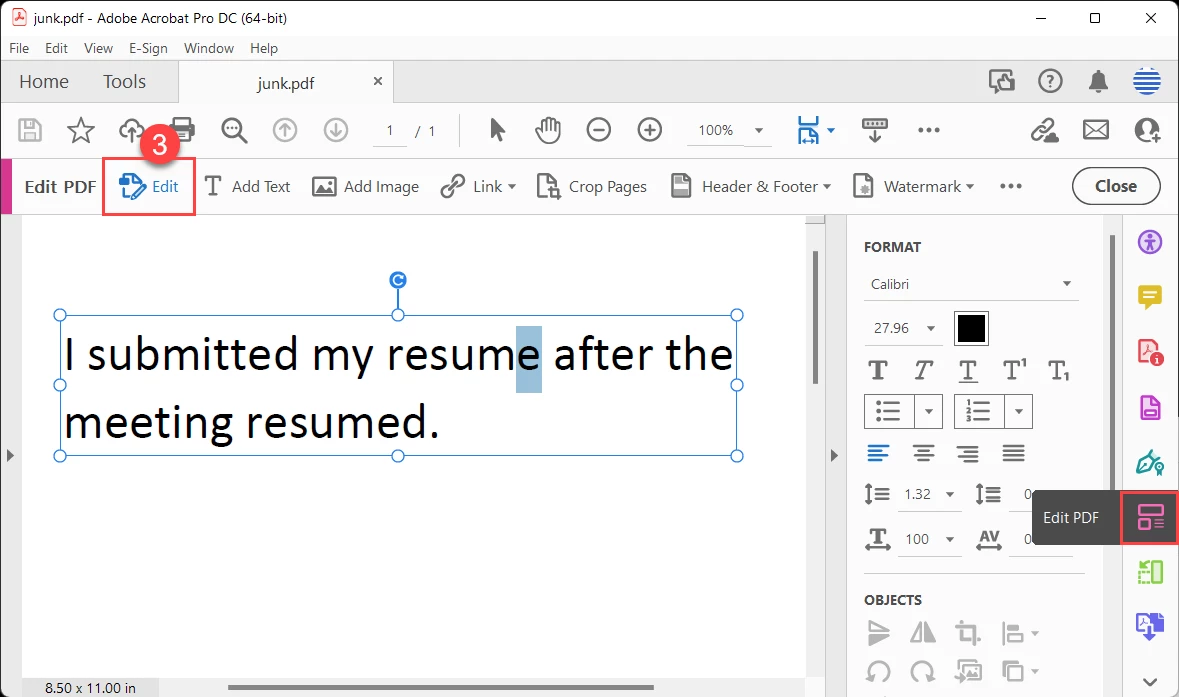
  3. Switch to Acrobat and open the Edit PDF tool, then select Edit Text.
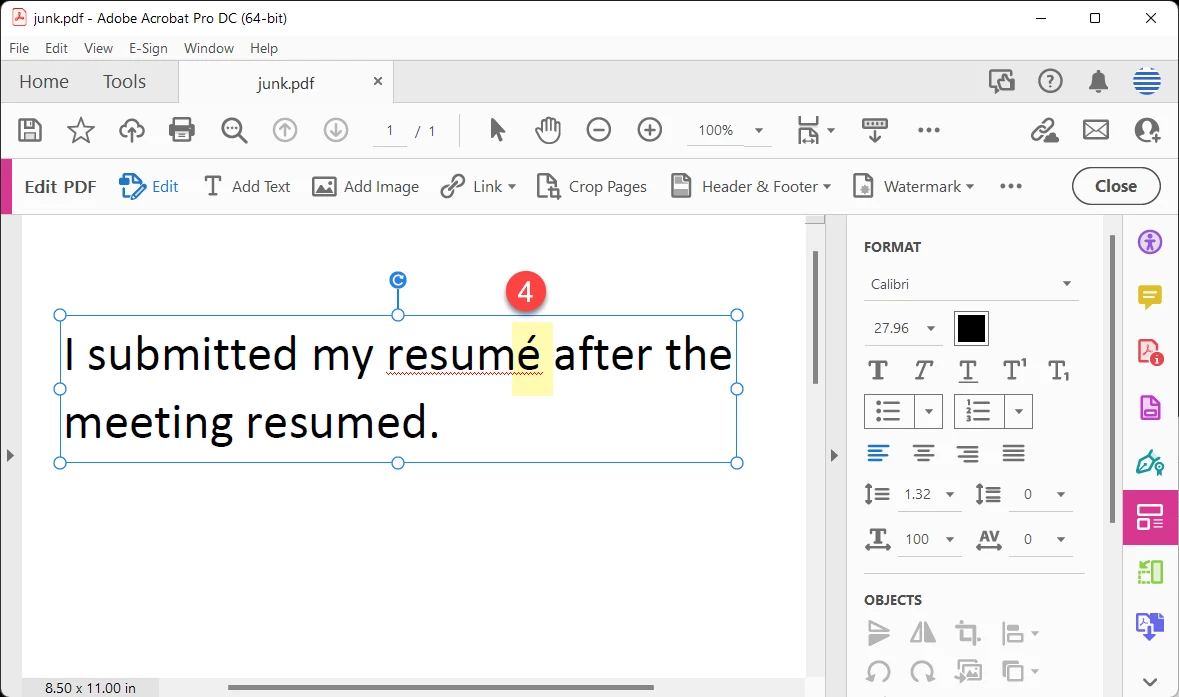
  4. Select the old character and paste in the new accented one that you copied into memory.


3 replies

New Participant
September 28, 2022

How do I add accented letters for Spanish in a PDF document? It shouldn't be that difficult.

Bevi Chagnon - PubCom.com
Brainiac
September 28, 2022

Ideally, all characters — including accented ones — should be inserted into the original source document, such as MS Word. By the time a PDF has been created from the source document, it's a bit late in the process to now add the correct accented character.


And it takes longer to do it in Acrobat, too, because Acrobat has only basic, rudimentary editing tools.


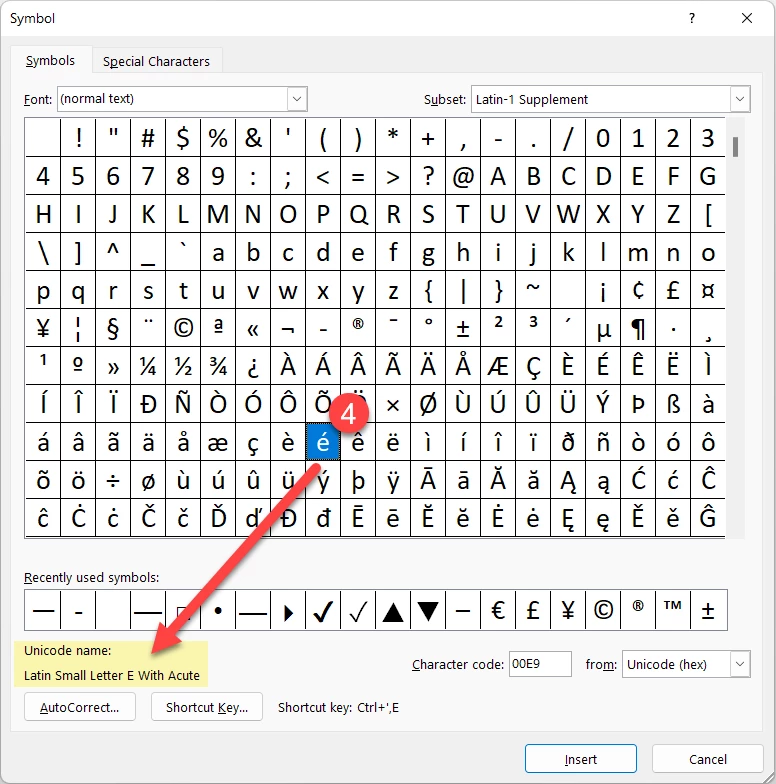
In MS Word:

  1. Choose the Insert ribbon/tab.
  2. Symbols.
  3. More Symbols.
  4. And then select the accented character from the chart.


In Acrobat, it's a bit more work to swap in an accented character:

  1. Open your operating system's character/glyph chart. In Windows, it's in the Control Panel / Windows Tools / Character Map.
  2. Find the accented character you want and copy it to the clipboard (Control + C).
  3. Switch to Acrobat and open the Edit PDF tool, then select Edit Text.
  4. Select the old character and paste in the new accented one that you copied into memory.


|    Bevi Chagnon   |  Designer, Trainer, & Technologist for Accessible Documents ||    PubCom |    Classes & Books for Accessible InDesign, PDFs & MS Office |

AkanchhaS8194121
Brainiac
June 26, 2021

Hi,


This issue was reported with the Acrobat version 2021.005.20048. 

The fix is available now with the latest update of Acrobat and Reader DC. Please install the latest update from the following link: https://www.adobe.com/devnet-docs/acrobatetk/tools/ReleaseNotesDC/continuous/dccontinuousjunehotfix2... 

Download the setup, run it, reboot the machine (if possible) and check the app functionality. 


To know more about the latest update, you can refer to this article: 21.005.20054 Optional update, June 23, 2021


Let us know if you still experience any issues.


Thanks,

Akanchha 

New Participant
February 15, 2022

This issue reappeared in the 21.011.20039 version. Please fix it.

Meenakshi Negi
Community Manager
Community Manager
February 16, 2022

Hi Heresiarca,


Thank you for reaching out.


The team is aware of the issue and working on the fix.

We will let you know once the fixed patch is available.


We appreciate your patience.


Thanks,
Meenakshi

Bevi Chagnon - PubCom.com
Brainiac
June 19, 2021

We need more information:

  • Which operating system?
  • What source program are you copying from?
  • What version of Acrobat are you using? Pro or Standard, and the build number.
  • Did any of your software change or get updated since the last time? Updated operating system? or Acrobat?
  • What's the name of the font you're copying in the source document, and what's the name of the font in Acrobat?


Sounds like this most likely is a font incompatibility between the 2 programs.


|    Bevi Chagnon   |  Designer, Trainer, & Technologist for Accessible Documents ||    PubCom |    Classes & Books for Accessible InDesign, PDFs & MS Office |

New Participant
June 19, 2021

Thank you for your quick response. I am cutting from various PDF files in Adobe Acrobat Pro DC 2021.005.20048 and pasting in google translate, Deepl, Reverso, and various other translation apps. It happens in every app. I tried a different computer and had the same result.


I use Mac OS Big Sur v 11.2.3


I haven't had any updates, I just started the computer one day and the problem was there. I use the translators about 7 hours a day and prior to the onset of this problem, it has been a very smooth process.


I have tried Ariel, Times New Roman and Roboto


Thanks!

Bevi Chagnon - PubCom.com
Brainiac
June 19, 2021

@defaultv5tc1ek6plx9 , this appears to be a bug that recently was identified with Acrobat 2021.005.20048.

It's being reported to the engineering team. See this similar post: https://community.adobe.com/t5/acrobat/copy-and-paste-that-does-not-take-accents-into-account/m-p/12124602


Suggestion: are you able to roll back to the previous version? Do this through Creative Cloud (the manager app).


|    Bevi Chagnon   |  Designer, Trainer, & Technologist for Accessible Documents ||    PubCom |    Classes & Books for Accessible InDesign, PDFs & MS Office |