
Participant
June 11, 2023
Question

Specific font in fillable PDF form

  • June 11, 2023
  • 1 reply
  • 1712 views

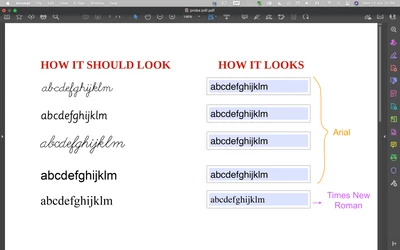
I would like to create an editable PDF where the user can modify a pre-existing word. The word should be displayed using a specific font that I have installed on my desktop.

In LibreOffice, I added a Text Box (Form Controls), entered the Default Text, and specified the Font. Then, I exported it as a PDF. However, when I open the document in Adobe Acrobat Pro, the font in the textbox appears to be changed. I am unsure of what I might be doing wrong. Attached is a picture showing how the PDF looks. The text boxes on the right should have the same font as the left side.

How can I resolve this issue?

I am working on a Mac, and the fonts appear to be embedded in the PDF. 

Thank you for your assistance.
This topic has been closed for replies.

1 reply

try67
Community Expert
Community Expert
June 12, 2023

I recommend creating the fields in Acrobat, not in LibreOffice. It will make sure the fonts are embedded correctly in the PDF, so they can be used in the fields, assuming their license allows for that, of course.

Nina GrAuthor
Participant
June 12, 2023

Thank you for your response. I also tried that, but it didn't work. Here's what I did: I clicked on Prepare Form, selected the Add a Text field icon, and set the desired font. However, when I typed in the text, only a dot appeared. When I checked the document's fonts, the font was listed twice: once with no indication and the other with "Embedded" written next to it. If I insert text directly into the document without using a Text field, the font works correctly. What could be the issue? Thank you.

try67
Community Expert
Community Expert
June 12, 2023

Did you generate a new version of the file without the fields, or did you just delete the fields and then re-created them? You should do the former.