
Participant
June 28, 2023
Answered

Stop Acrobat Pro opening documents in tabs

  • June 28, 2023
  • 4 replies
  • 30505 views

I am running Acrobat Pro 2023.003.20215 and it's opening all documents as tabs in the same window. This means I can't view two documents simultanesouly side by side. There used to be a Preference option to not have documents open in tabs, but with this version I can't find it. Anyone have a solution to this? Otherwise I need to open the documents in Preview (I'm on a Mac). Thanks.
Correct answer JR Boulay

You have 3 choices:

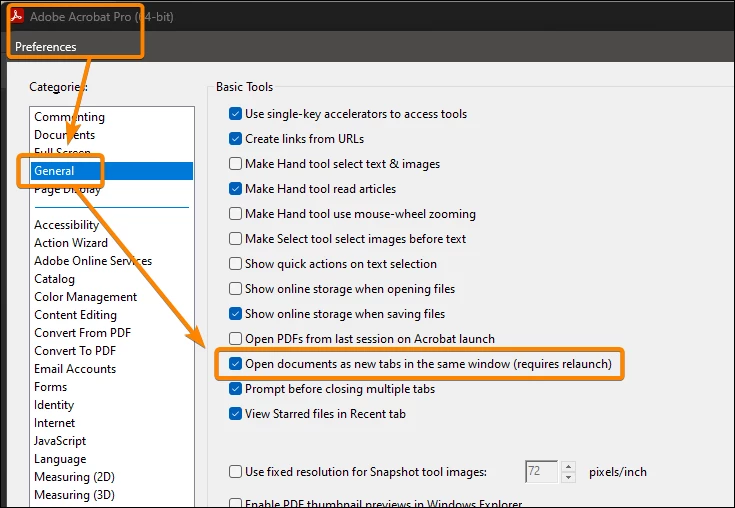
- Disable the Tab view in the Preferences.

- Clic on a tab and drag it outside the main Acrobat window.

- Use the View menu : Tile : H or V


4 replies

Known Participant
March 31, 2024

Adobe Acrobat 2023 ("New Acrobat") needs the option to open each document in a new window. This should be possible without disabling New Acrobat; the option should simply be reinstated.

Participant
April 7, 2024

Gee, what a choice: Force users to work with the oversize menu/toolbar on the right side of the of document or use New Acrobat and all documents open in one tab. Bad user experience.

Inspiring
April 27, 2024

"Bad user experience," indeed.

AkanchhaS8194121
Legend
June 29, 2023

Hi @AM278 


If you cannot find the preferences for opening documents in a new window, then you are certainly working on Acrobat's new UI.

With the latest changes, this option has been removed from the preferences.

As suggested above, you need to switch back to the old view to bring back the following preferences.

  • First, click on the hamburger icon in the upper left corner
  • Then select Disable New Acrobat

Once you get the old UI back. 

Click on Adobe Acrobat>Preferences >General> uncheck "Open documents as new tab in same window"> OK> close and reopen Acrobat


Hope this helps!


Thanks,

Akanchha 

Participant
September 20, 2023

This is REALLY dumb.  The new UI needs to put that option back.  I like it better, but the tabs thing is a dealbreaker as I need to swap pages around mutliple PDFs and doing it from tab to tab is terrible.

JR Boulay
Community Expert
JR BoulayCommunity ExpertCorrect answer
Community Expert
June 29, 2023

You have 3 choices:

- Disable the Tab view in the Preferences.

- Clic on a tab and drag it outside the main Acrobat window.

- Use the View menu : Tile : H or V


Acrobate du PDF, InDesigner et Photoshopographe
Participant
October 20, 2023

your picture doesnt apply in 2023, its old they removed that feature. please remove and stop referenceing this 'uncheck' box.


Bernd Alheit
Community Expert
Community Expert
June 29, 2023

Disable the new UI at the View menu.