
rkdbc
Participant
February 23, 2019
Answered

Stop New PDFs Opening after Creation and Save As Dialogue - Convert to Adobe PDF -

  • February 23, 2019
  • 4 replies
  • 16855 views

Hello,

On Windows 10, I can right click Word documents in File Explorer and convert to PDF using Adobe's "Convert to Adobe PDF" button.

How do I

  • Stop a Save As dialogue window popping up for each Word Doc?
  • Stop each created PDF opening in my default PDF viewer?


Thanks,
Rob
Correct answer MartB

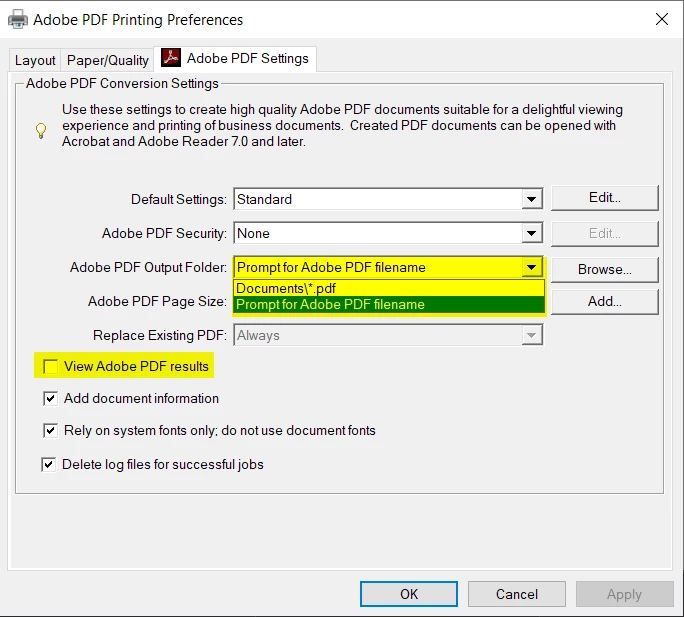
The Convert to PDF option is using the Adobe PDF 'printer'. The settings can be found in Windows Settings for this printer (Printers & Scanners > Manage printer > Printing preferences). Here you can select a default output folder and turn off "View Adobe PDF results"


4 replies

Participant
June 13, 2022

Easy. There is a tick box to enable / disable converted documents showing on creation.  Convert your document in adobe, a pop up box appears to let you choose which folder to save the document in, well there is a tiny tick box 'view results', just untick this and it will not open Word etc, tick it and it will. Simples.

Participant
March 15, 2022

But how do you STOP Adobe from opening a pdf when a .doc is saved in Word as a .pdf?  Microsoft says it's on your end.  Y'all say it's on their end.  When I save a .doc as a .pdf, I just want to go to the folder and drag it into my email, not look at the .pdf I just created.

Meenakshi Negi
Community Manager
Community Manager
March 16, 2022

Hi Kelly,


Thank you for reaching out.


When you create a PDF from a Word application, please use the following steps to stop the application from opening a new PDF:

1. In the Word application, click on the Acrobat ribbon.

2. Select Preferences, next to Create PDF option.

3. In the Adobe PDF Maker window, unmark the "View Adobe PDF result" option under the Settings tab.

4. Click on the OK button at the bottom of that window to save the changes.


Hope the information helps.

Let us know if you have any questions.


Thanks,

Meenakshi

MartBCorrect answer
Participant
May 27, 2020

The Convert to PDF option is using the Adobe PDF 'printer'. The settings can be found in Windows Settings for this printer (Printers & Scanners > Manage printer > Printing preferences). Here you can select a default output folder and turn off "View Adobe PDF results"


AkanchhaS8194121
Legend
February 26, 2019

Hi Rob,

We assume you are working with Acrobat DC?

How do I

  • Stop a Save As dialogue window popping up for each Word Doc?

Are you referring to the dialog box appears to decide the word document's location while converting a pdf file to word? If yes, this is a default behavior of the application, which can not be changed. After conversion application would ask for the desired location.

Stop each created PDF opening in my default PDF viewer?

What is the default pdf viewer to open pdf? Is it Acrobat or some other? There has to be a default pdf viewer to open .pdf file format. If its not Acrobat then it would be some other app which supports .pdf format.

You can right click on pdf and select open with.

Regards,

Akanchha

rkdbc
rkdbcAuthor
Participant
March 4, 2019

Thank you for the reply.

Is there a way to have a feature request made so that the save location does not need to be asked for each time?

Same to stop the newly created PDF being opened automatically.

Thanks,
Rob

AkanchhaS8194121
Legend
March 5, 2019

Hi Rob,

You can surely use this form to request new features or suggest modifications to existing features- Feature Request/Bug Report Form

-Akanchha