New Participant
November 8, 2023
Answered

Strange characters under Footnote references in pdf

  • November 8, 2023
  • 3 replies
  • 2064 views

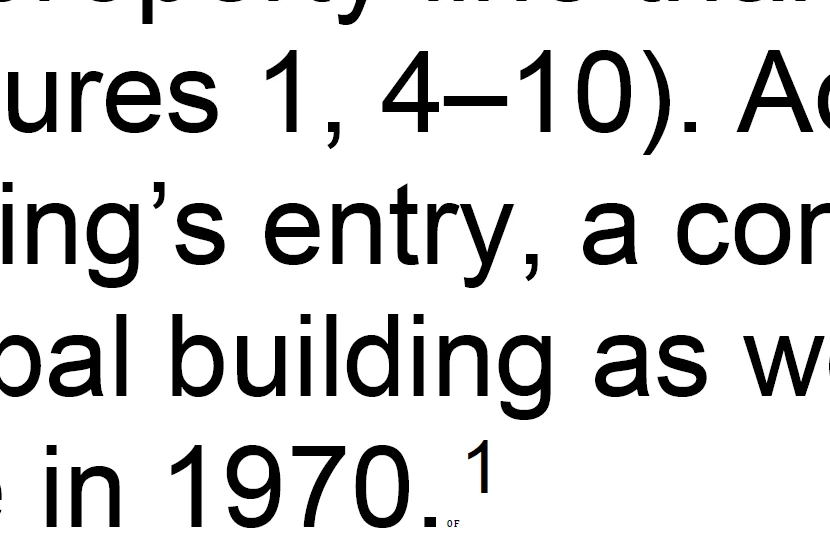
When I save as/export to/print to PDF from Microsoft word, I see small characters underneath my footnote references (See attached). In a window zoomed to 100%, these show up like a second period at the end of my setence, but zooming in shows it to be text. The text is different under each superscript footnote reference, always a number and a letter. It is not in my word doc. Perhaps a setting? I've made sure track changes is off, and the box that says "convert comments" is unchecked. Any help would be appreciated! Thank you. 
This topic has been closed for replies.
Correct answer PurpleDoctorfish

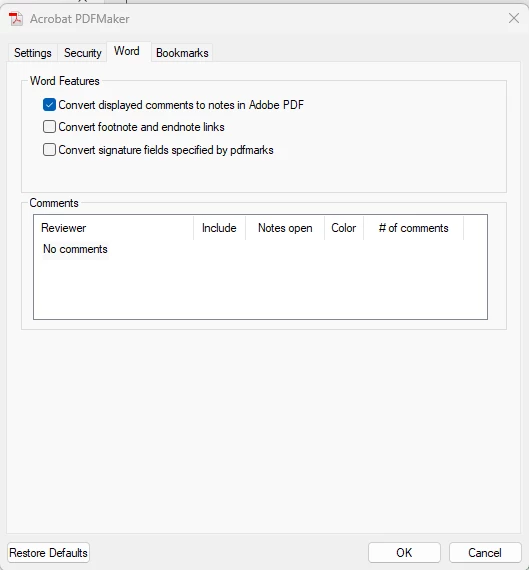
To disable these characters from showing in your footnotes in Acrobat, open a document in Microsoft Word, then do the following:


1. Go to Acrobat tab on the top right
2. Select Preferences in the "Create Adobe PDF" section
3. Go to Word tab
4. Uncheck "convert footnote and endnote links"

3 replies

PurpleDoctorfishCorrect answer
New Participant
October 15, 2024

To disable these characters from showing in your footnotes in Acrobat, open a document in Microsoft Word, then do the following:


1. Go to Acrobat tab on the top right
2. Select Preferences in the "Create Adobe PDF" section
3. Go to Word tab
4. Uncheck "convert footnote and endnote links"

S_S
Community Manager
Community Manager
October 23, 2024

Thanks @PurpleDoctorfish, for sharing what worked for you.


Marking this as correct answer for future users to use as reference.


-Souvik

Inspiring
August 7, 2024

Just encountered a document with this issue. Seems it's likely these characters were added at some point when generating a PDF using Acrobat from Word. They are 1 pt and with the ZWAdobeF font. 


It is using them as some sort of reference it seems, but I have no idea why it would permanently add them to the document. That is very bad behaviour. Unfortunately this was in a messy document made by someone else, so I don't know how exactly it happened.


Easy to remove with find/change at least... 😕😕

Abambo
Adobe Expert
November 10, 2023

This looks like a font issue. How exactly do you create the PDF? Do the als apear when using Save As PDF?

ABAMBO | Hard- and Software Engineer | Photographer
ScrollingAuthor
New Participant
November 10, 2023

It happens in every case: export to pdf, save as pdf, and print to pdf.