Participant
January 18, 2018
Answered

Strange Fonts

  • January 18, 2018
  • 2 replies
  • 7593 views

Hi,

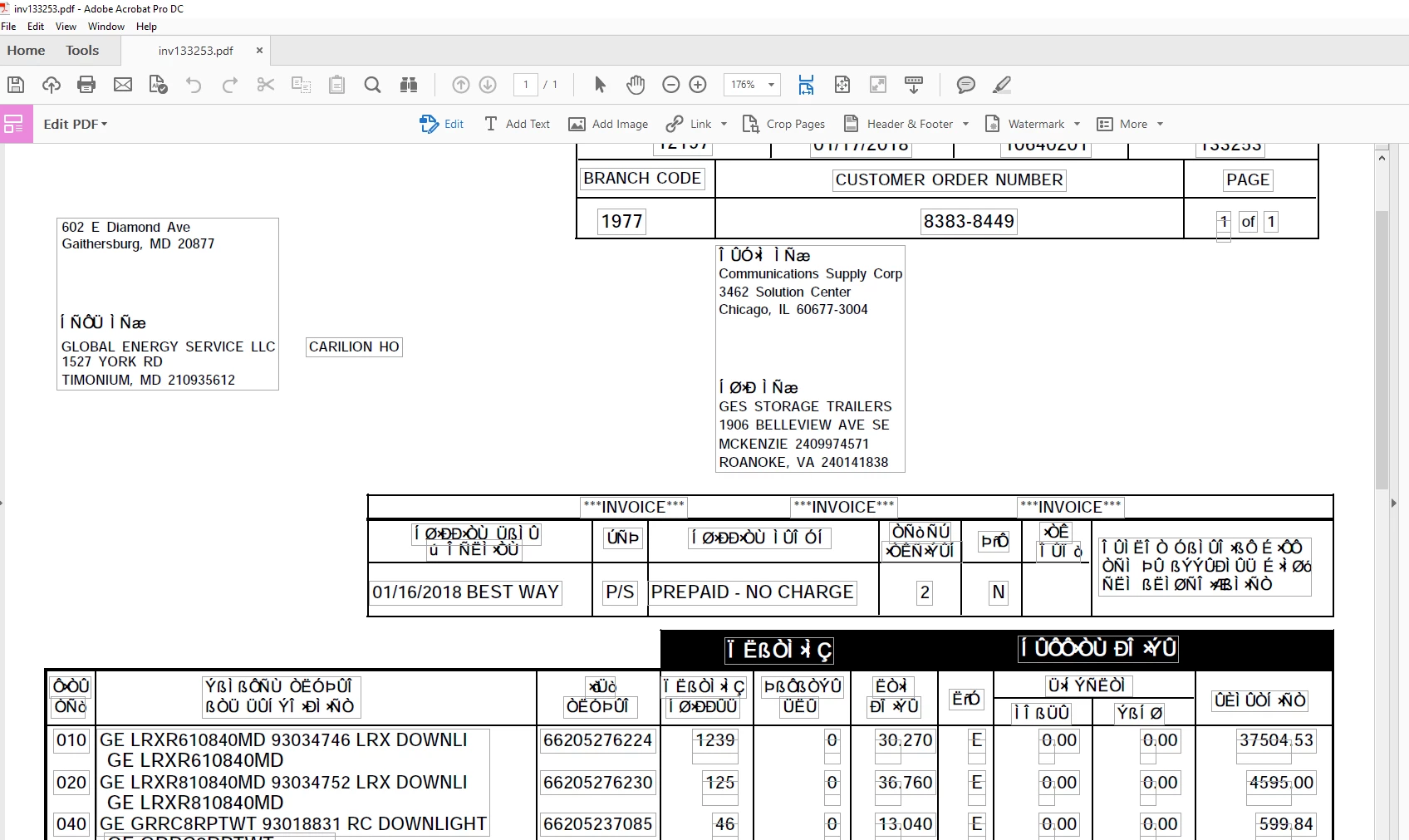
We have Adobe Acrobat DC Update 18-009-20050 and Windows 10 OS Build 16299.192. We receive and print over 50 invoices a day and 2 out of 25 vendors are now view and print with "hieroglyphics" instead of text and numbers. If I convert them to a html it's fine and my vendors assure me it's fine on their end. We really need this fixed, any ideas? See capture below:

Thank You!!

This topic has been closed for replies.
Correct answer Dov Isaacs

Christine sent me samples of the problematic PDF files for my examination.

Analyzing the PDF files, I saw that:

  • The PDF files were created by a tool that converts PCL print streams to PDF, something fairly unusual.
  • The fonts referenced by these PDF files were not embedded, but that had funky font names such as Arial+0000040 and Arial,Bold+0000041, resulting in Acrobat, Adobe Reader, or any other PDF reader needing to substitute the fonts.

I make a revision of the files in which I internally correct the font names to ArialMT and Arial-BoldMT respectively. This yielded PDF files that Christine could properly read on her system.

I also made a revision of the files (after the above correction) in which I embedded the fonts, guaranteeing proper font rendering. Christine was also able to properly read these PDF files on her system.

Bottom line is that the original PDF files were improperly created in terms of how they referenced fonts yielding a situation in which at least on some systems, improper font substitution would occur any yield the noted gibberish! 

          - Dov

2 replies

Dov Isaacs
Dov IsaacsCorrect answer
Legend
January 22, 2018

Christine sent me samples of the problematic PDF files for my examination.

Analyzing the PDF files, I saw that:

  • The PDF files were created by a tool that converts PCL print streams to PDF, something fairly unusual.
  • The fonts referenced by these PDF files were not embedded, but that had funky font names such as Arial+0000040 and Arial,Bold+0000041, resulting in Acrobat, Adobe Reader, or any other PDF reader needing to substitute the fonts.

I make a revision of the files in which I internally correct the font names to ArialMT and Arial-BoldMT respectively. This yielded PDF files that Christine could properly read on her system.

I also made a revision of the files (after the above correction) in which I embedded the fonts, guaranteeing proper font rendering. Christine was also able to properly read these PDF files on her system.

Bottom line is that the original PDF files were improperly created in terms of how they referenced fonts yielding a situation in which at least on some systems, improper font substitution would occur any yield the noted gibberish! 

          - Dov
- Dov Isaacs, former Adobe Principal Scientist (April 30, 1990 - May 30, 2021)
Abambo
Community Expert
Community Expert
January 22, 2018

Do you use standard tools for changing the font name or tools internal to Adobe? I’m asking because I have sometimes similar problems, where I would like changing the font name.

ABAMBO | Hard- and Software Engineer | Photographer
Dov Isaacs
Legend
January 23, 2018

The tools are internal to Adobe although if you check around, you may find some third party plug-ins that can do similar editing.

Note that such tools can readily trash a PDF file if you really don't know the internals of PDF. The tools don't have a "change font name" command. You need to know the internal format and what keys to tweak.

Finally, changing a font name by itself can lead to some wonky results. In this case I was changing a corrupted version of the Arial name to its proper name. You can't simply change a font name from let's say Arial to Verdana and expect that everything will come out right. There are many other pieces of internal font dictionaries that would need to be changed also.

Consider that you are lucky that such tools are not so readily available!!!  

          - Dov

- Dov Isaacs, former Adobe Principal Scientist (April 30, 1990 - May 30, 2021)
Dov Isaacs
Legend
January 18, 2018

Without posting a sample of such a PDF file, it is literally impossible to ascertain exactly what is causing the problem.  It could be fonts that are referenced but not actually embedded in the PDF file, encoding issues, etc.

It you can't post one of these files for access by forum members in general to look at, please contact me by private forum message with such a link such that we can examine the file here at Adobe.

          - Dov

- Dov Isaacs, former Adobe Principal Scientist (April 30, 1990 - May 30, 2021)
Participant
January 18, 2018

Dov,

See capture in first post and compare to this capture (opened and printed as a html), you will notice anomalies in the fonts only in some some areas........the other vendor the entire invoice is hosed with strange fonts.

Thx!

Dov Isaacs
Legend
January 18, 2018

I wasn't questioning that you are seeing this.

The problem is that without the actual PDF file exhibiting this problem, we cannot ascertain what is causing it!

          - Dov

- Dov Isaacs, former Adobe Principal Scientist (April 30, 1990 - May 30, 2021)