
Inspiring
August 30, 2017
Question

Submit button in InDesign form not working

  • August 30, 2017
  • 4 replies
  • 7363 views

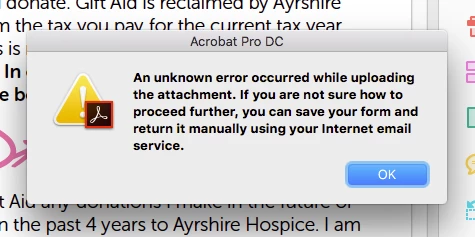
A client of mine has created a form in InDesign CC 2017. When the submit button is clicked this is the message they receive.

I can't see an issue with the button, it has the action 'submit form' with the correct mailto:email@address.com

Any light on this would be great thanks!
This topic has been closed for replies.

4 replies

Inspiring
August 30, 2017

Thank you all - it is definitely an issue with how mail is configured on the machine. Local email works fine but webmail doesn't. This has solved the issue with this job but surely there must be a better solution as how can we know a persons mail set up when we send out a form and expect it to be returned using the submit button?

Anyone got any solutions for that?

Thanks again

Barb Binder
Community Expert
Community Expert
August 30, 2017

Configuring the submit button to use mailto: is a quick and free option. The professional solution is to set the submit button to send the data to a script that will send a thank you note to the sender, and forward the data collected on for processing.

That said, if they are filling out the form in a browser, this may help—but I don't know:

https://www.chainsawonatireswing.com/2015/05/03/a-guide-to-getting-webmail-services-to-work-with-mailto-links/?from=@

~Barb at Rocky Mountain Training
Inspiring
August 30, 2017

The form was originally set to mailto:etc@etc.com but if the machine has web mail as a default it gets an error message.

Thank you Barb for the link. I will give it my attention and hopefully I can offer the client a solution.

Barb Binder
Community Expert
Community Expert
August 30, 2017

Hi Alma:

I'm guessing John is on to something. I have a local email client installed (not webmail) and the same setup works as intended.

P.S. If I remove the mailto: in front of the email address, it tries to find a file on my drive, so yes, keep that in.

~Barb at Rocky Mountain Training
Inspiring
August 30, 2017

I've tried a simple form and the same error is happening.

See screen shot.

Inspiring
August 30, 2017

I think it must be something very simple so was hoping someone had experienced the same message at some point and could direct me.

Barb Binder
Community Expert
Community Expert
August 30, 2017

Should we move this over to the Acrobat forum?


I'd vote yes to move it here: PDF Forms.

~Barb at Rocky Mountain Training
Derek Cross
Community Expert
Community Expert
August 30, 2017

Is the button working with your copy of Acrobat Reader?

Which Acrobat PDF reader is the the customer using?

Inspiring
August 30, 2017

No Derek it's not working with Reader. I've tried it on both Mac and PC with Acrobat Reader DC, but I know the client has tried it on older versions too.

JonathanArias
Legend
August 30, 2017

is this the one file this is happening with. have you tried different files? copy a submit button from a different document and paste it into that one and test too.