
Known Participant
July 7, 2021
Answered

Submit button with customer email address?

  • July 7, 2021
  • 1 reply
  • 836 views

Hello,


I work for an HVAC company and am looking to add a submit button to a few PDFs that our technicians will use to send copies of various service forms back to the office as well as to customers as receipts of purchase. At the moment, when the submit button is pressed, it brings up a new e-mail in Outlook addressed to the office address with the PDF attached. My employer suggested that the email automatically CC the office address instead, leaving the "to" field blank so that the technicians can input the customer address there. Is this a possibility? If so, how do I create buttons that will achieve this?

Any help is appreciated!
This topic has been closed for replies.
Correct answer Mike Bro

Hello @Toi0101,

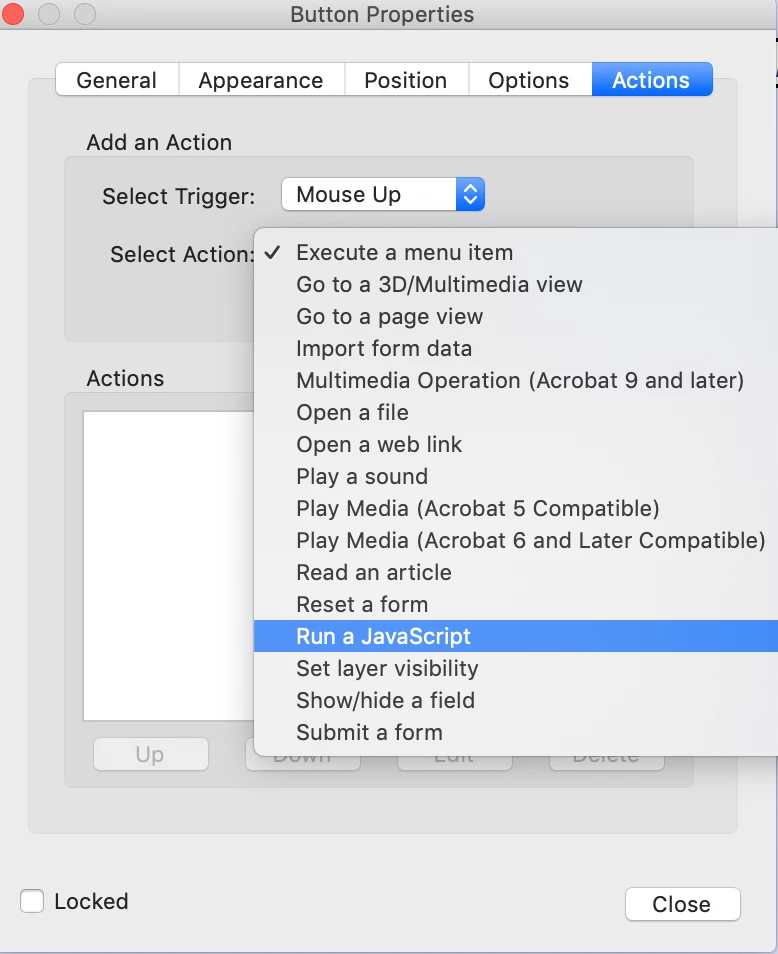
Under the submit button

Properties > Actions you can select the option "Run a Javascript.

Once selected, hit the Add... button and paste the below code into the pop-up window.

you can modify the info in the code as needed


var date = new Date();

this.mailDoc({

cTo: "",

cCc: "Your Company email Address Goes Here",

cSubject: "Receipt of Purchase: "+date,

cMsg: "\r\r email Body Message Goes Here If Any"

});


Regards,

Mike

1 reply

Mike BroCorrect answer
Legend
July 7, 2021

Hello @Toi0101,

Under the submit button

Properties > Actions you can select the option "Run a Javascript.

Once selected, hit the Add... button and paste the below code into the pop-up window.

you can modify the info in the code as needed


var date = new Date();

this.mailDoc({

cTo: "",

cCc: "Your Company email Address Goes Here",

cSubject: "Receipt of Purchase: "+date,

cMsg: "\r\r email Body Message Goes Here If Any"

});


Regards,

Mike

Toi0101Author
Known Participant
July 9, 2021

I appreciate your help!