
Exit
  • Global community
    • Language:
      • Deutsch
      • English
      • Español
      • Français
      • Português
  • 日本語コミュニティ
  • 한국 커뮤니티
0

Table border weight issue Word to Acrobat

New Here ,
Jul 15, 2024 Jul 15, 2024

I am having an issue preparing a pdf/form in Adobe Acrobat Pro when converting from Word. The document I am converting from word has a couple different tables, all with the same border weight/thickness. When I save this as an Adobe PDF to create my form, the formatting gets thrown off by presenting some tables as bold/thicker and some as they were in Word. Any solutions?


Thanks all!
TOPICS
Create PDFs , Edit and convert PDFs , General troubleshooting , Modern Acrobat , PDF forms
4.1K
Translate
Report
Community guidelines
Be kind and respectful, give credit to the original source of content, and search for duplicates before posting. Learn more
community guidelines
2 ACCEPTED SOLUTIONS
Community Expert ,
Jul 15, 2024 Jul 15, 2024

In Word, if you have the border set as a line for a specific thickness, but for example the top of one cell, but the bottom of the cell above is set as no border, or a different thickness, it will display the border  as consistent in Word.  However, when converted to PDF, it will show a thinner line unless the bottom of the upper cell is set the same as the top of the lower cell.  This goes for right/left sides of cells as well.  Also, try magifying the PDF and see if whether the lines are consistent.  Sometimes they look different at different zoom levels.  Try printing as well and see whether they are actually inconcistent

View solution in original post

Translate
Report
Community guidelines
Be kind and respectful, give credit to the original source of content, and search for duplicates before posting. Learn more
community guidelines
Community Expert ,
Jul 15, 2024 Jul 15, 2024
LATEST

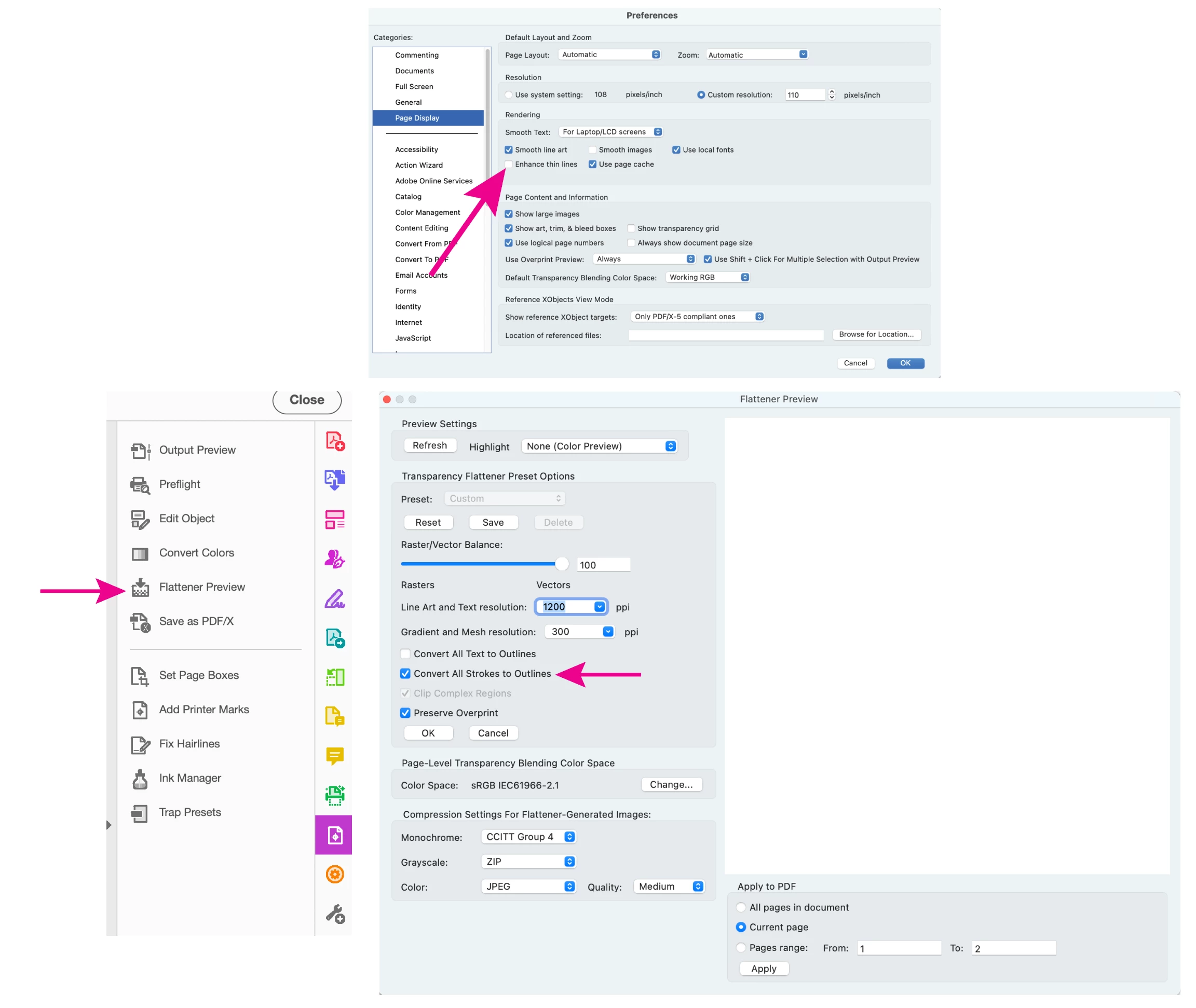
There is an Acrobat and Reader Page Display preference to "Enhance thin lines", try turning this off. If this helps, you can use the Flattener Preview tool to Convert All Strokes to Outlines, this will convert lines to shapes, preventing them from being enhanced in Acrobat and perhaps other pdf viewers as well. (Tools> Print Production). Flattening will remove existing form fields, so you can either do this before creating the form or use the Replace pages tool to replace the page content only, preserving the existing form fields.

convert lines to shapes.png


View solution in original post

Translate
Report
Community guidelines
Be kind and respectful, give credit to the original source of content, and search for duplicates before posting. Learn more
community guidelines
Community Expert ,
Jul 15, 2024 Jul 15, 2024

In Word, if you have the border set as a line for a specific thickness, but for example the top of one cell, but the bottom of the cell above is set as no border, or a different thickness, it will display the border  as consistent in Word.  However, when converted to PDF, it will show a thinner line unless the bottom of the upper cell is set the same as the top of the lower cell.  This goes for right/left sides of cells as well.  Also, try magifying the PDF and see if whether the lines are consistent.  Sometimes they look different at different zoom levels.  Try printing as well and see whether they are actually inconcistent

Translate
Report
Community guidelines
Be kind and respectful, give credit to the original source of content, and search for duplicates before posting. Learn more
community guidelines
New Here ,
Jul 15, 2024 Jul 15, 2024

Thank you! This worked in Adobe as when I view it at 100% it shows up correctly. However, when viewing the PDF not in Adobe but instead in my browser at the same %, the formatting issue appears again. How can I troubleshoot this? @PDF Automation Station 

Translate
Report
Community guidelines
Be kind and respectful, give credit to the original source of content, and search for duplicates before posting. Learn more
community guidelines
Community Expert ,
Jul 15, 2024 Jul 15, 2024
LATEST

There is an Acrobat and Reader Page Display preference to "Enhance thin lines", try turning this off. If this helps, you can use the Flattener Preview tool to Convert All Strokes to Outlines, this will convert lines to shapes, preventing them from being enhanced in Acrobat and perhaps other pdf viewers as well. (Tools> Print Production). Flattening will remove existing form fields, so you can either do this before creating the form or use the Replace pages tool to replace the page content only, preserving the existing form fields.

convert lines to shapes.png


Translate
Report
Community guidelines
Be kind and respectful, give credit to the original source of content, and search for duplicates before posting. Learn more
community guidelines