
EJProTechWriting
Participating Frequently
April 12, 2018
Answered

Table Editor Grid Lines

  • April 12, 2018
  • 3 replies
  • 2308 views

Hello,

I could not find a discussion relevant to my issue, and I apologize if I overlooked it. Here is my problem.

I'm attempting to scope a complex table originally created in Word 2010. The table has four cells merged into two at the top. When I invoke the Table Editor to scope the table, the grid lines on the Table Editor do not align with the borders on the converted Word table. See figure above. It makes it difficult to do the scoping.

Can someone suggest a fix for this?

Thank you,

Ed
This topic has been closed for replies.
Correct answer Dave__M

It's part of the Accessibility tools.  A subset of the Reading Order tool.

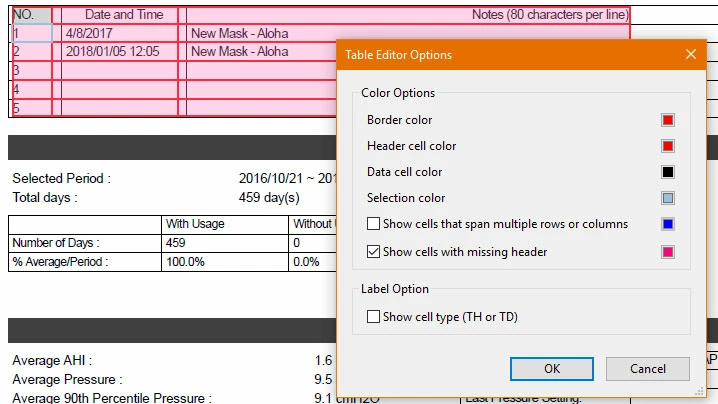
The Table Editor is a useful, but ugly thing.  You can change some of its characteristics by right-clicking on the table editor and selecting Table Editor Options.  Maybe something there will make things better for you, but it is notorious for not really aligning cells with what's on the page, I'm afraid.

My screenshot is from the DC version, but should be similar in your v. XI, I believe.

I hope this is of some help.

My best,

Dave

3 replies

EJProTechWriting
Participating Frequently
April 17, 2018

There is a Table Editor feature in Acrobat XI Pro. In a document with tables, take the following steps:

  1. Open TURO.
  2. With the Selection Tool, select a column heading. It becomes outlined in light blue.
  3. Right-click the blue-outlined heading. A menu appears with the Table Editor feature.
  4. Click Table Editor. A menu appears with Table Cell Properties and Table Editor Options.
  5. Click Table Cell Properties. A Table Cell Properties dialog box is displayed.
  6. Use the Table Cell Properties dialog box to scope the table.
try67
Community Expert
Community Expert
April 17, 2018

It sounds like you're using a plugin, not a built-in feature.

The tool Dave__M pointed out only has to do with the reading order, not the actual layout.

Dave__M
Community Expert
Community Expert
April 17, 2018

The original post mentioned trying to scope the table - which is defined in Acrobat's Table Editor.  It's not at all a plugin, but is part of the Accessibility tools built into Acrobat.  The visually mis-aligned cells have behaved that way for many versions.  The trick is to ignore the imprecision on screen, but to figure out what cell is what, and make your adjustments with the proper cell(s) selected.

Dave

EJProTechWriting
Participating Frequently
April 17, 2018

Sorry. I'm working with Acrobat XI Pro.

try67
Community Expert
Community Expert
April 17, 2018

There's no Table Editor in Acrobat, as far as I'm aware.

Dave__M
Community Expert
Dave__MCommunity ExpertCorrect answer
Community Expert
April 17, 2018

It's part of the Accessibility tools.  A subset of the Reading Order tool.

The Table Editor is a useful, but ugly thing.  You can change some of its characteristics by right-clicking on the table editor and selecting Table Editor Options.  Maybe something there will make things better for you, but it is notorious for not really aligning cells with what's on the page, I'm afraid.

My screenshot is from the DC version, but should be similar in your v. XI, I believe.

I hope this is of some help.

My best,

Dave

try67
Community Expert
Community Expert
April 12, 2018

"Table editor"? What application is this?