
Participant
January 9, 2019
Question

tagged cell won't show in tag list
  • January 9, 2019
  • 1 reply
  • 3309 views

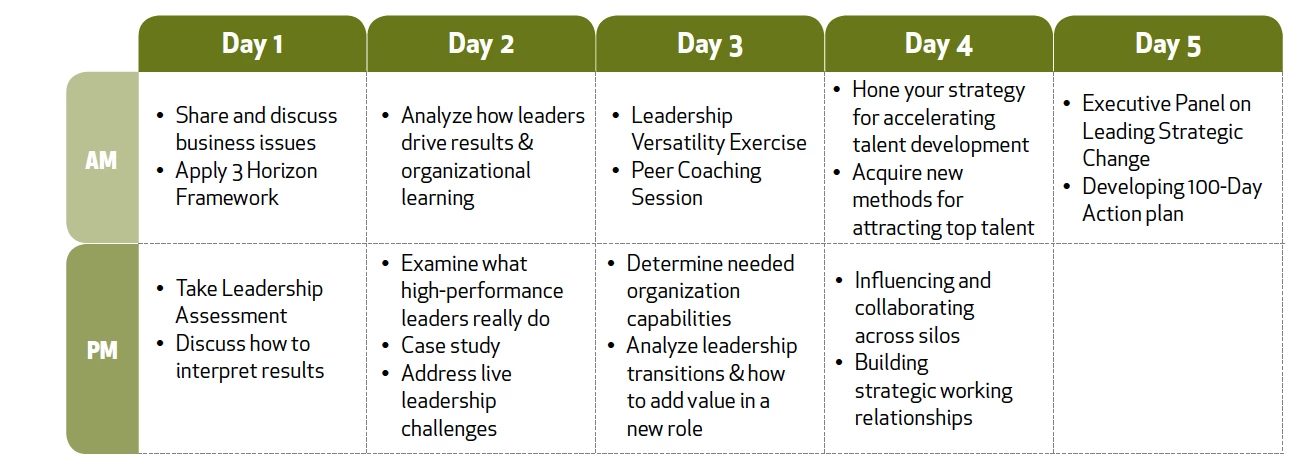
I'm having an issue with a single cell that won't show up in the tag list. All the other rows have been tagged as cells and they are all showing up fine. Just Day 1 PM cell keeps saying it doesn't exist - though I have highlighted it correctly (just like all the others). I'm very new to all this, but is there a way to delete the original tag and do it again? I don't want to delete the page structure though that seems my only option. This file did crash earlier today so there may be a corrupt issue at this point.

This topic has been closed for replies.

1 reply

Inspiring
January 9, 2019

I do not know your answer, but I would like to ask for a bit more detail.

In your work, is it possible that you have accidentally selected the table cell content and defined it as background/artifact? If so, do you have access to an earlier save to jump to? In my limited experience with PDF updates, I've started saving major stages with unique time stamps for just such mistakes that I've made. That or making an honest edit suddenly has corrupted my file and I cannot simply undo such edits.

You screen capture shows a clean selection box around the text "Assessment". Could it be that the text content elements were accidentally moved into a neighboring tag folder in your structure? How exactly are you making a selection? Find Tag from Selection gives nothing?

Participant
January 9, 2019

when I highlight the text and ask to show tag from selection - it says "The selection is not found."

I have not artifacted it that I know of.

Is there no way of "deselecting" it and re-selecting it? I am using this file as an exercise as I am quite new to this and this is my first PDF remediation test so nothing is crucial.

Participant
January 10, 2019

Well, I've been playing around with an old table PDF and have deleted a <TD> tag to try to recreate where you are. The only thing I've found so far is to make sure my Reading Order panel is open under Accessibility, draw a selection around the table's cell context text in layout (that was deleted from the Tag Panel), then from the Tags Panel Options drop down menu, choose Create Tag from Selection. I had to do this twice (draw a selection, choose Create Tag from Selection) before it created a Tag. Odd. Even odder, is that doing this step a third time deletes it again. So weird!

The problem here now is that, at least for my example, the text is split into individual tags. One for each letter. That's no good either as screen readers will literally read it one letter at a time. I thought there was a way to combine these elements into one but so far I'm stumbling to find it. If that ever existed.

I think it would be more efficient to trace your steps up to this point to find where and how this particular cell disappeared on you.

Try to export a new PDF to explore. Take a look at this very cell in the new PDF to see if the correct tags exist. Or at least that the content is represented correctly, whether or not the correct tag is applied automatically. If those missing bullets tags are there on the clean export, then safe assumption that it was at some point tagged as artifact/background or perhaps deleted altogether scrolling through the tag panel.

In recent fights with my own tables, I've honestly started over a few times just to experiment to see the effects of one step compared to others. In a way, it's trying on the patience but it has really helped me understand a lot of what is playing out with tables. Practice makes perfect, or so I'm told.

Again, I know this is not an answer. Perhaps at least it offers perspective. Free bump though, so maybe someone with more experience will pop in.

Good luck with this!


Thank you so much for your suggestions. Yeah - I know I will get frustrated at times, but I feel as though I am learning a whole new language! I've been designing for over 30 years and this is the first time we have ever had to deal with this issue. I am now hooked, intrigued and committed to learning to make these well-designed communications truly available to ALL.