reubenmk
New Participant
May 24, 2017
Answered

text direction gets changed

  • May 24, 2017
  • 4 replies
  • 25694 views

i tried to look for answers for my issue below. Couldn't find

I am creating a pdf where my text goes like this "123 (test)" ..but when i type the text it reverses automatically to "(test) 123" . i tried my best to fix this but it doesn't work. I also tried a simple number test like this '123 456 789' . instead it displays '789 456 123'. Can somebody provide me a solution?

This topic has been closed for replies.
Correct answer tarekahf

Marhaba Tarek, I don't have a problem with Acrobat, check my post # 8 above were I posted a "solution", well at least I think it's a solution.


Thank you Zaid Al Hilali​!

I think the problem is resulted the the OS Language/Regional Settings on the Windows PC.

On my personal Laptop (Windows 10), I have set Arabic Language based settings in several places. However, the main UI is English. If I remember correctly, such settings are in Regional Options or something like that.

On my Work PC (Windows 7), there is no problem, and all such related Languages settings are based on English.

All other Acrobat settings/preferences are exactly the same on both personal laptop and work PC.

Following is the main place where I need to verify. Below is snapshot of my Work PC Regional and Language Settings for System Locale. When I am back home, I will try to play around with such configurations to see if this will make a difference. This includes Format, Location, Keyboards and Languages, and Administrative.
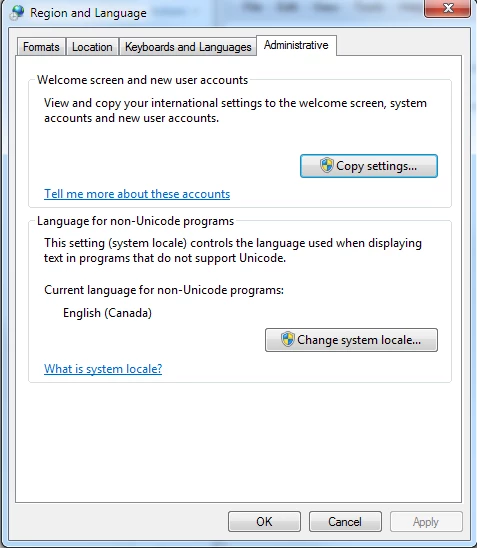
Regards,

Tarek

4 replies

New Participant
August 7, 2023

Thanks for all the tips!  The same thing happened to me in Adobe Photoshop CS and I'm only using English language settings.  The solution for me was:

> add the "Character" panel (Type > Panels > Character Panel)

> click on the small "pancakes" icon in the top-right corner of the "Character" panel window

> select "Middle Easter Features"

> select "Left-to-Right Character Direction"

Brainiac
May 24, 2017

I have another question too, it may seem strange. Hebrew and Arabic. Is this a computer or software with either language? Is the PDF using either language? (Please answer the other question too).

reubenmk
reubenmkAuthor
New Participant
May 25, 2017

Thanks a lot for your reply

I live in Kuwait.

will that have anything to do with this? yeah Arabic is involved at times..I'm not sure what or how to check/change the particular settings for this? the screenshot u see here is what i am doing exactly,

Steps to reproduce this issue

1) go to start, open adobe acrobat dc.

2)once its opened click on tools -> create pdf -> blank page(last option as seen in the first image)

3)click on edit pdf (it appears on the right side) and u get the tool bar as shown in the second image.

4) add text and i just typed '123 456' but the image shows how it appeared.

this is just a screenshot to show the product how it looks like.  pdf pro.

Zaid Al Hilali
Brainiac
May 25, 2017

It's good that Test Screen Name​ thought about language.

You may try by changing "paragraph direction" in the Language preferences…

Brainiac
May 24, 2017

Good, thank you for the version. Unfortunately because you are new to the product you don't realise just how many different ways there are to do things, how many similar tools. You say you are "typing a normal text". Is this a fill in form? An existing PDF that is not a form? A blank file you made? What tool did you use? Imagine we've never seen the software and please tell us exactly what you click, what you type.

Brainiac
May 24, 2017

Because this is very unusual you need to describe in detail what you are doing and the software, system and fonts you use.

reubenmk
reubenmkAuthor
New Participant
May 24, 2017

i know its unusual ...but im trying this for the first time since I'm a beginner and just bought a license 2 weeks back...

adobe acrobat pro dc version 2017.009.20044..windows 7.. font for the text  - arial...

What i am doing exactly is described in the issue- i am just typing a normal text after opening a blank document under create pdf...its the same when i try to edit an existing pdf too...