
Text document is all images
I receive pdf files from a client's service and have no part in their creation. The files are all text and searchable but they are "read" as images. For example, a 54 pg all text, black and white mostly double spaced document should not be 12 mb.
After checking Save as Optimized, then clicking Audit space usage, there was 97.69% used by images, 0.46% used by fonts and the image count was 54, confirming that every page is being read as an image (as if I didn't see the blue box around the page anyway). Optimizing only does so much and sometimes very little to reduce the size.
If I go to Recompress Images, it reduces the file size but the font quality is bad. I have adjusted numerous items in the drop down menus but the result is bad quality, no reduction or a bigger file. Below is the latest trial & error of the optimize screen:
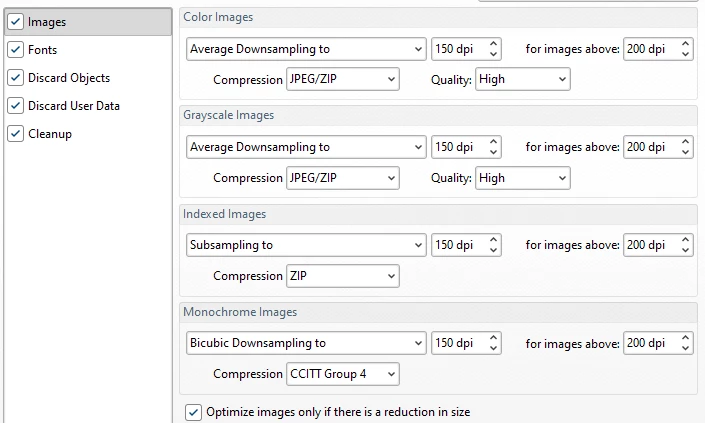
The client's service is not the problem. They add one cover page (which does not show as an image) so the document is being sent to them or uploaded this way. Short of printing and rescanning to pdf (which is not happening), how can I reduce the file size to something closer to what it should be? Is there a way to convert the images so they are read as text pages and not seperate images? Any other suggestions are welcome as I've tried quite a few things that did not work. And please be kind, I am an end user....haha.
 AdChoices