
Participant
September 11, 2024
Question

Text Edit Box not going away

  • September 11, 2024
  • 1 reply
  • 1779 views

The text editing box that appears when editing text in Acrobat sometimes does not want to close out, even when selecting another tool (i.e. highlighter or drawing a shape). It doesn't even move with the custom toolbar panel, it stays frozen in place. Even when opening another pdf file, the text edit box appears on that pdf file, in the same location. Here's a snapshot of how it looks:
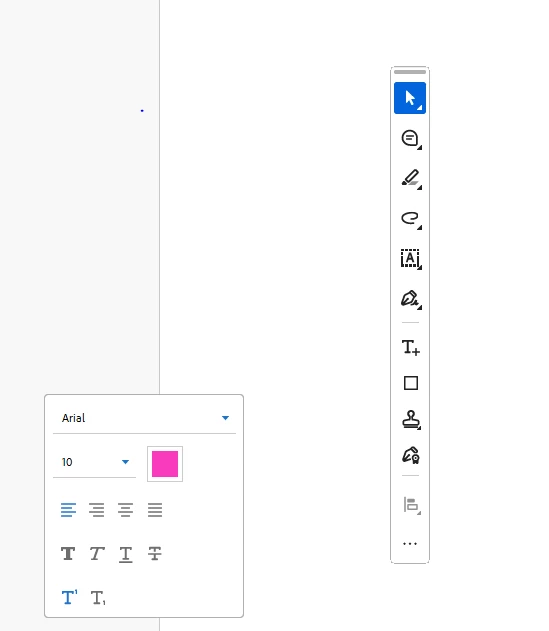
The only solution I've found was to completely close out of Acrobate and start it again, which is very inconvenient for the price of the software subscription. 

Any help would be greatly appreciated. JAK.


This topic has been closed for replies.

1 reply

ls_rbls
Community Expert
Community Expert
September 11, 2024

Hi @Khalid38945170l6l1 ,


Are you able to share a copy of that PDF with nonsensitive data on it?


Are you on Microsoft Windows 11 or Windows 10?


And which version of Acrobat Pro do you have?

Participant
September 11, 2024

I'm running Windows 10 Enterprise 64bit.  OS Version: 10.0.19045 

The Acrobat Pro version I'm running is:  Continous Release 2024.002.21005 /  24.2.21005.0

Total Physical Memory: 16493348 KB
Total Virtual Memory: 4194176 KB


Unfortunately, I can't share a copy of the pdf as the information on it is senstive. Additionally, that would defeat the purpose I assume, as closing out of the pdf file and reopening it solves the frozen toolbox. This happens infrequently, maybe once ever few hundred pdf edits. JAK.

ls_rbls
Community Expert
Community Expert
September 11, 2024

Assuming that you haven't done so yet, What happens if you repair the installation?