
Participating Frequently
July 29, 2024
Answered

Text Field Set for Military Time?

  • July 29, 2024
  • 2 replies
  • 2332 views

How do I set a text field to military time without the ":"?  HHMM, for example: 0800, 1000, 1200, 1500, 2359, etc. I want to set the field to accept numbers only (so my keyboard adjusts to numbers when I enter the field) rather than typing numbers into an unformatted text field.


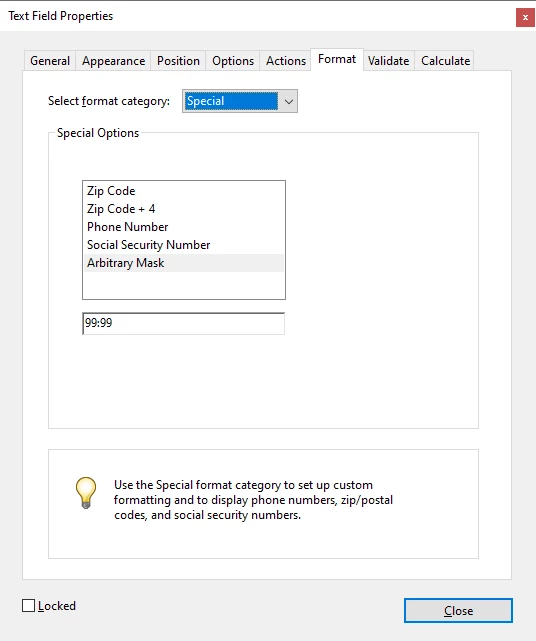
If not possible to format for time without the ":" (07:00), how do I format the field so that the ":" is entered automatically without typing it?  I type 0700, and when I tab to the next field, the text automatically changes to 07:00?


Either option is good for me.


Thank you for your time. 
This topic has been closed for replies.
Correct answer PDF Automation Station

Try this:


2 replies

PDF Automation Station
Community Expert
Community Expert
July 29, 2024

Try this:


OCONUS74Author
Participating Frequently
July 29, 2024

This 99:99 worked perfectly to automatically add the ":" in the text - thanks very much!

PDF Automation Station
Community Expert
Community Expert
July 29, 2024

Does it bring up the number keyboard?  I can't test on a mobile device.

creative explorer
Community Expert
Community Expert
July 29, 2024

@OCONUS74 when you 'Prepare a Form' you can edit the 'text fields.' Click on 'Text Fields' and click it to where you want the text field to be on the form. I pick the arrow tool to resize the 'text field.' Double-click on the text field to open the 'Properties' - Format - Number. Change the 'Decimal Places' to be 'zero' andclick on close when ready.

Now, you can enter whatever number in...granted, someone could still type in the wrong time I guess!


m
OCONUS74Author
Participating Frequently
July 29, 2024
Thank you @creative explorer

I am actually doing this the way you described now - however, when I
type "0700" the "0" disappears from the numbers as it does not recognize a
number beginning with "0". Hence my dilemma. Any way to keep the "0" on
the number at the beginning?

Thanks again.

--
Best Regards,
OCONUS74Author
Participating Frequently
July 29, 2024

You can't have it both ways. If you set the field's Format to Number it will drop the initial zero added, but you'll get the numbers keyboard only (on a mobile device). If you set it to None you could enter anything into it (and then use a Validation script to reject invalid values, although that might not work on a mobile device), but the Numbers-only keyboard won't appear when you click into it.


Thanks for the reply.

I don't think that a text field to show proper military time (with the "0"
for morning hours and without a ":" between the hour and minute numbers) is
wanting something unreasonable or "both ways," but I appreciate the
information and your time.

However, if that is not possible, is there no way to have the ":"
automatically populate between the first two digits and the second two of a
number that will always contain four digits?

--
Best Regards,