FuzzyOnion01
Inspiring
January 16, 2024
Answered

The document could not be saved. There was a problem reading this document (105).

  • January 16, 2024
  • 2 replies
  • 2832 views

Any fix out there for this? Just trying to save a pdf. Come on Adobe, every new version just adds to the bugs.

 

Correct answer Barbara2468798899tf

HI, I'm having the same issue on a form. I'm using Adobe Acrobat (64-bit). It's a government form we needed to fill out sign and send back. When I filled it out and tried to sign it came up with this message: 
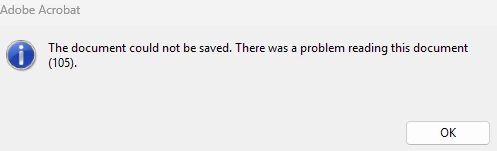
My work around would seem to be, fill it out print it sign it in ink, scan it and then send it to the person. 

I checked the security settings and they are: 
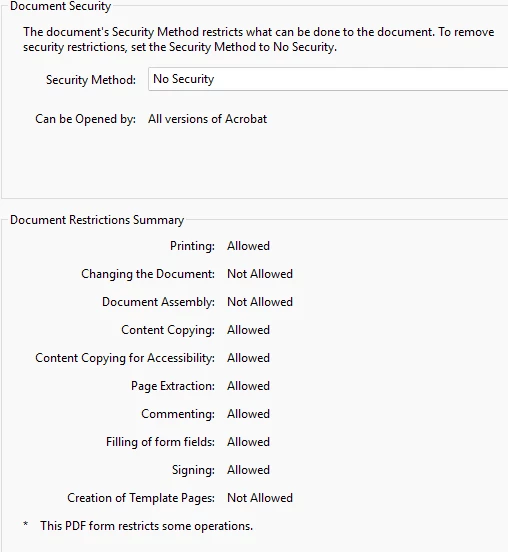
Would this be the cause? 

Regards,

Barb Oksanen


Re about my previous post, I found a work around about extracting the document and saving it as a new document. This worked for me, I have Adobe Acrobat but, it did not work for the guy I was trying to help, he has Adobe Reader. I even saved the document as a "Reader Extended PDF" and it still did not work for him to electronically sign his document. He was able to fill it out but the signature field was not visible for him. The poor guy has to print it > sign it> and then scan it in and send the form back to the Government. That was a real bummer.

Please let us know how to fix this and not investing in another Adobe product. 

Best Regards,

Barb Oksanen


2 replies

New Participant
April 19, 2025

This just popped up for me. I can't seem to find a way to fix it. I am using Pro DC.

Thanks

S_S
Community Manager
Community Manager
July 14, 2025

Hi @michael_4111,


Hope you are doing well. Sorry for your experience with saving files on Acrobat.


Do you still see the error? If yes, can you ensure that the application is updated to the latest version (2025.001.20566)? 

To do so, go to Menu > Help > Check for Updates.


If the issue persists, please share a few pieces of information for further investigation:

1. The sample file where you experience the issue;

2. The exact workflow when you encounter the error;

3. Screenshot of the error you see.


Look forward to hearing from you.


Regards,
Souvik.

New Participant
August 7, 2025

HI, I'm having the same issue on a form. I'm using Adobe Acrobat (64-bit). It's a government form we needed to fill out sign and send back. When I filled it out and tried to sign it came up with this message: 

My work around would seem to be, fill it out print it sign it in ink, scan it and then send it to the person. 

I checked the security settings and they are: 

Would this be the cause? 

Regards,

Barb Oksanen

S_S
Community Manager
Community Manager
January 18, 2024

Hi @FuzzyOnion01,


Hope you are doing well. Sorry for your experience with Acrobat.


Would you mind sharing a few more pieces of information for further investigation:

1. The app version of Acrobat you are using (go to Help-> About Acrobat Pro);

2. The OS [Windows/Mac] and its version;

3. Do you see the error with every file you open or with specific files? Could you share a sample file with me over a private message?

4. Please share a screen recording of the events or steps you followed where you see the error message.


While you share the above details, you might want to try the steps mentioned here: Solved: Error - The document could not be saved. There was.


Look forward to hearing from you.


-Souvik

New Participant
January 25, 2024

The latest version of Acrobat has a nasty issue with max filename/path lengths.    I haven't counted the characters, but it looks like 80 to 128 characters is the max.  This needs to be at least doubled by Adobe.

The truly nasty part of this, is that Adobe is attached to Windows Explorer.  When I try to make a copy of the folder and put it somewhere with a shorter path, I get a similar error about source and destination being the same name.


Adobe, Please fix this.

New Participant
February 8, 2024

Same issue here. Unfortunately, it wasn't resolved with character limit, I tried storing files on desktop which path has around 20 chars, but still no go. Kind of sucks i'm paying $240/year for this business critical software and they can't even keep a simple thing working.