Exit
  • Global community
    • Language:
      • Deutsch
      • English
      • Español
      • Français
      • Português
  • 日本語コミュニティ
  • 한국 커뮤니티
0

The PDF document cannot be compressed

New Here ,
Aug 05, 2025 Aug 05, 2025

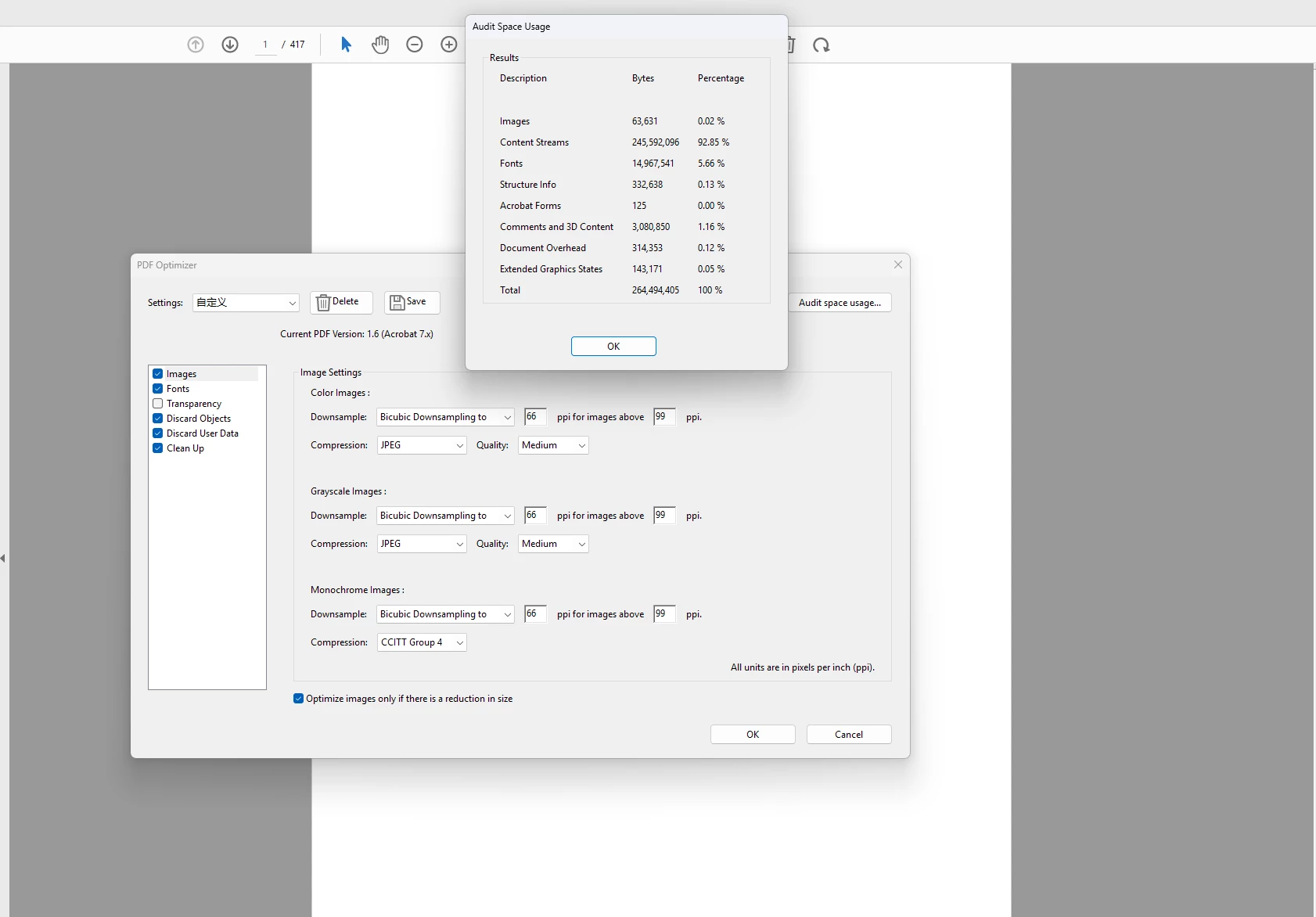
When the content flow in a document accounts for more than 90%, compressing the document can only compress a little. How can a large proportion of compression be achieved屏幕截图 2025-08-05 182815.png
TOPICS
How to , PDF , PDF forms
145
Translate
Report
Community guidelines
Be kind and respectful, give credit to the original source of content, and search for duplicates before posting. Learn more
community guidelines
Adobe Employee ,
Aug 05, 2025 Aug 05, 2025
LATEST

Hi there,

Hope you are doing well and thanks for reaching out.

If your document has mostly text and layout (more than 90%), it can be hard to make the file much smaller — because there's not much that can be compressed. But here are some ways you can still try to reduce the file size:

1. Shrink the Images:

If your file has pictures, you can make them smaller or lower the quality a bit. This helps a lot.

2. Reduce Font Size or Remove Extra Fonts:

Some PDFs have fonts saved inside them. You can remove the ones not being used or only keep the letters that appear in the file.

3. Flatten Layers:

If your file has layers (like from design software), flattening them into one layer can help make the file smaller.

4. Remove Extra Stuff:

Use File > Save as Other > Optimized PDF in Acrobat, and remove things like:

  • Hidden layers
  • Comments or notes (if not needed)
  • Extra data or bookmarks

5. Print to PDF (only if needed):

You can “Print to PDF” to make a simple version of your file. Just remember, this will remove clickable links and form fields.


Hope this information will help


~Amal

Translate
Report
Community guidelines
Be kind and respectful, give credit to the original source of content, and search for duplicates before posting. Learn more
community guidelines
