
Participant
November 18, 2022
Answered

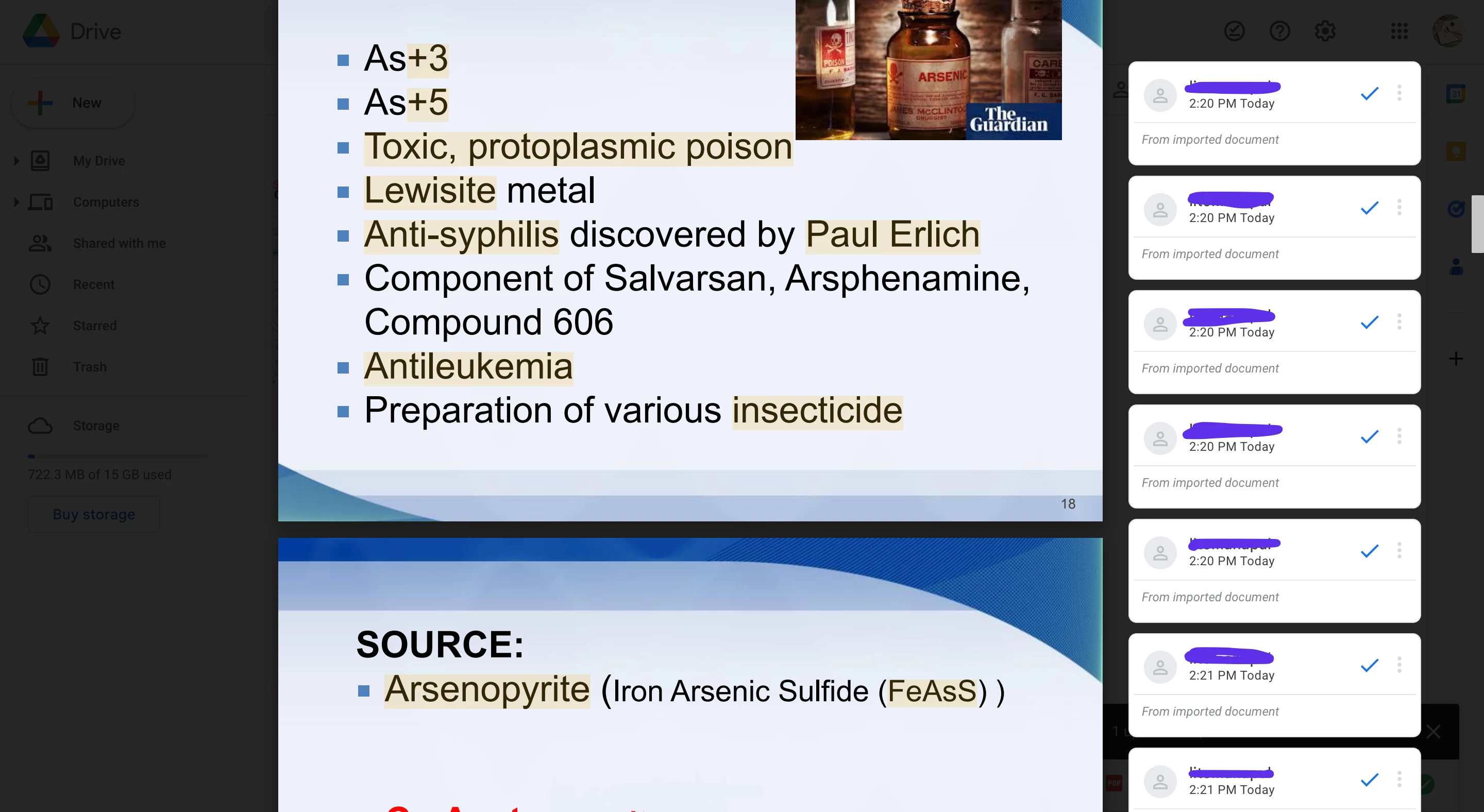
These comments, how do I highlight without these popping up when I upload them in gdrive?
  • November 18, 2022
  • 2 replies
  • 2909 views

I know highlighting creates comments, but it didn't do that for me until recently. It even removed the colors of the highlights. I have past documents where I've highlighted, and it never created any comments. Is there a way to fix this?

Correct answer defaultyir9wnq09i5k

I have been struggling with the same issue for a few days now. I've tried all the suggestions I could find on different forums. None worked. So I just started playing around and whammo I unchecked a completely different box than what everyone said and my highlighter is back to normal. I went to Edit>Preferences>Commenting and I unchecked the very last box at the bottom "copy selected text into highlight, Strikethrough, Underline" etc. I closed the program and reopened my file and it finally highlighted w/o the comment box.

2 replies

Document Geek
Community Expert
Community Expert
November 18, 2022

Previosuly, did you use Adobe reader or Acrobat to make your highlights? If so, then yes, it made comments for you. 


But if you made your "highlights" using a non-adobe program, prehaps it simply painted a highlight mark over your document. 

Participant
November 18, 2022

No, I did use adobe acrobat in my previous documents because it was hard to find other free apps/sites that can edit pdfs as well as acrobat reader. But I just realized that my pdfs were compiled images, not a PowerPoint, that's most likely why it didn't make comments because you need that free-draw highlight thing to highlight text on images. I guess I'll just have to convert my ppt pdf into a pile of images and then back to a pdf format.


defaultyir9wnq09i5kCorrect answer
Participant
September 3, 2024

I have been struggling with the same issue for a few days now. I've tried all the suggestions I could find on different forums. None worked. So I just started playing around and whammo I unchecked a completely different box than what everyone said and my highlighter is back to normal. I went to Edit>Preferences>Commenting and I unchecked the very last box at the bottom "copy selected text into highlight, Strikethrough, Underline" etc. I closed the program and reopened my file and it finally highlighted w/o the comment box.

Amal.
Community Manager
Community Manager
November 18, 2022

Hi @_LostJams26691497t158 


Hope you are doing well and sorry to hear that.


It is the design behavior of the application to create comments when you highlight any text in the PDF. However, you may control the comment pop-up behavior from the preferences. Go to Edit (Win), Adobe Acrobat (Mac) > Preferences > Commenting > Uncheck everything under Pop up open behavior > Click OK and reboot the application and check.


Hope it will help


Regards

Amal

Participant
November 18, 2022

Hello, thank you for responding. I followed the instructions and unchecked everything under pop up then restarted the application. But unfortunately, it's still doing it. As you can see, it even changed the color to a lighter one.