
September 7, 2017
Question

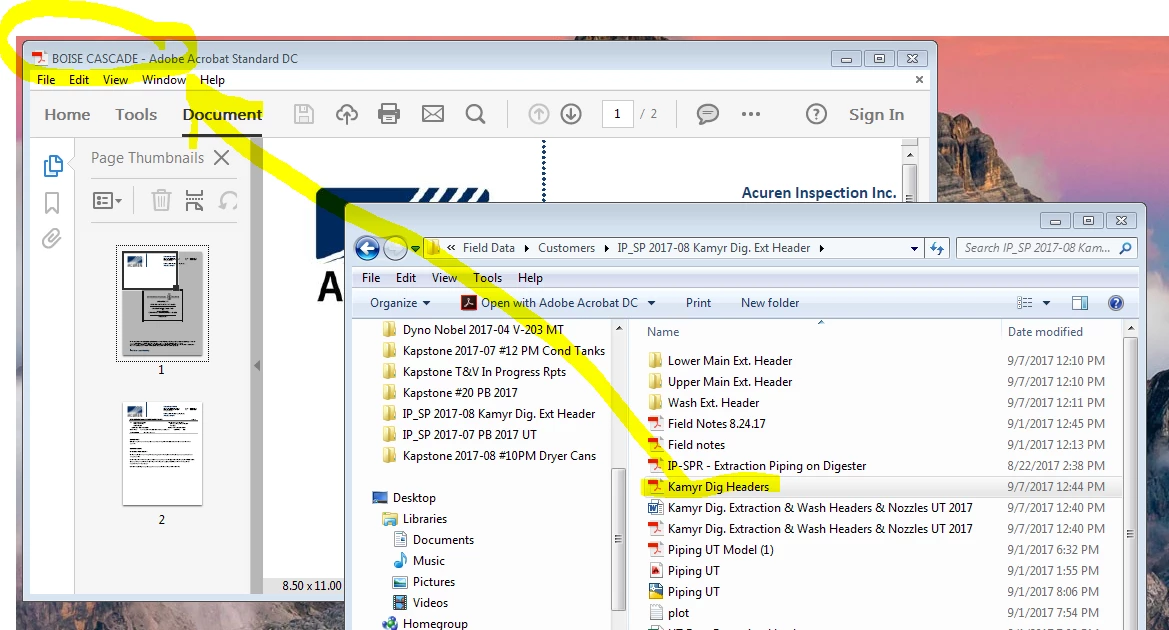
Title bar is different than title of my PDF.

  • September 7, 2017
  • 2 replies
  • 33092 views

No matter how many times I "save as", I still have this showing up in my title bar: "BOISE CASCADE - Adobe Acrobat Standard DC". The title I have the PDF saved as is "Kamyr Dig Headers". Where on earth do I go to fix this? Can't find anything on this in the help pages / searches. Making me crazy.
2 replies

Bernd Alheit
Community Expert
Community Expert
September 8, 2017

In the "Initial View" of the document properties you can specify what will displayed.

Participant
December 27, 2017

In Adobe Acrobat DC Pro you can go to File > Properties and edit the title there. Doing this will change the what shows in the title bar in Adobe.

Participant
November 20, 2020

Thank you so much. Outstanding.  

September 7, 2017

... and changing the title in the Title field before you hit save DOES NOT make a difference either!

September 7, 2017

Okay, saving as from the PDF with the wrong title bar name, after changing the name in the Title Field didn't help, BUT going back to my original Word doc and saving that as a PDF while changing the name in the Title Field before hitting save DID fix it. Whew.

Participant
June 6, 2019

The correct answer is actually below.