Participant
August 17, 2023
Answered

Trying to put document in two-page up view but I have no view menu

  • August 17, 2023
  • 2 replies
  • 849 views

I'm working with Adobe Acrobat Pro v 2023.003.20269 and I'm trying to put my document in the two page view, but I do not have a view menu any longer.  I'm completely lost on how to do this with the updated version of adobe pro. Can anyone help? 



Correct answer AkanchhaS8194121

Hi @Kevin24548651jwg2 


Hope you are doing well.

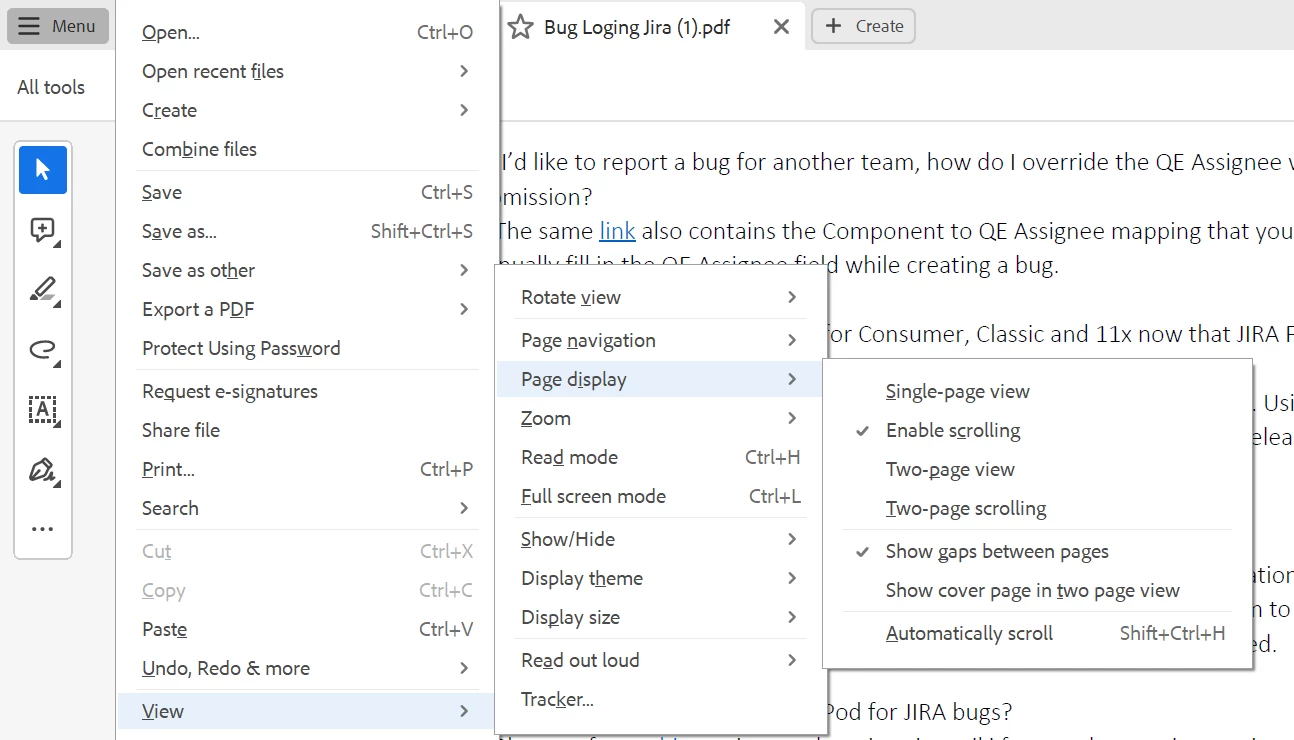
Acrobat's Modern Viewer is where all features have been merged under the Main Menu.


Click on the Menu>View>Page display


To learn more about the Acrobat New UI, please refer to this helpful article here: https://helpx.adobe.com/acrobat/using/new-acrobat-experience.html


Thanks,

Akanchha

2 replies

Participant
August 18, 2025

Akanchha, 

It seems that Adobe by their 'modernisation'  of the UI has removed a facility that several of us have been using daily: A shortcut to swap between 1-page and 2-page view. Clicking around with the mouse may have felt modern in the early 80s but for power users, it's a painfull nuisance. Hence, your answer is not correct. In Modern Acrobat there is no shortcut to change the page view, and there is no way of adding your own shortcuts either. I am out of here and will find another PDF viewer.

AkanchhaS8194121
AkanchhaS8194121Correct answer
Legend
August 20, 2023

Hi @Kevin24548651jwg2 


Hope you are doing well.

Acrobat's Modern Viewer is where all features have been merged under the Main Menu.


Click on the Menu>View>Page display


To learn more about the Acrobat New UI, please refer to this helpful article here: https://helpx.adobe.com/acrobat/using/new-acrobat-experience.html


Thanks,

Akanchha

Participant
January 30, 2025

I know Akanchha, thanks, but what happen to the keyboard shortcuts for two-page side-by-side? They don't seem to be covered in the list of short-cuts given on the page you link.

/Troels