
Inspiring
June 7, 2025
Answered

Turn off "View Summary" prompt

  • June 7, 2025
  • 2 replies
  • 3901 views

Can I turn off the "View Summary" prompt without turning off generative AI features in Acrobat? I would like to leave generative AI features on, but I don't need to be reminded every single time I open Acrobat that they exist.
Correct answer Vinod Dobhal

Hi @KazuTa,


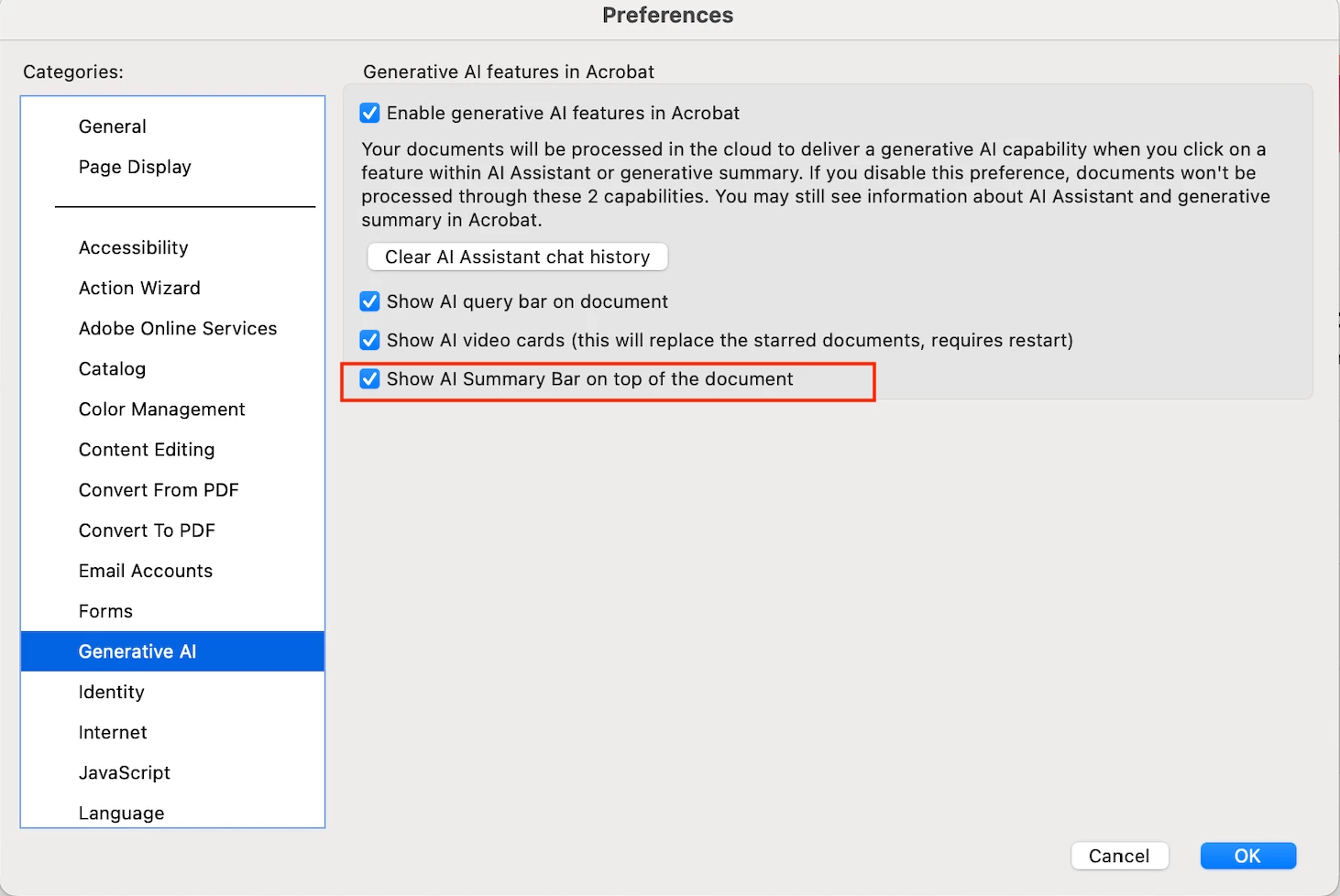
To turn off the “View Summary” prompt, you can disable it through the Preferences dialog. Here’s how:

  1. Go to Edit > Preferences > Generative AI
  2. Uncheck the option “Show AI Summary Bar on top of the document”


This will hide the summary bar while keeping the Generative AI features active on your system.


Let us know if you need any further help!


Thanks,

Vinod

2 replies

Vinod DobhalCorrect answer
Adobe Employee
June 9, 2025

Hi @KazuTa,


To turn off the “View Summary” prompt, you can disable it through the Preferences dialog. Here’s how:

  1. Go to Edit > Preferences > Generative AI
  2. Uncheck the option “Show AI Summary Bar on top of the document”


This will hide the summary bar while keeping the Generative AI features active on your system.


Let us know if you need any further help!


Thanks,

Vinod

KazuTaAuthor
Inspiring
June 9, 2025

Wow! Thank you, @Vinod Dobhal

Adobe Employee
June 9, 2025

You’re very welcome! 😊

Please keep using the feature and feel free to reach out if you run into any issues or have more feedback. We’re always here to help!

S_S
Community Manager
Community Manager
June 8, 2025

Hi @KazuTa,


Hope you are doing well. Thanks for writing in!


There is no specific option to disable the summary prompt. You can either disable the summary bar or the complete Generative AI tool.


That being said, you might want to try the steps below:

1. Go to Start > Registry Editor;

2. Go to Path: HKEY_CURRENT_USER\SOFTWARE\Adobe\Adobe Acrobat\DC\AVGeneral

3. Create a DWord: bInfobubble

4. Set the Value: 0


More info here: https://adobe.ly/45GRLRO.


Note: Please close Acrobat and terminate any task from Task Manager before following the step.


Hope this helps.


Regards,
Souvik.