
ereyes2017
Inspiring
October 14, 2017
Answered

Two submit buttons

  • October 14, 2017
  • 5 replies
  • 4980 views

In https://helpx.adobe.com/acrobat/using/setting-action-buttons-pdf-forms.html you can read:

Add a submit button  

When you distribute a form, Acrobat automatically checks the form. If it doesn’t find a submit button, it adds a Submit Form button to the document message bar. Users can click the Submit Form button to send completed forms back to you. If you don’t plan to use the Submit Form button created by Acrobat, you can add a custom submit button to your form.

I added a Submit button to my form but when I distribute the form I get two submit buttons: the one I added plus the one in the standard purple banner as shown below:
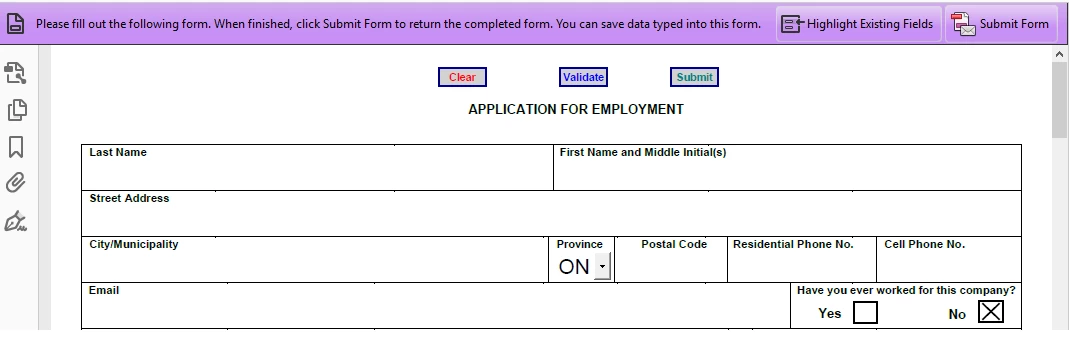
So despite my submit button, Adobe Acrobat still created its own. Any explanation?

The only reason for me to add my own submit button was to do some validation before submitting the form.

In fact, I would like to have a submit button with the following JavaScript code:

if (FormOk()==true) {

    var nButton = app.alert({

        cMsg: "Do you really want to submit this application form?",

        cTitle: "Submit form",

        nIcon: 2, nType: 2

        });

    if ( nButton == 4 ) {

        // Submit form to UNC

        this.submitForm({cURL: "\\SERVER\SHARE\", cSubmitAs:"PDF"});

        app.alert({

          cMsg: "Your application has been submitted",

          cTitle: "Submit form",

          nIcon: 3});

    } else {

        app.alert({

          cMsg: "Your application was NOT submitted",

          cTitle: "Submit form",

          nIcon: 3});

    }

}

This would validate the data entered (code for FormOk function not included) and if everything is Ok then would ask the user for confirmation before submitting the form.

Thanks in advance!
This topic has been closed for replies.
Correct answer ereyes2017

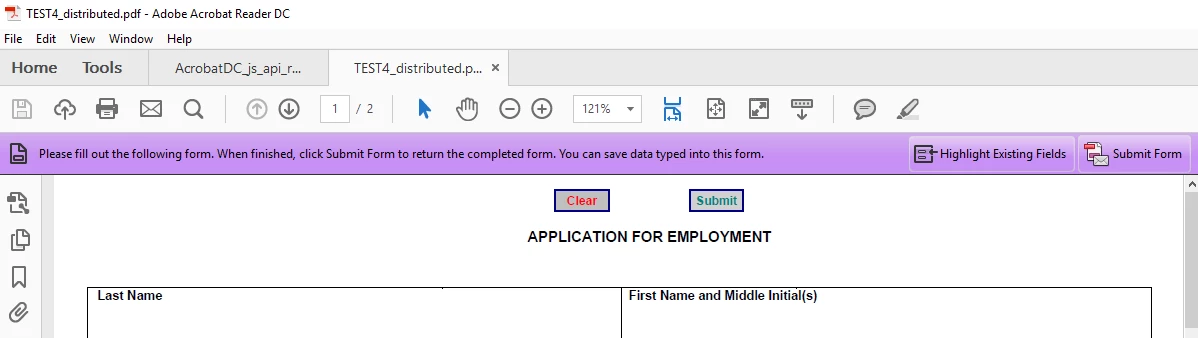
Same result. The distributed form got two Submit buttons:

Both buttons worked Ok and I got the responses on Tracker as shown below:


I figured the whole thing out and everything is working as I wanted so I am sharing the solution with everybody.

I got the purple banner disabled by doing the following:

  1. In Adobe Acrobat open the File menu
  2. Select Properties
  3. Select the Inital View tab
  4. In the User Interface Options section, check "Hide window controls"
  5. Save and close the file

I then re-opened the form, re-distributed it and this time, like magic, Acrobat recognized my custom Submit button and went through the usual dialogs for creating a distribution workflow. The distributed form does not display the purple banner and my submission workflow works flawlessly.

Summarizing:

  • The submitForm method does support both regular UNC as in:
      this.submitForm({cURL:"//SERVER/SHARE", cSubmitAs:"PDF"});
    or a URL as in:
    this.submitForm({cURL:"smb://SERVER/SHARE/", cSubmitAs:"PDF"});
  • Hiding window controls from the Initial View not only disables the purple banner but also allows Acrobat to properly handle a custom Submit button when generating a distribution workflow

All this have been tested using Adobe Acrobat DC

5 replies

Participating Frequently
October 5, 2020

Hello,

I have used your JavaScript in the Submit botton to a UNC path successfully on PC. However, it does not work on any tablet with iOS or Android. Would you have any recommendation?

Bernd Alheit
Community Expert
Community Expert
October 20, 2017

You use a button with javascript action, not a button with submitform action.

ereyes2017
Inspiring
October 20, 2017

What would be the point of adding my own Submit button if it is going to use only for a Submit function?

That would be kind of re-inventing the wheel.

But I think I get your point, I am re-testing right now with my button including Submit a form as an action

ereyes2017
Inspiring
October 20, 2017

Same result. The distributed form got two Submit buttons:

Both buttons worked Ok and I got the responses on Tracker as shown below:

Legend
October 19, 2017

I don't think Adobe offer the workflow you want but I'd be delighted to be corrected.

ereyes2017
Inspiring
October 19, 2017

Adobe has the workflow I want, the issue is with something not working as documented. The documentation says:

"When you distribute a form, Acrobat automatically checks the form. If it doesn’t find a submit button, it adds a Submit Form button to the document message bar."

My form has a Submit button but Adobe still adds its own. Is it so difficult to get my point?

I don't expect a solution from Adobe until the next update. BTW do you know how frequently they release updates?

At this point I am thinking about a small hack. I am going to try to find out the name of the Adobe Submit Form button and disable it when the form is opened.

Legend
October 19, 2017

Then don't use the distribute mechanism. That is done by submitting the file, you can't have it both ways. Or, remove your custom submit button. Tracking is NOT a side effect of the submitForm method.

By by the way, does your attempt to do submitForm to a file write the file? I know it says the submit succeeded but that's just because you put that message out.

ereyes2017
Inspiring
October 19, 2017

You still don't get it, I want the workflow!

Adobe default Submit Form button is limitted. With my custom button I can do whatever I need (complex validations included) before submitting the document

Sure Tracker is not a side effect of the submitForm method but the distribution workflow IS which means:

     NO SUBMIT = NO WORKFLOW

DId you read that both responses from my custom submit button and from Adobe Submit Form button went to Tracker?

Two different response files.

try67
Community Expert
Community Expert
October 14, 2017

Don't use the Distribute command. Simply send out your form with the button

you added.

ereyes2017
Inspiring
October 14, 2017

Thanks for your reply.

Without distributing the form, I would not get a workflow for collecting the responses.  Would I have to implement my own "Tracker" app? Sounds like re-inventing the wheel.

Legend
October 15, 2017

Big problems here.

To to start with you have a "Submit URL" which is not a URL. It's a Filename. "submit" requires an actual URL, using the http, https or mailto protocols. SUBMIT DOES NOT MEAN SAVE. Reliable workflows use https or http and use a script written by a web programmer. 

Second, if you want to use track this has to do the submit. You can't have it both ways. Tracking isn't different.
