Exit
  • Global community
    • Language:
      • Deutsch
      • English
      • Español
      • Français
      • Português
  • 日本語コミュニティ
  • 한국 커뮤니티
0

Type Text tool is missing

New Here ,
Jul 30, 2025 Jul 30, 2025

I have had this issues a few times now. I filled in and saved a form and wanted to edit some info after, I couldn't. 

Why is the type text tool missing after I edited and saved the pdf? 


This was before I edited the pdf which shows the tool

Screenshot 2025-07-31 at 10.49.08 am.png


After I edited and saved, it's missing

Screenshot 2025-07-31 at 10.49.59 am.png

I tried to look for it from "Find tools" and nothing. 


I ended up having to fill in the form from downloading the new form again. 


Why is this happening?? 


TOPICS
PDF , PDF forms
285
Translate
Report
Community guidelines
Be kind and respectful, give credit to the original source of content, and search for duplicates before posting. Learn more
community guidelines
1 ACCEPTED SOLUTION
Community Expert ,
Jul 30, 2025 Jul 30, 2025
LATEST

@Chloe_Ng8942  as per @Amal. who is an Adobe employee was asking what version you are using is quite important....  so they can diagnose the problem, it really becomes a guessing game.

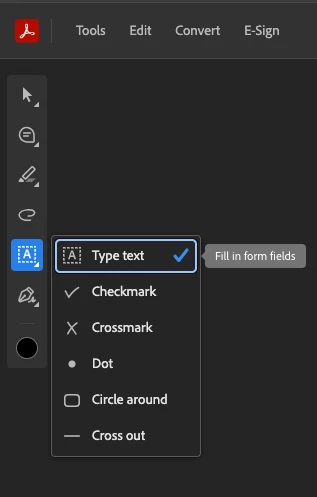
It appears that you are using the online version of Acrobat: 

creativeexplorer_0-1753940496500.png


I was able to type in a few text boxes, and I couldn't replicate your issue. 

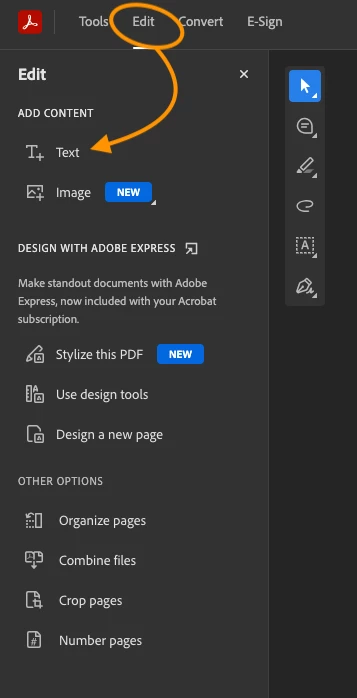
I even tried using the 'Edit' tab, and still couldn't replicate your issue

creativeexplorer_1-1753940651680.png


View solution in original post

Translate
Report
Community guidelines
Be kind and respectful, give credit to the original source of content, and search for duplicates before posting. Learn more
community guidelines
Adobe Employee ,
Jul 30, 2025 Jul 30, 2025

Hi there,

Hope you're doing well, and thanks for reaching out. We're sorry you're experiencing this issue.

Could you please let us know the version of your operating system and Acrobat DC?

To check the Acrobat version, go to Help > About Acrobat. Make sure you have the latest version 25.01.20577 installed. You can update it by going to Help > Check for Updates, and then restarting your computer.

If you're using Windows, please also try repairing the installation from the Help menu.

In case the issue continues, try resetting Acrobat preferences by following the steps here:How to reset Acrobat preferences

Let us know how it goes.

~Amal

Translate
Report
Community guidelines
Be kind and respectful, give credit to the original source of content, and search for duplicates before posting. Learn more
community guidelines
New Here ,
Jul 30, 2025 Jul 30, 2025
Unfortunately, the issue persists even after resetting the preferences as instructed.
Is it because the pdf is a form which has a setting that disables editing after first save?


Get Outlook for Mac <>

This email and any attachments are confidential and may contain information that is protected by copyright. If you are not the intended recipient, please notify the sender immediately and then delete it and any copies.
Translate
Report
Community guidelines
Be kind and respectful, give credit to the original source of content, and search for duplicates before posting. Learn more
community guidelines
Community Expert ,
Jul 30, 2025 Jul 30, 2025
LATEST

@Chloe_Ng8942  as per @Amal. who is an Adobe employee was asking what version you are using is quite important....  so they can diagnose the problem, it really becomes a guessing game.

It appears that you are using the online version of Acrobat: 

creativeexplorer_0-1753940496500.png


I was able to type in a few text boxes, and I couldn't replicate your issue. 

I even tried using the 'Edit' tab, and still couldn't replicate your issue

creativeexplorer_1-1753940651680.png


Translate
Report
Community guidelines
Be kind and respectful, give credit to the original source of content, and search for duplicates before posting. Learn more
community guidelines