
Participant
August 28, 2023
Question

Unable to Use Read Out Loud Tool

  • August 28, 2023
  • 1 reply
  • 5576 views

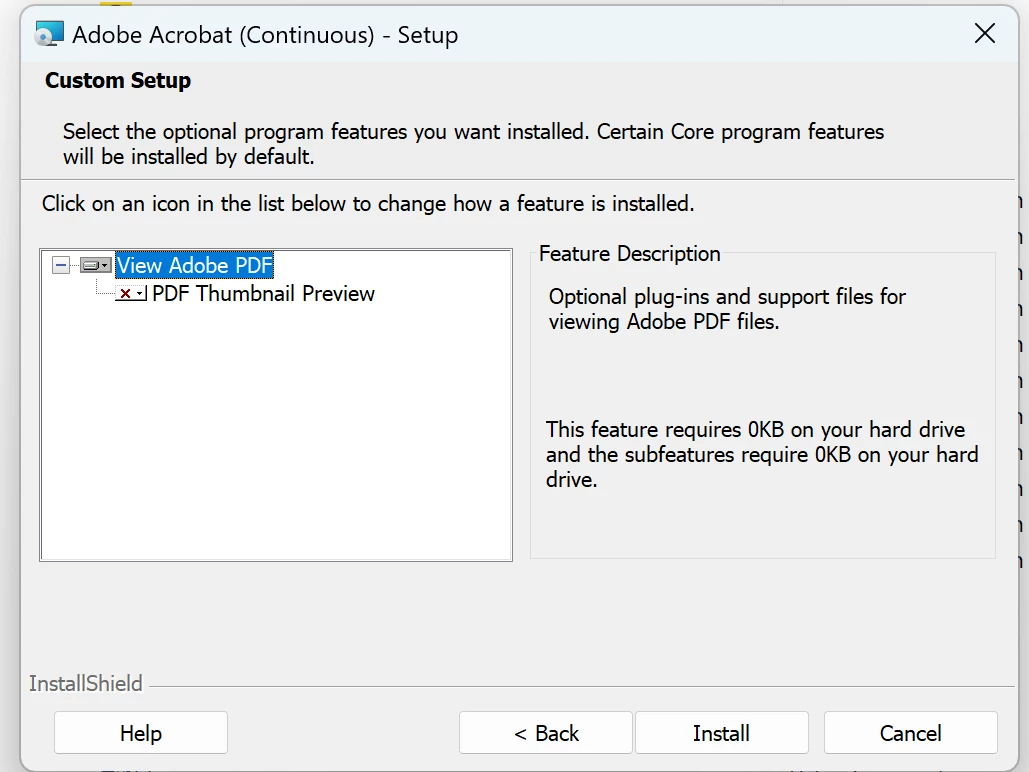
As the title says, I am unable to utilize the read out loud function within adobe acrobat. When I attempt to utilize this function, a window pops up saying: No English voice available on the system. I've also attempted to add languages to adobe acrobat, however when in the proper install menu, the language drop down menu does not appear. 
1 reply

Amal.
Legend
August 28, 2023

Hi @Kyle31919847mwfp 

Hope you are doing well and sorry to hear that.


What is the version of the Acrobat DC you are using? To check the version go to Help > About Acrobat and make sure you have the recent version 23.03.20284 installed. Go to Help > Check for updates and reboot the computer once.

Also try to repair the installation from the help menu (Win Only) and see if that works.


Acrobat uses the voices installed in your operating systems provided by the Microsoft Speech API (SAPI). You should check, if there has any been installed or not.

https://support.microsoft.com/en-us/help/17173/windows-10-hear-text-read-aloud

https://support.microsoft.com/en-us/Search/results?query=Microsoft+Speech+API+%28SAPI%29


Try to set a voice manually in Acrobat/Reader.

Open [Edit] > [Preferences] > [Reading], uncheck "use default voice" and select a voice from the drop down below.


You may also try the steps below and see if that works:

1. Go to Control Panel >Programs and Features.
2. Select Acrobat and and click Change.
3. Choose Modify and click Next.
4. Click Languages.
5. Click on the drop down against the languages that you want to install and select This feature will be installed on the local hard drive.
6. Click Install.
7. CTRL+Click on Acrobat.


Regards

Amal

Participant
August 29, 2023

I have already attempted to manually set a voice, and there were no options available. Modifying the installation also does not work as shown in the image attached to my post. The version of adobe acrobat is also the same as listed in your reply, 2023-003-20284

Amal.
Legend
August 30, 2023

Hi there

We are sorry to hear that the issue still persists. Would you mind collecting the Adobe CC logs https://helpx.adobe.com/creative-cloud/kb/cc-log-collector.html , Procmon logs (Win Only) https://www.adobe.com/devnet-docs/acrobatetk/tools/Labs/acromonitor.html  and  share them via any cloud storage. Just upload the log file to the cloud and generate the link and share that link with us for further investigation.

Regards
Amal