
Copy link to clipboard
Copied
Hello Acrobat Community, I've been having issues regarding the files exporting from InDesign and viewing the PDF in a browser using Acrobat Reader and Adobe Acrobat.
At early stage, I thought it's errors on InDesign part as I mention in my post here. I use Thai fonts and the exported files looks perfectly fine, but if I copied&pasted it on Notepad or using ctrl+f funtion to look for keywords, I coundn't find a single match as all the fonts are in the wrong orders with unprocessed glyphs or unknown characters as attached.
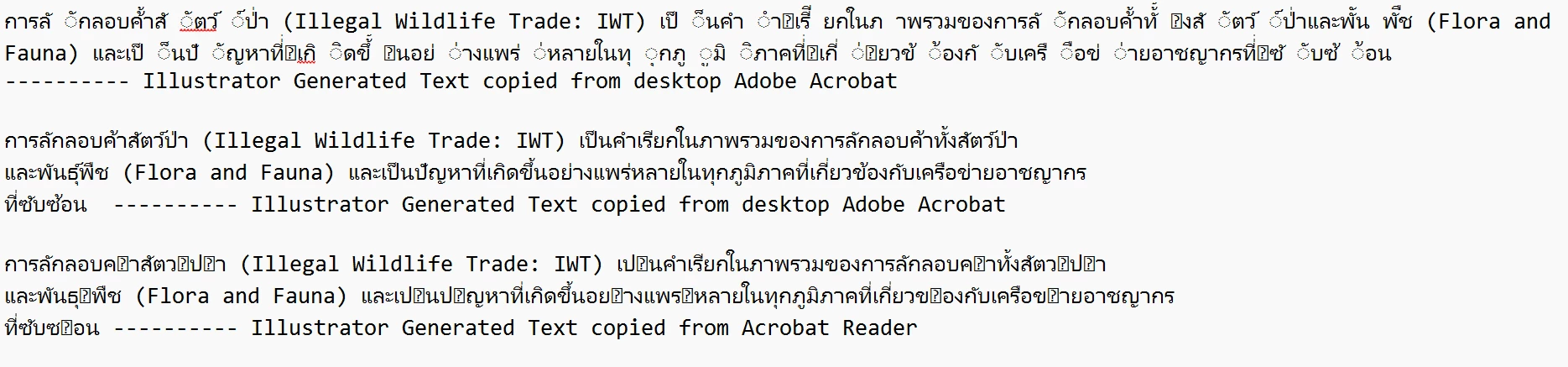
This causes us lots problems as we want to spread knowledge and info to all audience, but our work has never been showed up on the web browser because they cannot find the matching keywords by the search engine.
After the generous help from InDesign Community, I did some new setting and adjustment but the problems persist. And we tried using the same text and fonts on Illustrator to compare and the issue reduces significantly but some issues remain the text copied from Acrobat Reader.
We conclude that the problems may arise from Acrobat part and hope that the experts here could help. I would love to continue using InDesign but the issues are truly diminishing value and impact of our work.
Thank you in advance.
Copy link to clipboard
Copied
just notice some typo on the attached pic, here is the correct one showing that the text generated from InDesign are in a big mess.
Copy link to clipboard
Copied
Hi @THBrussels,
Hope you are doing well. Thanks for writing in!
I went through your post on the InDesign community too to get more details, and it seems a font embedding issue where Acrobat or any viewer you are trying to use is checking for fonts within the internal system rather than on the document, which creates either jumbling of words or redundant characters due to incorrect substitution.
While these are just my self assumptions, would you mind sharing the file with me for further investigation?
Look forward to hearing from you.
-Souvik
Copy link to clipboard
Copied
Hello Souvik, thank you for your reply. I will share the file with you in your direct inbox.
Please do not hesitate to contact me if you need further file or information.
Copy link to clipboard
Copied
@Thai Customs Brussels Sure!
Do share both the original and the exported file with me, so I can test them both and get back to you with a solution.
-Souvik
Copy link to clipboard
Copied
@Thai Customs Brussels I have responded to your message.
Kindly try the steps mentioned and let me know if it helps.
-Souvik
Copy link to clipboard
Copied
Hello Souvik, sorry for a late reply and thank you for your intruction.
However, I already installed these fonts but the issues persist. As mentioned on the original post, the main pressing concern is that people couldn't fing the file from the search engine because the documents (especially the one generated from InDesign) have errors and doubled vowels symbols. Could you please further guide me or show me the results on your part?
Thank you
Copy link to clipboard
Copied
Hello, this post has a very late reply from Adobe support team cam someone take this matter at hand please?
This issue is linked with the support from both InDesign and Acrobat, I believe all users deserve attentive support from the support team? It's rather disappointing.
Get ready! An upgraded Adobe Community experience is coming in January.
Learn more