
Question
Unlinking Copied Fields in a PDF Form
I've created a PDF form with 100+ text fields which have identical size and properties. To place those fields in the form, I simply copied them, giving each one a different name. In the sample below, the fields are the blue squares.
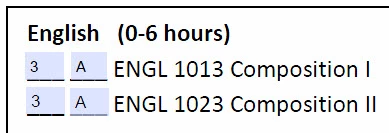
When I fill in the first field, that value appears in the other fields. For example, when I keyed in the number 3 above, that number automatically appeared in the field directly below. How can I unlink all of them so that each field might have a unique value which doesn't automatically appear in the other fields?
I realize one answer would be to tediously create each field as a separate entity, but that would so time consumming.
Many thanks for any suggestions!
 AdChoices