
Participating Frequently
June 28, 2017
Answered

update Adobe Acrobat XI on Windows 10 failed. Reinstalling fails too

  • June 28, 2017
  • 4 replies
  • 4478 views

I have a licence for Adobe Acrobat XI which i used till today.

Acrobat told me there was a update so i tried to install it.

Unfortunately this failed with a errormessage (without error code) telling me my drive y:\ does not excist.

When clicking on the link in the errormessage, i am directed to Fix Windows errors that occur during Acrobat Reader update

When folowing those steps It still doesnt work.

Ik removed Acrobat in System-Apps but reinstalling still fails for same reason.

In the past I had the workaround to temporary move Y:\My Documents to C:\My Documents and after the update move C:\My Documents back to Y:\My Documents but this didnt work.

What do I have to do to make installing Acrobat Possible?
This topic has been closed for replies.
Correct answer Test Screen Name

Did you check My Pictures too? This causes more problems in fact.

4 replies

Test Screen NameCorrect answer
Legend
June 29, 2017

Did you check My Pictures too? This causes more problems in fact.

Participating Frequently
June 29, 2017

Thank you for helping me.

I moved My Pictures to the default location "C:\Users\Rob\Pictures"

After this is was possible to install Acrobat XI Pro AND install the update.

What do I have to do to make Adobe understand this problem is bothering me and maybe many more dispointed customers?

Legend
June 29, 2017

Ok, I expected this, really, but it was worth a try.

Did you move your My Documents folder to Y: or My Pictures, or anything else? This causes terrible difficulties. Move them all back or keep a removable device with empty folders in that location.

Participating Frequently
June 29, 2017

Windows 10 tells me here where My Documents are

They are on the default location where I restored them to a few days ago.

Legend
June 29, 2017

You don't need to install Acrobat 9, you just need its serial number, to enter when the Acrobat XI installer asks you for a qualifying product. Let's worry about updates once Acrobat XI is installed.

Participating Frequently
June 29, 2017

I have all serial numbers.

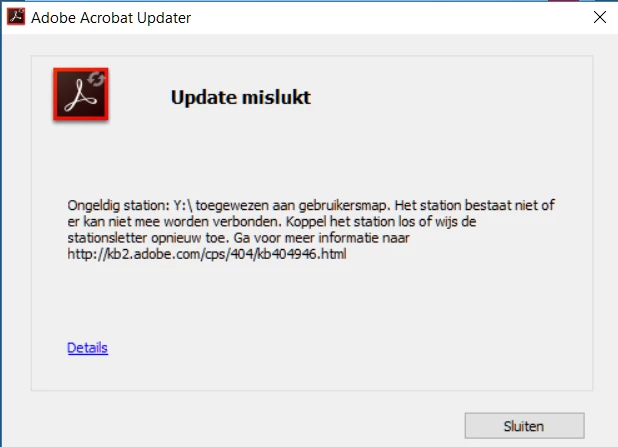
Before the installer asks for my serialnummer I get this errormessage when installie XI Pro:

When i translate it for you it tells: "invalid drive Y:\ aplyd to userfolder. Drive does not exist of cannot be connected to. Disconnect drive or aply "Y" again.

Y is my networkdrive which I use perminently and is constant available.

I dont know what the installer wants with my networkdrive.

kglad
Community Expert
Community Expert
June 28, 2017

update by downloading the files directly and then applying them:  http://www.adobe.com/downloads/updates/

if that fails, copy and paste the error message so we can use a translator to understand the error message.

Participating Frequently
June 28, 2017

Thank you for answering my question!

Like i tried to describe, Acrobat is now deleted and I now try to install it again.

I bought "Adobe Acrobat XI Pro" which is not in the list.

Do i have to choose "Acrobat Pro Extended" then?

Legend
June 28, 2017

Are you being asked to choose a "qualifying product" when you install? This is an OLDER product from which you upgraded.